
Tuotannon hallinta
Get your traders ready for show day
Food, drink and market traders need their insurance, hygiene certificates, terms and load-in times sorted before the gates open at your event, and chasing forty traders by email takes a week. Each trader's own page lets them do their part, while you see at a glance who still owes what.
Give each approved trader their own page to accept your trading terms, pay their invoice, book a load-in time and upload certificates, chase what is missing, and check every pitch, power and water need before your event.
- Kenelle
- Getting approved traders' paperwork, payments and load-in sorted
- Kestää
- 9 minuuttia
Ennen aloitusta
- You need an owner, admin or producer role on the event.
- The traders are approved, as in the guide to taking trader applications.
-
Add your trading terms and email wording
In Vendors, select Set up, then Terms and emails, and enter or paste your Trading terms.
Huomautus: Traders accept the terms on their page, and we keep the time, their name and the exact text. If you change the terms, every trader accepts them again.
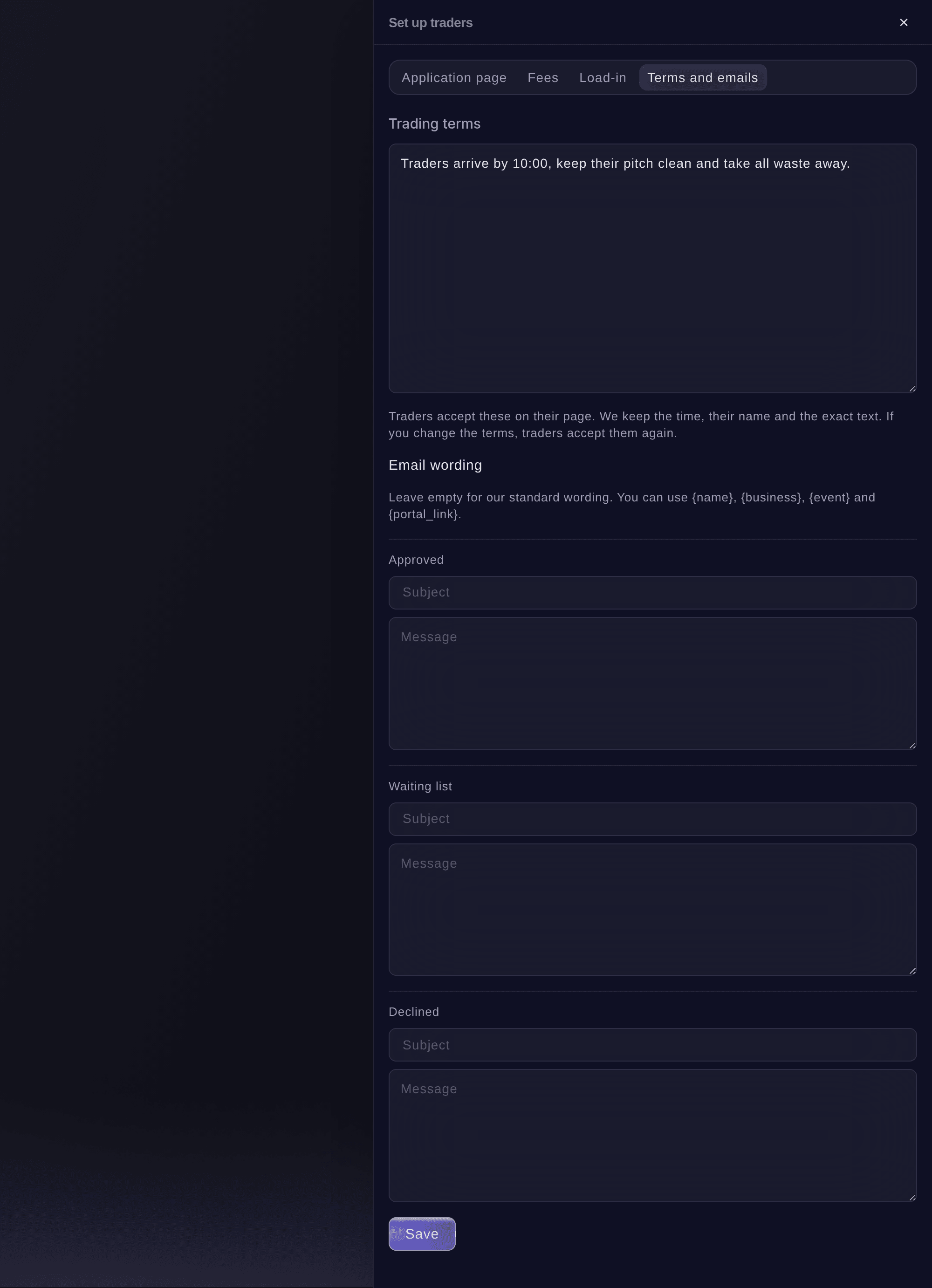
Set up traders, Terms and emails. -
Add load-in times
Select Load-in, then Add load-in time, choose when it Starts and Ends, the Gate or area and how many Traders at a time.
Huomautus: Approved traders choose a time on their page, and each time shows how many are booked. A time that traders have booked cannot be removed until you move them.
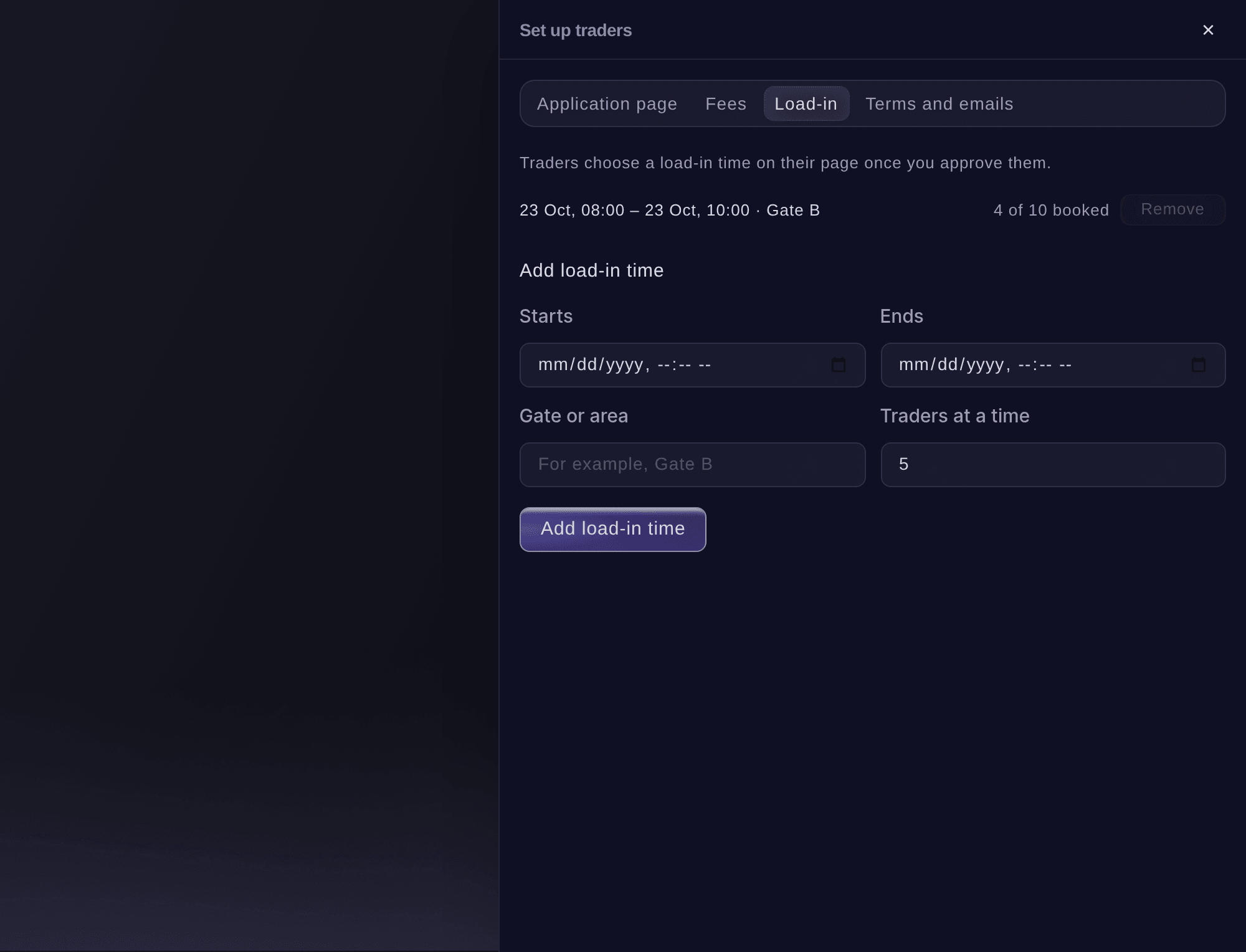
Set up traders, Load-in. -
Open an approved trader
Select Trading, then select the trader. Their panel shows the pitch, invoices, Paperwork and whether their trader page link works.
Huomautus: The row in the list says how many things are to chase, or Paperwork in when everything is done.
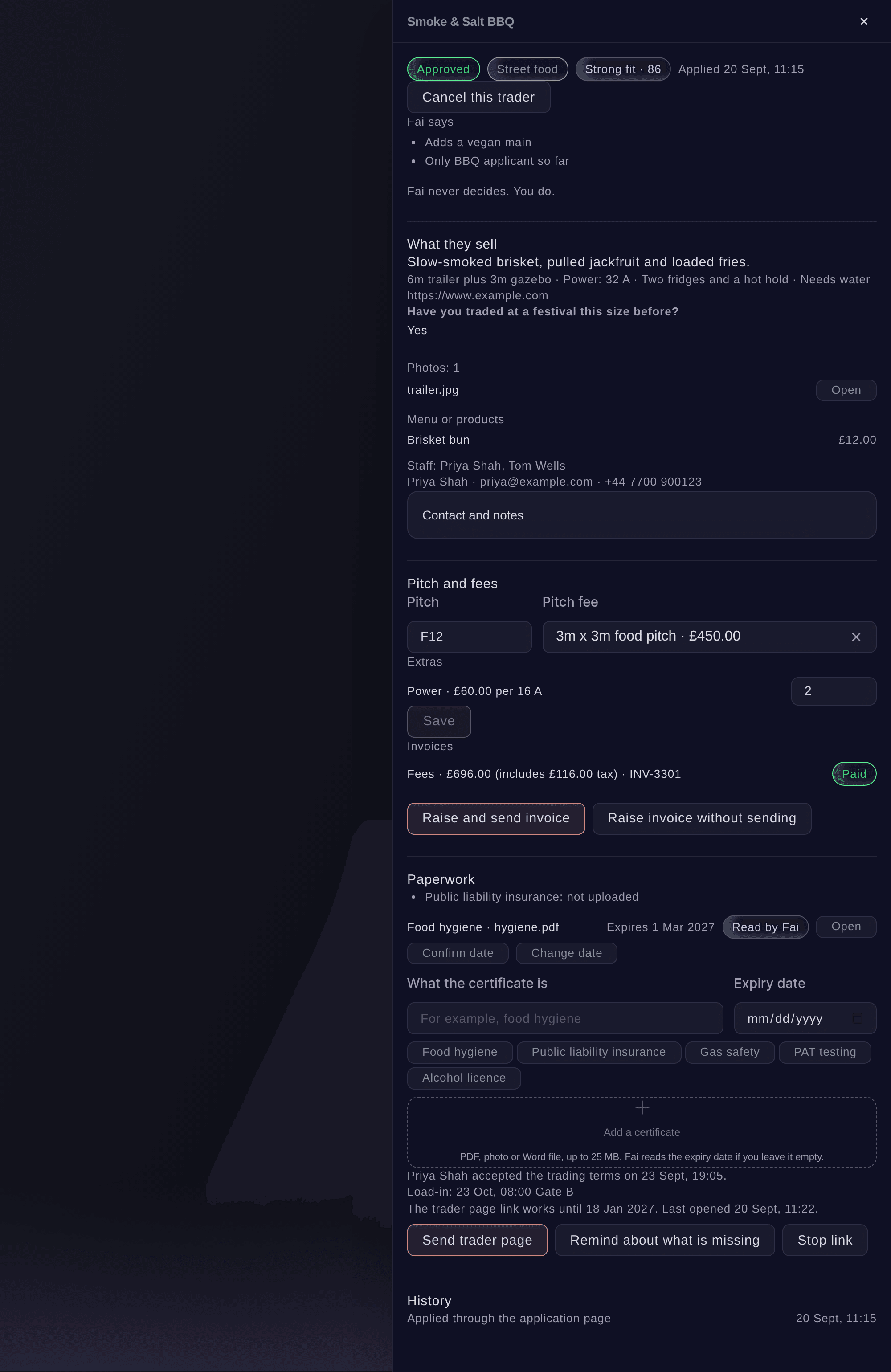
An approved trader. -
Send the trader their page
Under Paperwork, select Send trader page, then confirm. The trader gets an email with a link to their page and needs no password.
Huomautus: Any earlier link stops working when you send a new one. The panel says when the link works until and when the trader last opened it.


The trader's own page
The trader page shows their pitch and fees with Pay invoice, your trading terms to accept, the load-in times to book, the certificates you need, their menu or products and the staff working on the stall. It changes as you update their panel.

-
Add a certificate yourself
Optional: If a trader sends you a certificate by email, open their panel, enter What the certificate is, then select Add a certificate and choose the file.
Huomautus: Use a PDF, a photo or a Word file up to 25 MB. Leave the expiry date empty and Fai reads it from the file.
-
Check the expiry dates Fai read
A date Fai read shows Read by Fai. Select Confirm date if it is right, or Change date if it is not.
Huomautus: A certificate that runs out before the event ends shows as expiring under Paperwork, and the trader is counted as having something to chase.
-
Chase what is missing
Select Remind about what is missing, then confirm. The trader gets an email listing what is still missing, with a new link to their page.
Vinkki: Fai checks for missing or expiring certificates and unpaid invoices, and suggests reminders on the event's Today page for you to approve.
-
Check every pitch
Select Pitch list at the top of Vendors. Every trading trader is listed with their pitch, the power they need in amps and whether they need water.
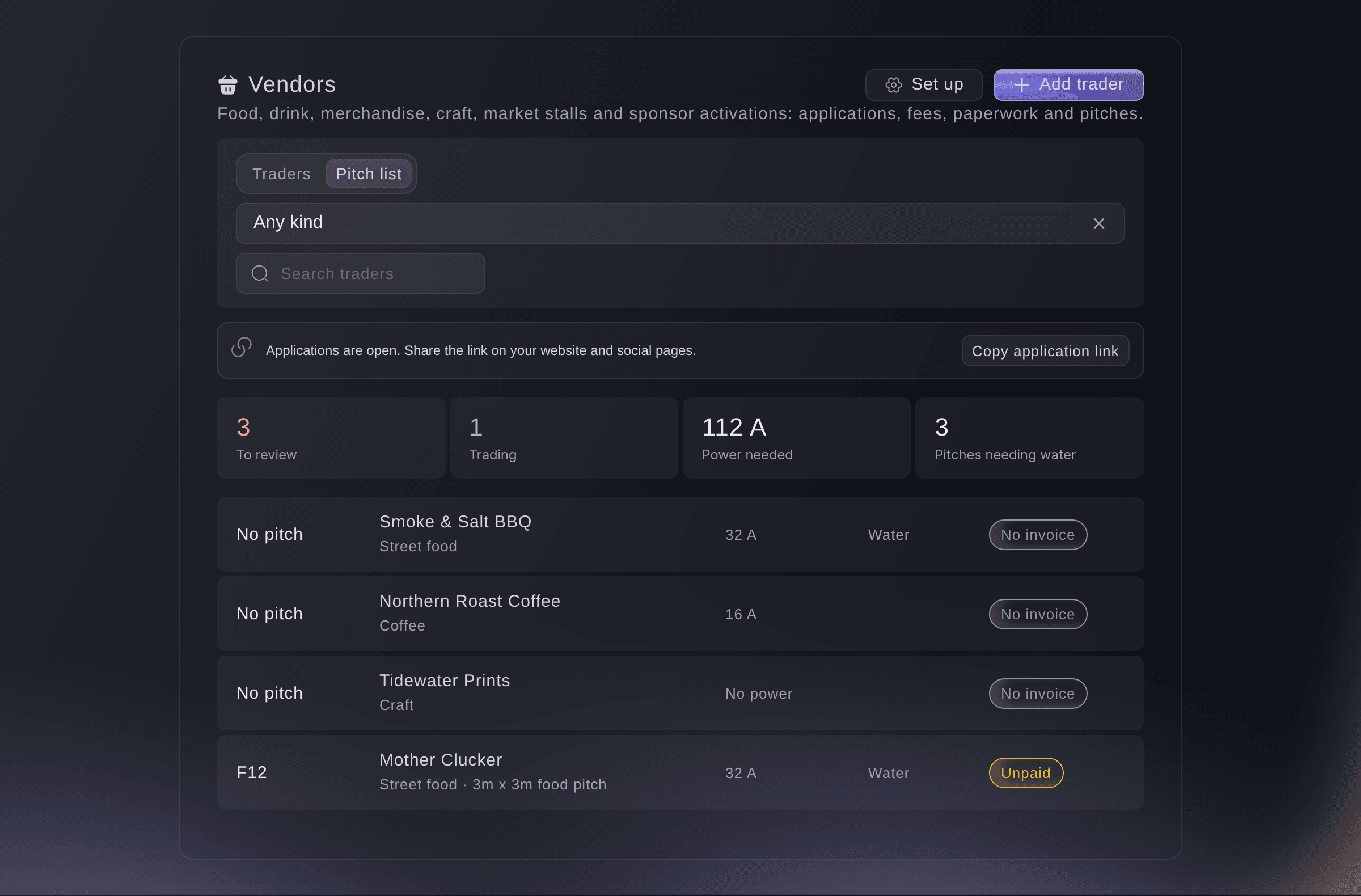
Vendors, Pitch list.

Kokeile näitä vaiheita omassa tapahtumassasi
Luo ilmainen tili, rakenna tapahtumasi ja seuraa yllä olevia vaiheita omassa hallintapaneelissasi. Se vie muutaman minuutin, eikä sinun tarvitse varata myyntipuhelua.
Ei käyttöönottomaksuja. Ei pakollista kuukausimaksua. Luottokorttia ei tarvita.
Tai anna sen hoitua puolestasi
Fai sets up your trading terms and load-in times, sends a trader their page or a reminder of what is missing, sets a pitch and reads the certificates traders upload. She asks you before anything is sent or changed.
Hallintapaneelissasi, Fain kanssa
Which traders at <EVENT NAME> are still missing certificates or have not paid, and send each of them a reminder
Anna Fain hoitaa se puolestasi
Fai toimii Ticket Fairy -hallintapaneelissasi. Luo tili, avaa Fai ja liitä yllä oleva kehote.
Ei käyttöönottomaksuja. Ei pakollista kuukausimaksua. Luottokorttia ei tarvita.
Stop a trader page link
-
Stop the link
Open the trader, select Stop link, then confirm.
Huomautus: The trader can no longer open their page until you send a new link.
Fai stops a trader's page link after you confirm.
Hallintapaneelissasi, Fain kanssa
Stop the trader page link for <BUSINESS NAME> on <EVENT NAME>
Kysymyksiä joita sinulla voi olla
- Who can open a trader's certificates?
- Owners, admins and producers of the event, from the trader's panel. Each file opens through a link that lasts five minutes, and every opening is recorded.
- What if a trader's link has expired?
- Their page says the link has expired and asks them to ask you for a new one. Select Send trader page to send it.
- What happens to a trader's load-in time if I cancel them?
- Their place goes back to the load-in time, so another trader can book it. The same happens when you decline them or they withdraw.
- Do the certificates show anywhere else?
- Yes. Each certificate is also listed in the event's Compliance section, under the trader.
Jäikö vielä kysyttävää?
Varaa esittely, niin vastaamme siihen puhelussa sinun tapahtumatyyppisi mukaan. Tai luo tili ja katso itse.
Ei käyttöönottomaksuja. Ei pakollista kuukausimaksua. Luottokorttia ei tarvita.
Aiheeseen liittyvät oppaat
Tee tämä omassa tapahtumassasi
Luo tili, rakenna tapahtumasi ja seuraa vaiheita omassa hallintapaneelissasi. Sinun ei tarvitse varata myyntipuhelua.