
Driv produktionen
Settle a show with an artist after your event
Promoters and venues settle with the artist's tour manager on the night or the morning after, and every figure gets questioned. A settlement built from your own ticket sales, costs and the agreed deal shows where each number came from, so the conversation is about the deal, not the arithmetic.
Let Fai draft the settlement for a show from its ticket sales, budget costs, the artist's deal and the act's own travel, hotel and agency fee, check where every figure came from, add or reverse lines, and share it, mark it agreed and mark it paid.
- För
- Settling a show with the artist's side after the event
- Tar
- 8 minuter
Innan du börjar
- You need an owner, admin or producer role on the brand.
- For the artist's fee to be worked out for you, the show needs an accepted offer. Enter show costs as actuals in the event's budget first if you want them on the settlement.
-
Open Settlements
In the sidebar, select your brand, then Event Operations, then Settlements, and select Settle a show.
Obs: Once a show has ended with no settlement, Needs attention lists it with Settle, and an accepted offer's panel has Settle this show. Both open the same dialog.
-
Choose the show and the deal
Choose the Event, choose the accepted offer under Performer deal, then select Draft the settlement.
Obs: Ticket sales come from the event's ticket records after refunds, costs from its budget actuals and the fee from the deal. Choose No performer deal to settle a show without an artist fee.
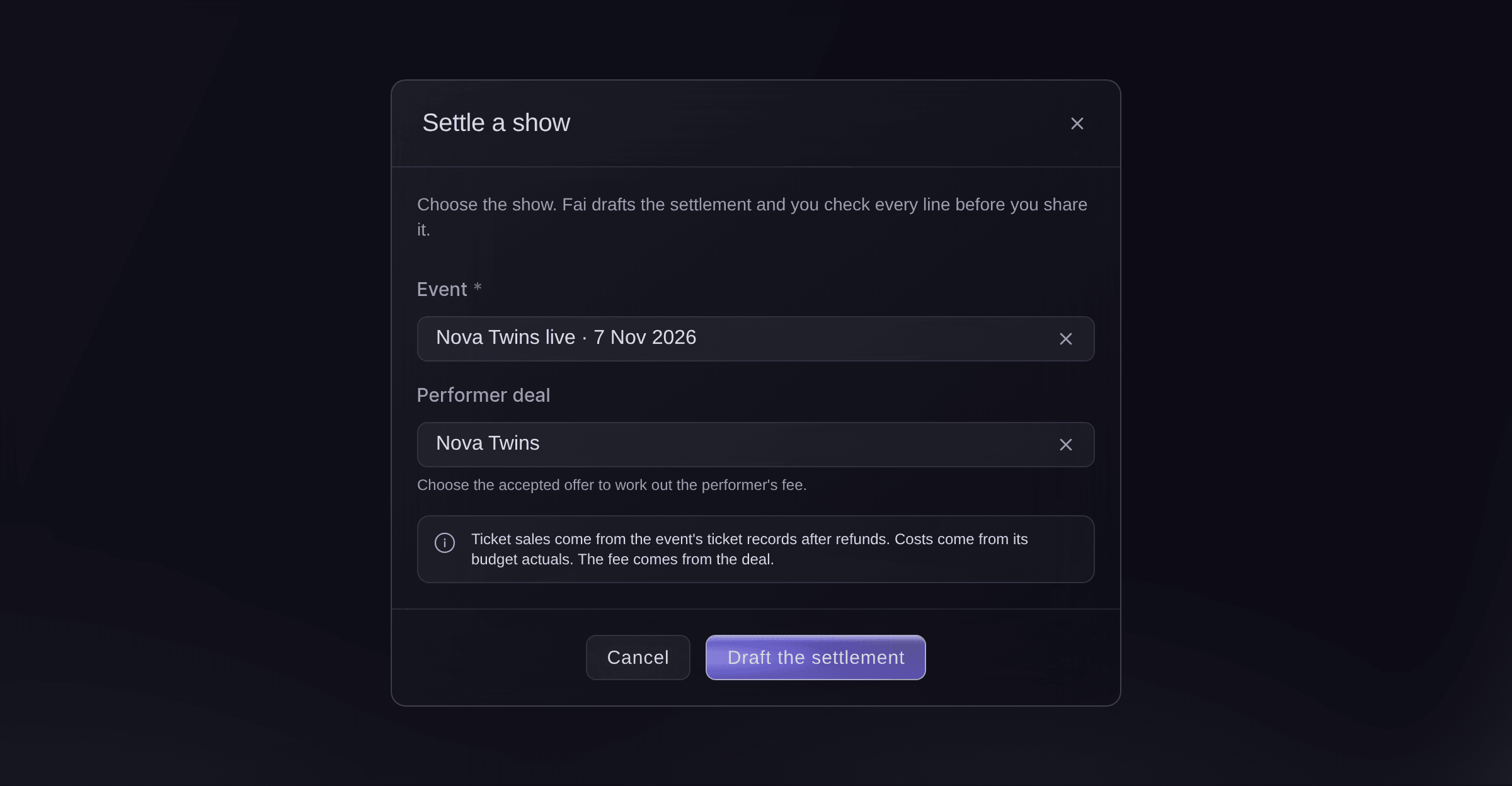
Settle a show. -
Check every line
Read each line under Lines. Each one says where its figure came from, such as From ticket sales or From the deal, and how it was worked out.
Obs: The lines are grouped into income, deductions, show costs and payments to the performer. Totals adds them up and shows Left for you.
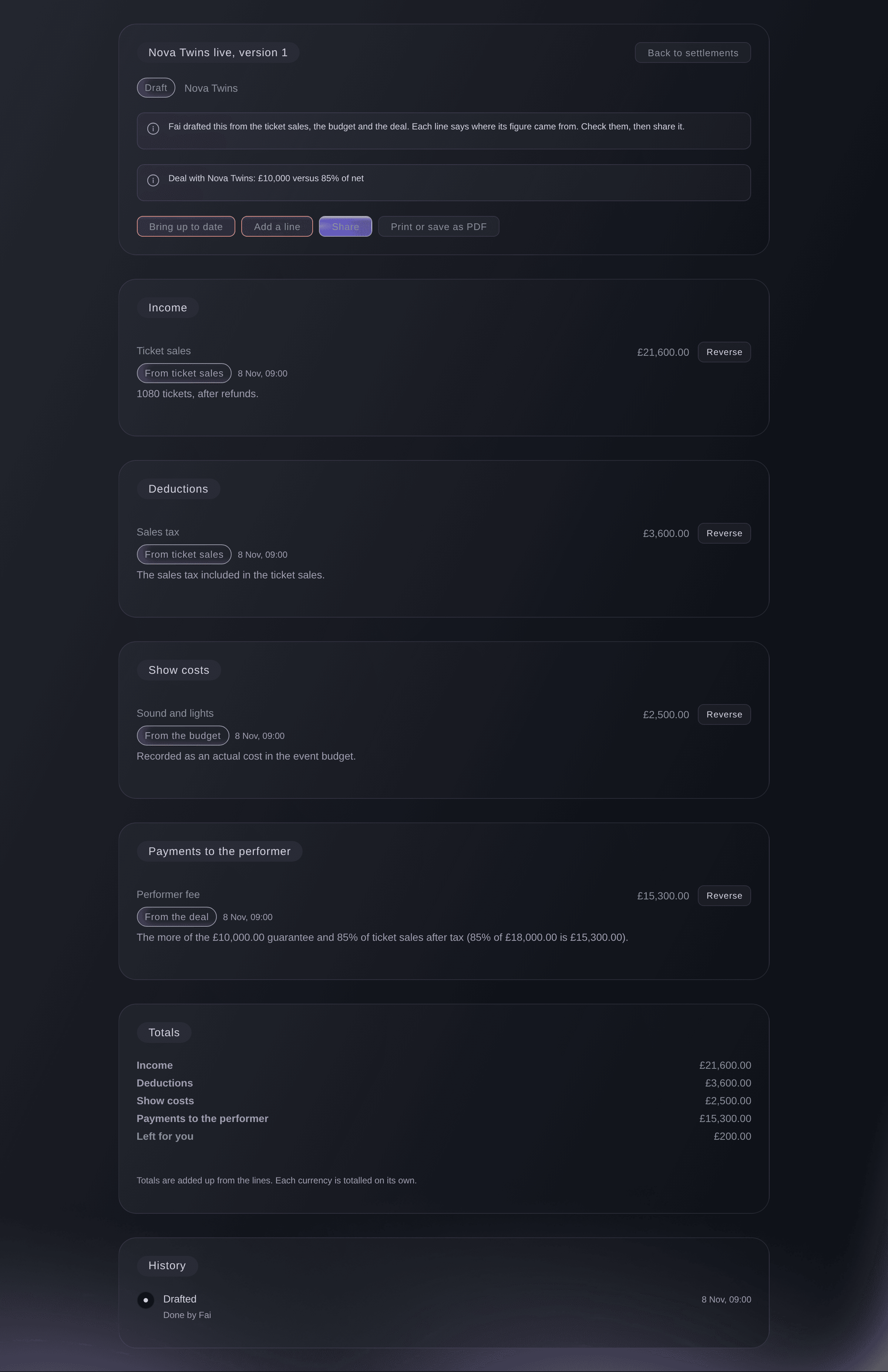
A settlement Fai drafted.


The act's own costs
When the show has the act's accepted offer, the settlement also lists the act's travel, hotel stay and Payments due costs as show costs marked From the act's costs, and the offer's agency fee as a payment beside the performer fee, worked out on the fee the deal pays. Any actual cost in the budget's Artists & talent section is then left out of this settlement, so nothing counts twice. Each amount stays in its own currency.

-
Update the settlement with the latest figures
Optional: Select Bring up to date after a late refund or a new budget actual. The lines that come from the ticket sales, the budget and the deal are worked out again.
Obs: A line you reversed is not added back.
-
Add a line
Optional: Select Add a line, choose the Kind, enter What it's for and the Amount, then select Add line.
Obs: Enter a minus amount for a credit, such as a merchandise share you owe back.
-
Reverse a wrong line
If a line is wrong, select Reverse on it, then Reverse in the dialog. A new line cancels it and both stay on the sheet.
-
Share the settlement
Select Share, then Share in the dialog.
Varning: The lines are locked once it is shared. To change anything after that, you reopen it as a new version.
-
Send a copy to the artist's side
Select Print or save as PDF, save the file and send it to the tour manager or agent.
-
Mark it agreed, then paid
When both sides agree the figures, select Mark as agreed. Once the artist has been paid, select Mark as paid.
Obs: Marking it paid records the payment. It does not move any money.
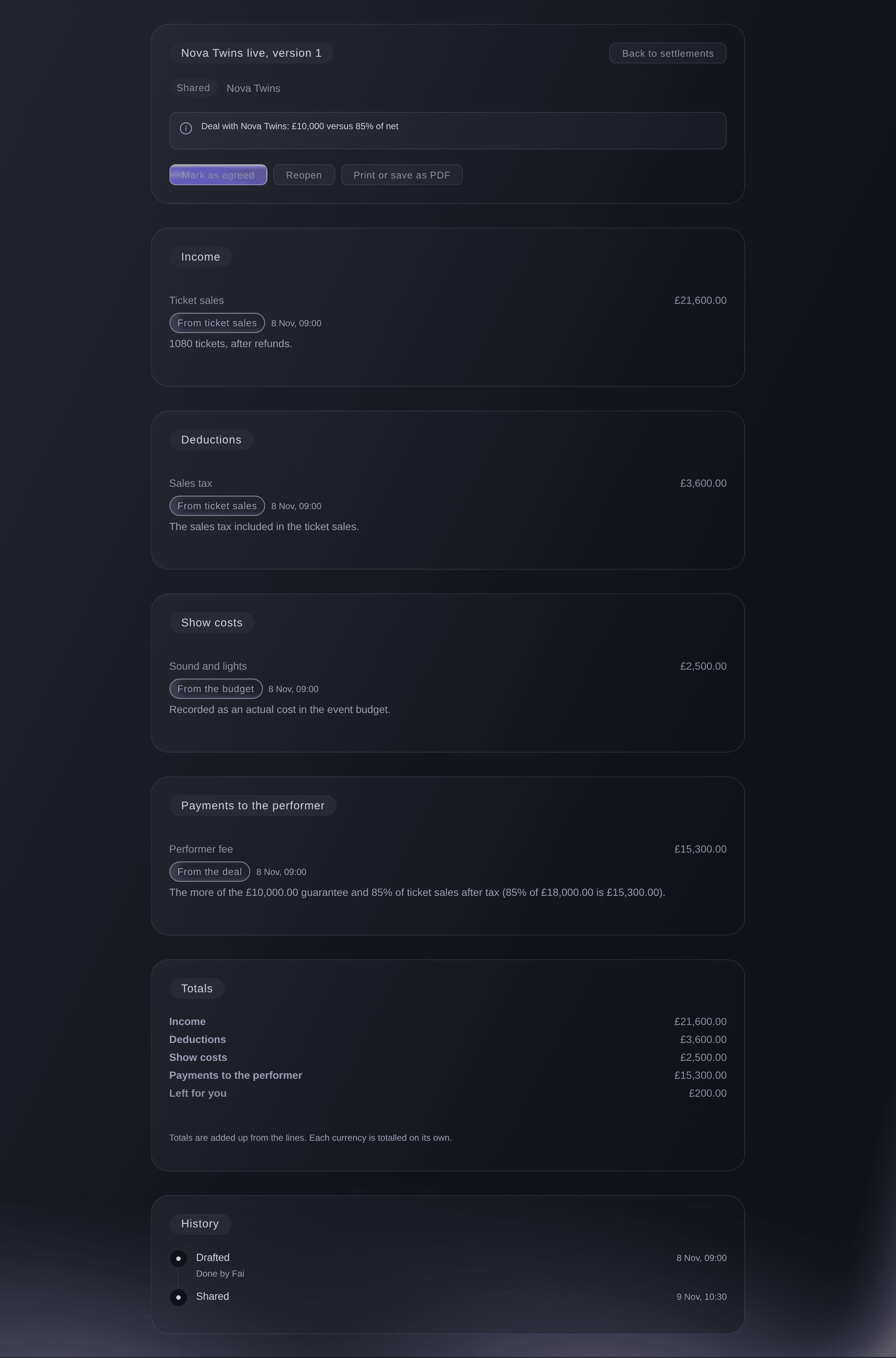
A shared settlement.

Prova de här stegen på ditt eget evenemang
Skapa ett gratis konto, bygg ditt evenemang och följ stegen ovan i din egen instrumentpanel. Det tar några minuter och du behöver inte boka något säljsamtal.
Inga startavgifter. Ingen obligatorisk månadsavgift. Inget kreditkort krävs.
Eller låt det göras åt dig
Fai drafts a show's settlement, brings it up to date, adds or reverses lines, and shares it, marks it agreed or paid, or reopens it, asking you before each change.
I din instrumentpanel, med Fai
Draft the settlement for <EVENT NAME> with <ARTIST NAME>'s deal and tell me what is left for us
Från din egen assistent, via MCP
Anslut assistenten till vår MCP-server och be den:
Behåll --read-only i MCP-konfigurationen. Den här uppgiften läser bara data, så assistenten behöver inga verktyg som gör ändringar.
Pick the brand, list the settlements for <EVENT NAME> and show me the lines and totals of the latest one
Från din terminal
Installera CLI:t från vår CLI-sida, logga in med ticketfairy auth login och välj varumärket du arbetar med via ticketfairy brand use <BRAND_ID>. ticketfairy brand list och ticketfairy event list visar de ID:n som de andra kommandona använder.
The CLI reads settlements: the list for an event and one settlement's lines and totals. Drafting, changing and sharing a settlement are done in the dashboard or through Fai. You need an owner, admin or producer login on the brand.
List the settlements for one event, with their status and version.
ticketfairy event-os venue settlements list --brand <BRAND_ID> --event <EVENT_ID>
Show one settlement with its lines and totals.
ticketfairy event-os venue settlements show <SETTLEMENT_ID> --brand <BRAND_ID>
Låt Fai göra det åt dig
Fai arbetar inuti din Ticket Fairy-instrumentpanel. Skapa ditt konto, öppna Fai och klistra in instruktionen ovan.
Inga startavgifter. Ingen obligatorisk månadsavgift. Inget kreditkort krävs.
Correct a settlement after it is shared
-
Reopen it as a new version
Open the settlement, select Reopen, enter why under Why are you reopening it?, then select Reopen.
Obs: The version you reopened stays exactly as it was, marked Replaced, and a new draft starts with the same lines for you to correct.
Fai reopens a shared, agreed or paid settlement as a new version after you confirm and give the reason.
I din instrumentpanel, med Fai
Reopen the settlement for <EVENT NAME>, the bar share was left off
Frågor du kanske har
- Why is the ticket income different from my sales report?
- The settlement counts tickets after refunds, so a refund after the show brings it down. Select Bring up to date on a draft to pick up refunds since it was drafted.
- Does Fai draft settlements on her own?
- Fai lists shows that ended with no settlement in Needs attention. Where the show is linked to an event, she also suggests drafting it in that event's suggestions, and nothing is drafted until someone approves it.
- Why can I not delete a line?
- Nothing on a settlement is deleted, so the artist's side can always see what changed. Reverse the line instead, and the history shows both.
- Why is the Artists & talent spend in my budget not on the settlement?
- The act's own travel, hotel and costs are on the settlement from the act's record, so the budget's Artists & talent actuals are taken out to avoid counting them twice. If the act's costs are cleared, the budget's actuals come back on the next Bring up to date.
- Can a settlement hold more than one currency?
- Yes. Each currency is totalled on its own under Totals.
Har du fortfarande en fråga?
Boka en demo så svarar vi på den i ett samtal, utifrån din typ av evenemang. Eller skapa ditt konto och se själv.
Inga startavgifter. Ingen obligatorisk månadsavgift. Inget kreditkort krävs.
Relaterade guider
Gör det på ditt eget evenemang
Skapa ditt konto, bygg evenemanget och följ stegen i din egen kontrollpanel. Du behöver inte boka ett säljsamtal.