
Tuotannon hallinta
Hand out accreditation passes at your event desk
Festival accreditation teams hand out hundreds of wristbands and badges in the days before the gates open, often with a queue of crew and a scanner in one hand. The hand-out desk finds each pass in a scan, shows what to check, and keeps a record of who collected what, so nobody leaves with the wrong pass or gets two.
Run your accreditation desk from the pass list: scan a ticket or badge, or enter a name, check the card with the photo, zones and days, and hand the pass to the holder or to a team lead collecting for their crew. The desk says in plain words what to sort out first, such as a missing badge photo, and records who took each pass and which teammate gave it out.
- Kenelle
- Handing out passes to crew, performers and guests at your accreditation desk
- Kestää
- 5 minuuttia
Ennen aloitusta
- You are an owner, admin or producer on the event. The event's Operations page opens for those roles only.
- The passes you hand out are issued in Accreditation.
-
Open Accreditation
Open the event, select Operations, then select Accreditation in the list of sections.
Huomautus: A pass someone has collected says who took it, and Handed over above the list shows the passes still to collect. If Accreditation is not in the list, select More sections and open it there.
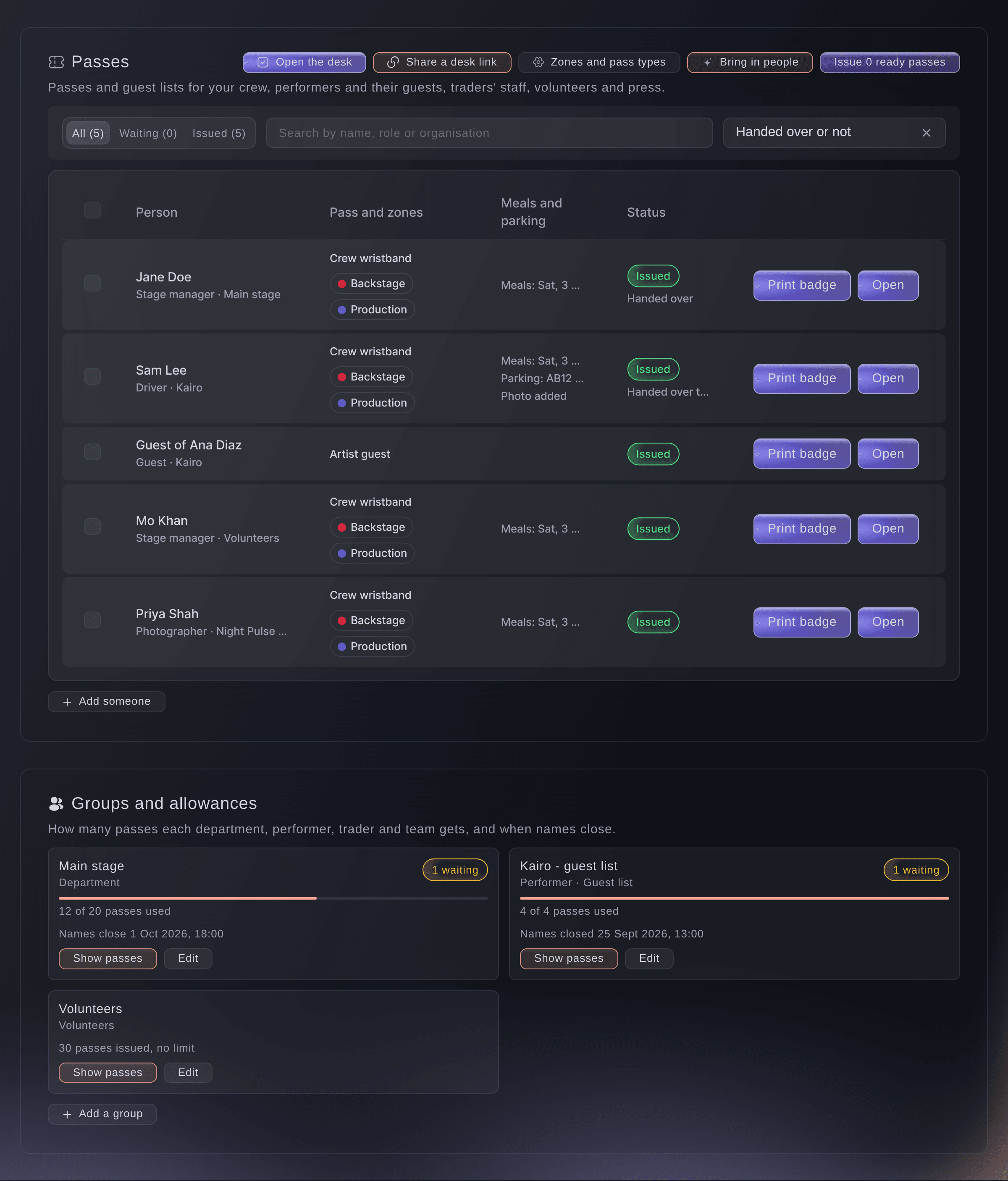
Accreditation while passes are being collected. -
Open the desk
Select Open the desk at the top of Accreditation.
Huomautus: The desk opens in place with the cursor in the scan field, where a USB or Bluetooth scanner that types the code works. For a phone or tablet whose user has no dashboard login, select Share a desk link instead.
-
Scan the pass
Scan the code on the ticket or badge, or enter part of a name, organisation or role in Scan a pass or enter a name.
Huomautus: A scanned code opens its pass at once. For a name, choose the person from the matches; a pass for another event never shows.
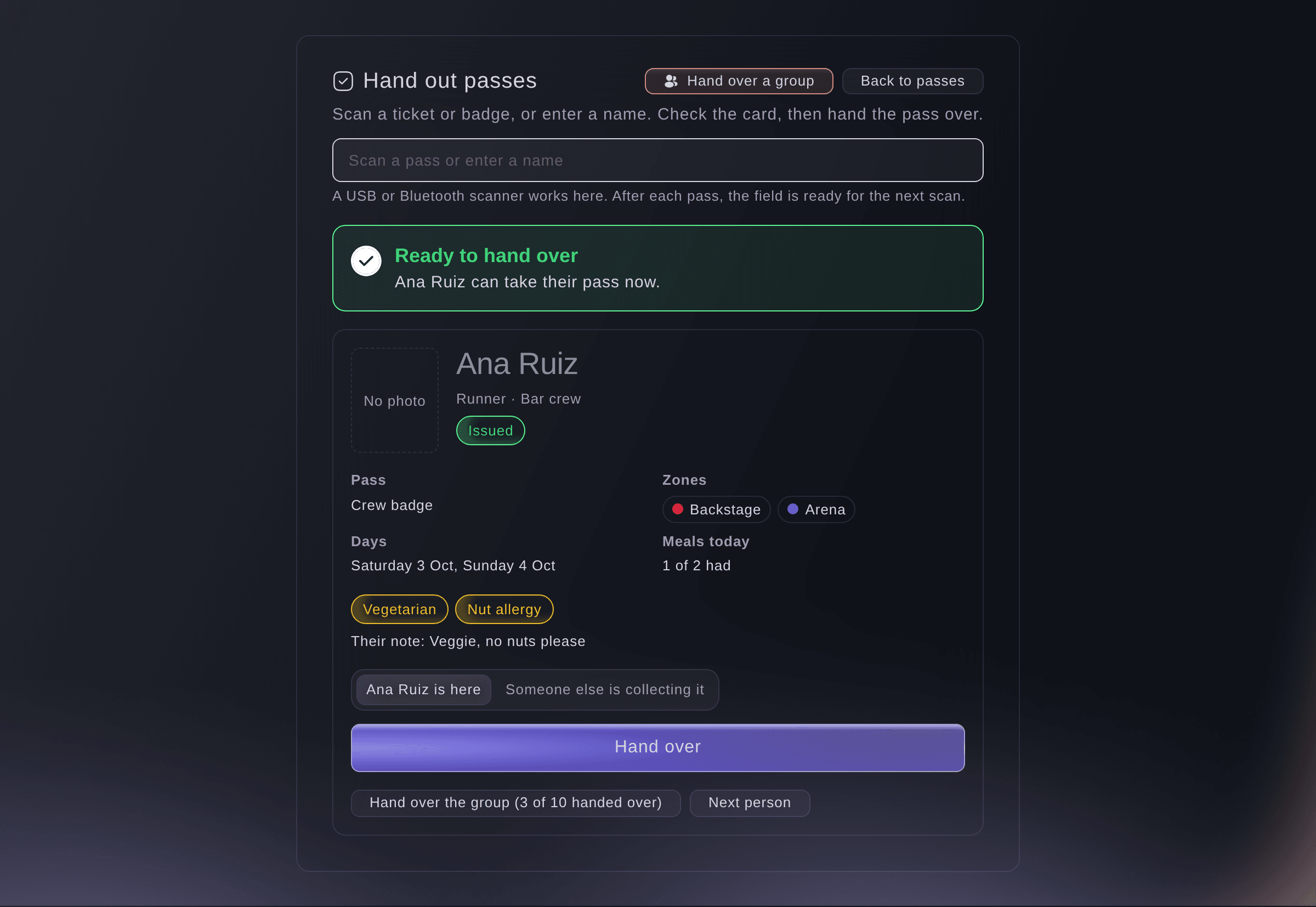
A pass ready to collect. -
Check the card
Check the photo, Pass, Zones and Days against the person in front of you.
Huomautus: Green Ready to hand over means nothing is left to sort out.
-
Choose who takes the pass
Choose the button with the holder's name, such as Ana Ruiz is here, or choose Someone else is collecting it and enter the Collector's name.
-
Hand the pass over
Select Hand over, then give them the pass.
Huomautus: The pass then shows who took it and which teammate gave it out. The field empties and waits for the next scan.


A pass that needs a check
The card says Check before you hand it over and lists each thing in plain words, with the button that fixes it. Induction not done offers Induction done here when you went through the safety briefing with them, and for a volunteer Send their volunteer page again, and No photo yet offers Take the photo now with this phone's camera. For those two you can also enter a reason and select Hand over anyway; a pass that is not issued yet, or still waiting for approval, stays at the desk.

Kokeile näitä vaiheita omassa tapahtumassasi
Luo ilmainen tili, rakenna tapahtumasi ja seuraa yllä olevia vaiheita omassa hallintapaneelissasi. Se vie muutaman minuutin, eikä sinun tarvitse varata myyntipuhelua.
Ei käyttöönottomaksuja. Ei pakollista kuukausimaksua. Luottokorttia ei tarvita.
Tai anna sen hoitua puolestasi
Fai finds a pass by its code or by a name, organisation or role, says whether it is ready to collect and what to sort out first, and records a collection, a whole group's collection or an undo. She shows you the pass and waits for your yes before she records anything.
Hallintapaneelissasi, Fain kanssa
Is Ana Ruiz's pass ready to collect at <EVENT NAME>? She is here now to collect it
Anna Fain hoitaa se puolestasi
Fai toimii Ticket Fairy -hallintapaneelissasi. Luo tili, avaa Fai ja liitä yllä oleva kehote.
Ei käyttöönottomaksuja. Ei pakollista kuukausimaksua. Luottokorttia ei tarvita.
Give out a whole group's passes
-
Choose the group
Select Hand over a group at the top of the desk, then choose the Group.
Huomautus: After a scan, the group button on the card opens that person's group directly.

A group's passes for its team lead. -
Enter who is collecting them
Untick anyone who is not being collected, enter the name in Who is collecting them, then select the button that counts the passes.
Huomautus: Up to 200 passes go at once. A pass that is not issued, is waiting for approval or was already collected is left out, and the desk says which ones and why.

Fai records a group's issued passes as taken by a named collector when you ask, after you confirm, and tells you which passes it left out and why.
Hallintapaneelissasi, Fain kanssa
Jo Lead is collecting all the bar crew's passes at <EVENT NAME>
Undo a collection
-
Undo it
Scan the pass, select Undo hand-over, enter the Reason, then select Undo hand-over.
Huomautus: The pass comes back to the desk. Its history keeps who had taken it and why it came back.
Fai undoes a collection when you ask and give a reason, after you confirm.
Hallintapaneelissasi, Fain kanssa
Dev Patel's pass at <EVENT NAME> went to the wrong collector, undo it
Kysymyksiä joita sinulla voi olla
- What if two desks scan the same pass?
- The first desk to record it counts. The second desk shows Already handed over with who took the pass, and records nothing.
- Why does a scan say no pass found?
- The code belongs to another event, or the name is spelled differently. Scan the code again, or enter part of the name, organisation or role.
- Where is the photo taken at the desk kept?
- On the pass, exactly as if you had uploaded it in Accreditation, so it prints on the badge.
- Can I see who has collected their pass?
- Yes. In Accreditation, choose Handed over or Not handed over yet above the list, and each collected pass says who took it.
- Does the desk work without a connection?
- Yes. Keep scanning and handing passes over; each hand-over is kept on the device and sent when the connection is back, and a bar counts what is waiting. Keep the page open until it says everything is sent.
- Can I record someone's food needs at the desk?
- Yes. Select Record food needs on their card, enter them or tick No food needs, then save. The kitchen count includes them straight away.
- Does collecting a pass change what the door scanner allows?
- No. The pass opens the same zones on the same days whether or not it was collected at the desk.
Jäikö vielä kysyttävää?
Varaa esittely, niin vastaamme siihen puhelussa sinun tapahtumatyyppisi mukaan. Tai luo tili ja katso itse.
Ei käyttöönottomaksuja. Ei pakollista kuukausimaksua. Luottokorttia ei tarvita.
Aiheeseen liittyvät oppaat
Tee tämä omassa tapahtumassasi
Luo tili, rakenna tapahtumasi ja seuraa vaiheita omassa hallintapaneelissasi. Sinun ei tarvitse varata myyntipuhelua.