
Piloter la production
Balance your event team's workload
Event producers and operations leads hand out hundreds of tasks in the weeks before an event, and the same two people end up with most of them. The workload view adds up each person's tasks and shifts day by day, so you can spread the work before anyone burns out.
See how many hours each person on your event team has day by day, from their tasks and their rota shifts, spot anyone over the limit before the week of the event, and move a task to the teammate with the most room in one step when Fai suggests it.
- Pour
- Spreading the work across your event team
- Durée
- 6 minutes
Avant de commencer
- You are an owner, admin or producer on the event. The event's Management page opens for those roles only.
- Your tasks have someone assigned and a due date, and your crew and volunteers are on the rota if you want their shifts counted.
-
Open the workload
Open the event, select Management, then select Tasks. Workload is on the Tasks section.
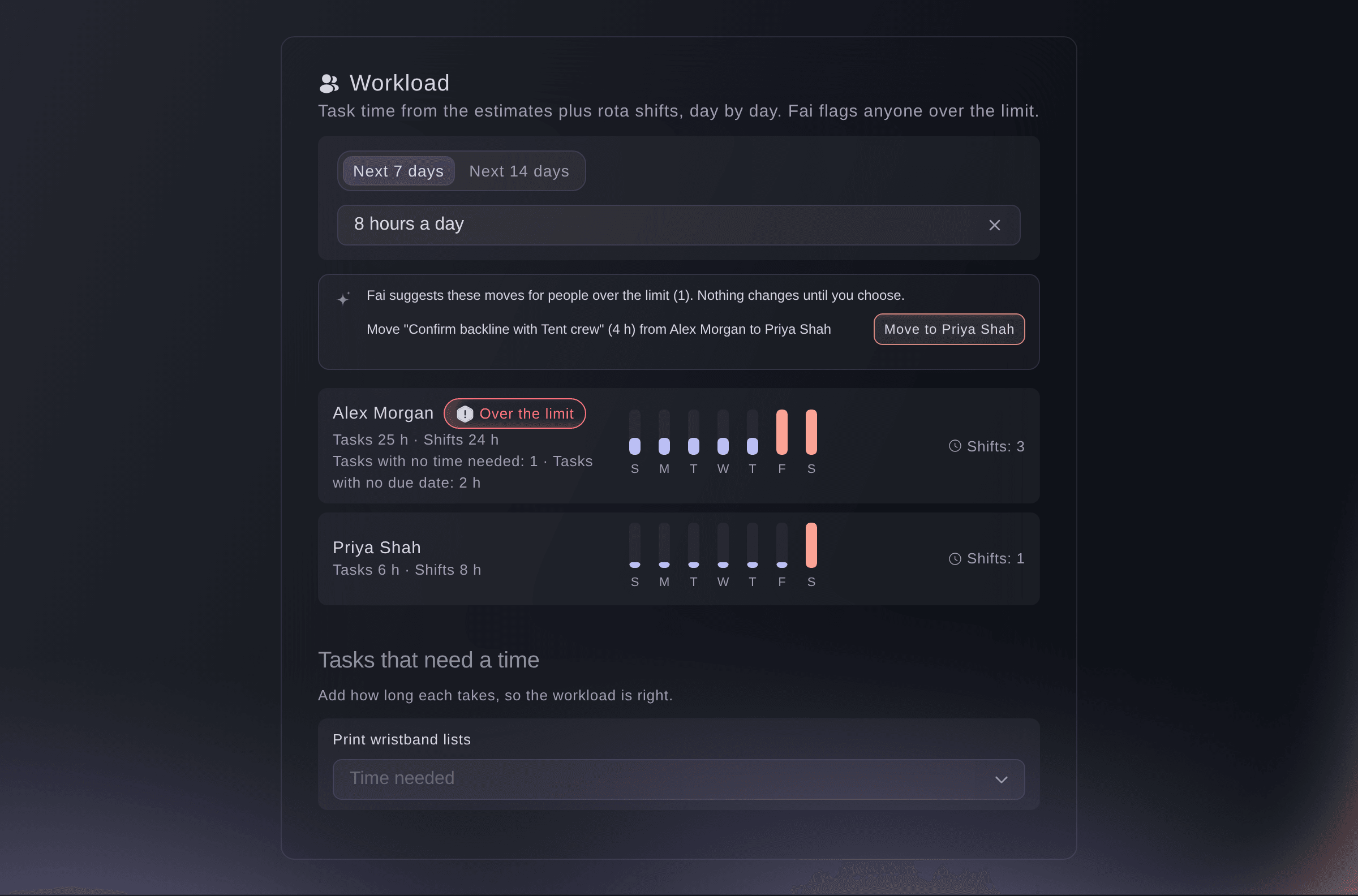
Workload for the next 7 days. -
Choose the days and the limit
Choose how far ahead to look, the next 7 or 14 days, then choose the hours a person can work in a day.
Remarque: Task time is spread over the days from a task's start to its due date and shared between the people assigned to it. Rota shifts are added for anyone whose email matches.
-
Add the time each task needs
Under Tasks that need a time, choose the Time needed for each task.
Remarque: You can also set Time needed when you open a task. A task with no time needed or no due date is listed separately, so the totals stay right.
-
Move work from someone over the limit
Find the person marked Over the limit, select the move button on Fai's suggestion, then confirm.
Remarque: Fai suggests the teammate with the least work on those days. The new person is added to the task first, then the first person is taken off it.

Essayez ces étapes sur votre propre événement
Créez un compte gratuit, montez votre événement et suivez les étapes ci-dessus dans votre propre tableau de bord. Cela prend quelques minutes et vous n'avez pas besoin de réserver un appel commercial.
Pas de frais d'installation. Pas d'abonnement mensuel obligatoire. Pas de carte bancaire requise.
Ou faites-le faire pour vous
Fai reads each person's task time and rota hours for the next 7 or 14 days, says who is over the daily limit and suggests which tasks to move. Move the task in the dashboard when you agree with her.
Dans votre tableau de bord, avec Fai
Who on the <EVENT NAME> team is over 8 hours a day in the next two weeks, and which tasks should move?
Laissez Fai le faire pour vous
Fai travaille dans votre tableau de bord Ticket Fairy. Créez votre compte, ouvrez Fai et collez la consigne ci-dessus.
Pas de frais d'installation. Pas d'abonnement mensuel obligatoire. Pas de carte bancaire requise.
Questions que vous pourriez avoir
- Why are someone's rota shifts not counted?
- Shifts are matched to a team member by email address. Check that their crew or volunteer record has the same email as their Ticket Fairy login.
- Does Fai move tasks by herself?
- No. Fai only suggests moves. A task moves when you confirm it.
Vous avez encore une question ?
Réservez une démo et nous y répondrons lors d'un appel, pour votre type d'événement. Ou créez votre compte et voyez par vous-même.
Pas de frais d'installation. Pas d'abonnement mensuel obligatoire. Pas de carte bancaire requise.
Guides associés
Faites-le sur votre propre événement
Créez votre compte, montez votre événement et suivez les étapes dans votre propre tableau de bord. Vous n’avez pas besoin de réserver un appel commercial.