
Piloter la production
Choose what Fai does on your event
Promoters running several events do not want the same help on each of them: a club night needs no catering reader, a conference needs no rider checks. Fai's settings on each event let you keep the help that event needs and switch off the rest.
See the work Fai does on her own for one event and the actions she can take when you ask, and turn off any of her work you do not want on that event.
- Pour
- Deciding how much of an event's work Fai does on her own
- Durée
- 4 minutes
Avant de commencer
- You are an owner or admin of the brand the event belongs to. Other roles do not see Fai's settings.
-
Open Fai's settings for the event
Open the event, select Management, then select Fai config at the top of the page.
Remarque: What Fai does lists the work Fai does on her own, such as reading contracts and riders. Each item says On or Off for this event.
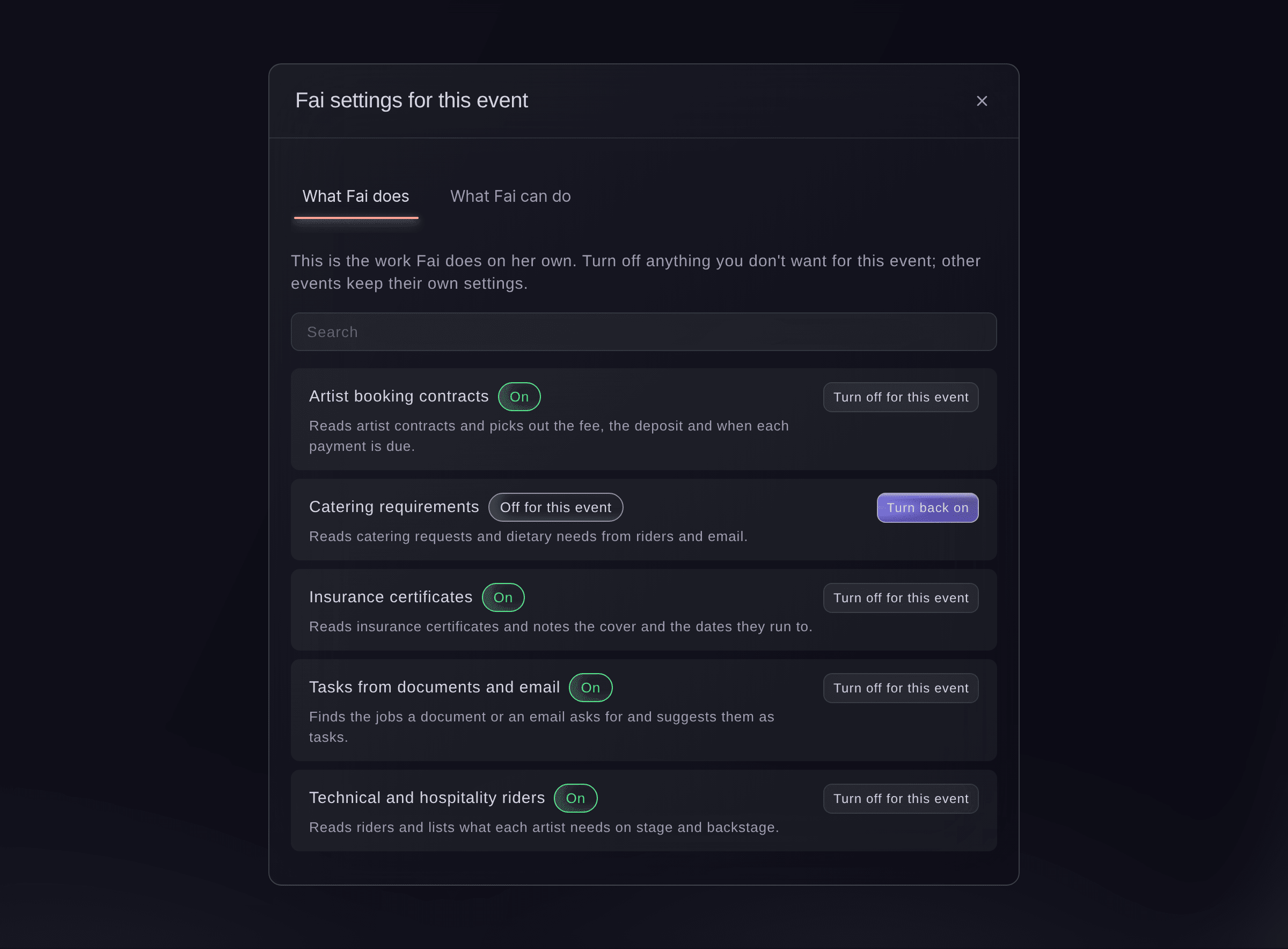
Fai settings for this event. -
Turn off the work you do not want
Find the item, using Search if the list is long, and select Turn off for this event.
Remarque: Only this event changes; your other events keep their own settings. Select Turn back on at any time to undo it.
-
Check what Fai can do when you ask
Select What Fai can do to see the actions Fai can take on the event when you ask her.
Remarque: An action marked Asks you first always waits for your yes; one marked Reads only looks things up and changes nothing.

Essayez ces étapes sur votre propre événement
Créez un compte gratuit, montez votre événement et suivez les étapes ci-dessus dans votre propre tableau de bord. Cela prend quelques minutes et vous n'avez pas besoin de réserver un appel commercial.
Pas de frais d'installation. Pas d'abonnement mensuel obligatoire. Pas de carte bancaire requise.
Ou faites-le faire pour vous
Fai opens the event's Management page for you, where you turn her work on or off for the event in Fai config.
Dans votre tableau de bord, avec Fai
Open the Management page for <EVENT NAME>
Laissez Fai le faire pour vous
Fai travaille dans votre tableau de bord Ticket Fairy. Créez votre compte, ouvrez Fai et collez la consigne ci-dessus.
Pas de frais d'installation. Pas d'abonnement mensuel obligatoire. Pas de carte bancaire requise.
Questions que vous pourriez avoir
- What does "Changed for this event" mean?
- Fai follows extra instructions on this event for that item. Ticket Fairy support adds those instructions when you ask for them.
- Can I give Fai my own instructions for an event?
- Contact Ticket Fairy support with what you want Fai to do differently on the event, and support adds the instructions for you.
- Why does the dialog say only brand owners and admins can change Fai's settings?
- Your role on the brand does not include changing them. Ask an owner or admin of the brand to make the change.
Vous avez encore une question ?
Réservez une démo et nous y répondrons lors d'un appel, pour votre type d'événement. Ou créez votre compte et voyez par vous-même.
Pas de frais d'installation. Pas d'abonnement mensuel obligatoire. Pas de carte bancaire requise.
Guides associés
Faites-le sur votre propre événement
Créez votre compte, montez votre événement et suivez les étapes dans votre propre tableau de bord. Vous n’avez pas besoin de réserver un appel commercial.