
Piloter la production
Call your show live on show day
Stage managers and show callers run the day from a phone at the side of the stage. The Show day section puts each stage's current and next cue, how far behind it is running and who is arriving on one page, so the whole team sees the same show as it happens.
Follow what is on now and next on every stage of your event against the event's own clock, call each cue as it happens, catch a stage up when it runs late, and report an incident without leaving the page.
- Pour
- Running each stage on the day of the show
- Durée
- 6 minutes
Avant de commencer
- You are an owner, admin or producer on the event. The event's Management page opens for those roles only.
- The day has a run of show. Show day shows the cues you planned there.
-
Open Show day
Open the event, select Management, then select Show day in the list of sections.
Remarque: The event's own clock is under the title, so everyone reads the same time wherever their phone is set. On a phone during the event, Show day is first in the list of sections.
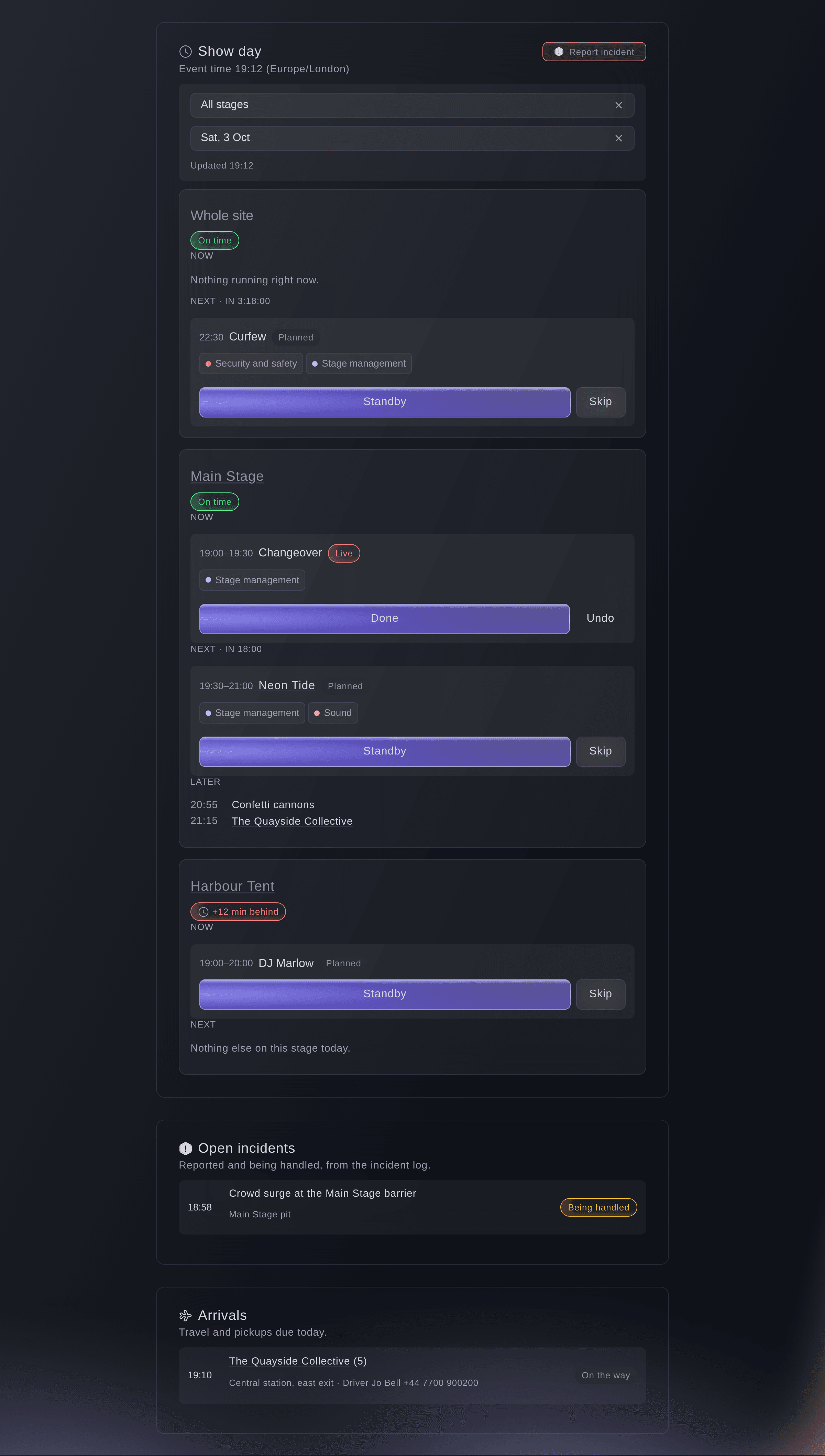
Show day at 19:12. -
Choose your stage
Optional: choose your stage in Stage, or All stages to follow the whole event.
Remarque: Your phone remembers the stage, so it opens on it next time. The page updates every 20 seconds and says when it last did.
-
Call each cue as it happens
Select Standby, Go live or Done on the cue, or Skip for one that is not happening.
Remarque: Each stage shows its cue Now, the one Next with a countdown, and the rest Later. Your call reaches everyone on Show day and on the day sheets.
-
Undo a call
Select Undo on the cue.
Remarque: Undo takes the cue one step back: from done to live, from live to standby, and from standby or skipped to planned. Both calls stay in the cue's history.
-
Catch up a stage that runs late
When a stage shows as behind, select the button to move the rest of today, for example "Move the rest of today by 10 minutes", then select Move them.
Remarque: Every cue on that stage from the next one on moves by the same minutes, and cues already done stay as they are. If the stage is locked, unlock it on the run of show first.
-
Report an incident
Select Report incident at the top of Show day.
Remarque: Incidents opens, where you select Report incident again to enter what happened. Open incidents on Show day lists the ones still being handled, beside Arrivals due today.

Essayez ces étapes sur votre propre événement
Créez un compte gratuit, montez votre événement et suivez les étapes ci-dessus dans votre propre tableau de bord. Cela prend quelques minutes et vous n'avez pas besoin de réserver un appel commercial.
Pas de frais d'installation. Pas d'abonnement mensuel obligatoire. Pas de carte bancaire requise.
Ou faites-le faire pour vous
Fai reads what is on now and next on each stage and calls a cue standby, live, done or skipped, undoes a call or moves the rest of a stage's day when you ask. She waits for your yes before each call.
Dans votre tableau de bord, avec Fai
Neon Tide is live on the Main Stage at <EVENT NAME>, and move the rest of the Main Stage 10 minutes later
Laissez Fai le faire pour vous
Fai travaille dans votre tableau de bord Ticket Fairy. Créez votre compte, ouvrez Fai et collez la consigne ci-dessus.
Pas de frais d'installation. Pas d'abonnement mensuel obligatoire. Pas de carte bancaire requise.
Questions que vous pourriez avoir
- What if two of us call the same cue at once?
- The first call counts. The second is told that someone else moved the cue first, and the page shows where the cue is now.
- Who can call cues?
- Owners, admins and producers call every stage, and the show callers named on the run of show call their own stage. A show caller with another role on the event asks Fai to call a cue.
- What happens when my phone loses signal?
- Show day keeps the last version it loaded and says it may be out of date, then catches up when the signal comes back.
Vous avez encore une question ?
Réservez une démo et nous y répondrons lors d'un appel, pour votre type d'événement. Ou créez votre compte et voyez par vous-même.
Pas de frais d'installation. Pas d'abonnement mensuel obligatoire. Pas de carte bancaire requise.
Guides associés
Faites-le sur votre propre événement
Créez votre compte, montez votre événement et suivez les étapes dans votre propre tableau de bord. Vous n’avez pas besoin de réserver un appel commercial.