Feed your crew on time and bill suppliers for meals

Get meal times from your shifts and collect each person's food needs once. Scan a pass to serve a meal, then charge each outside team for its people's meals.

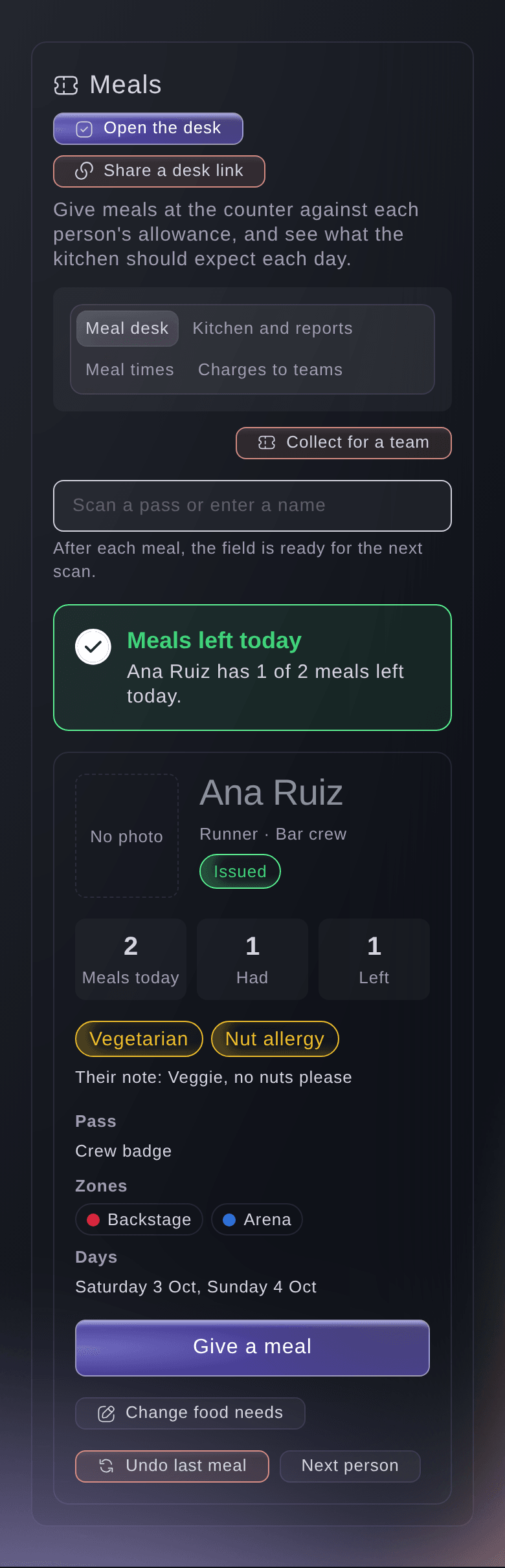
Ticket Fairy meal desk with a runner's pass scanned, one of two meals left today and their vegetarian and nut allergy needs
  • Your kitchen knows the numbers and food needs
  • Each meal counted against the person's pass
  • Outside teams invoiced for their people's meals

Get meal times from the shifts you already planned

Ask for meal times from the shifts and you get breakfast, lunch, dinner and a late meal suggested on each day when people are on shift at that time. Keep the ones you serve and leave out the rest. The kitchen serves when your crew are working, with no guessing from last year's plan.

Add a meal time of your own with its day, start, end and where it is served, such as the crew catering tent or the production office. A late meal for the night crew can run past midnight. Move or remove a meal time whenever the rota changes. Meals already given stay in the record, and the kitchen count updates straight away.

Meal times tell the kitchen when to serve and how many people to expect. What each person may eat in a day comes from their pass and their shifts, so a runner on a long shift gets the meals a long shift needs without anyone working it out by hand.

  • Suggested meal times: breakfast, lunch, dinner and a late meal, based on who is on shift
  • Your own meal times: any day, any time, with where the meal is served
  • Late meals: a meal time can run past midnight for the night crew
Ticket Fairy meal times suggested from the shifts for a festival's second day, with the people on shift at breakfast, lunch, dinner and the late meal

Collect food needs once, in each person's own words

Crew and volunteers enter their food needs in their own words on their My shifts page, such as vegan, or nut allergy, carries an EpiPen. They give them once, and each meal time and kitchen count includes them. Each meal time shows how many people are on shift and their food needs, with a count of who has not given them yet. You know exactly who to ask before the kitchen orders.

Food needs come from everyone who eats. A volunteer's answer from their application counts until they give one on their page. Staff at the hand-out and meal desks can record food needs at the counter for anyone who has not given them. Performers' needs come from the hospitality answers on each act's advance, listed by act for the kitchen.

  • Food needs in their own words: given once on the person's My shifts page
  • Recorded at the desk: for anyone who has not given them yet
  • Performers from their advance: hospitality answers listed by act
  • Who still owes food needs: the people to ask before the kitchen orders
Ticket Fairy meal times for a festival day, with a crew lunch suggested from the shifts and a late meal, the people on shift and their food needs

Give your caterer the numbers for each day

Kitchen and reports adds up the meals expected each day, with vegetarian, vegan and gluten-free meals counted, the meals already served and the meals on passes you have not issued yet. Your caterer orders and preps to the numbers from your rota and passes, so the last crew in from the build still find a hot meal.

Choose a day to see each group's allowance beside what it ate, with each extra meal listed by the team member who gave it. Print the kitchen sheet with the counts, food needs and performer notes and no other personal details, for the pass in the kitchen or the wall of the caterer's office.

  • Meals expected each day: with food needs counted
  • Allowance against meals: each group's meals for the day beside what it ate
  • Kitchen sheet: the counts and food needs on paper
Ticket Fairy kitchen and reports for a festival, with meals expected each day, dietary needs counted, meals served, extra meals by team member and dietary notes from artist advances

Share a live count your kitchen opens on a tablet

Share a kitchen count link and your kitchen opens it on any tablet or phone without signing in. It shows the day's meals expected, served and still to serve, the food needs and the meal times, so the head chef knows when to start the second batch of the vegan option. It shows counts only, never the names behind them, so you can leave it on a tablet in a busy kitchen.

The link opens one kitchen count for one event and nothing else in your dashboard, and you can stop it at any time. As your team serves meals at the desk, the count of meals still to serve goes down.

  • Kitchen count link: live counts for the kitchen, with no sign-in
  • No names: counts and food needs only
  • Still to serve: the meals left as service goes on
Ticket Fairy kitchen count opened from its link, with the meals expected, served and still to serve, the food needs and the crew lunch time

Serve each meal from the person's own pass

Scan the code on a ticket or badge, or enter part of a name, and you see the meals the person has left today and their food needs, with their own note and any note from their artist advance. Give the meal and the field is ready for the next scan. Nobody shares a paper voucher, nobody eats twice on one allowance, and the person serving sees the allergy before the plate goes out.

An extra meal needs a reason and keeps the name of the team member who gave it. Undoing the last meal gives it back, and the history keeps both. When two counters scan the same pass at once, both count against the same allowance, so the second counter sees what is left after the first.

When a stage crew or a PA supplier sends one person to fetch lunch, collect for the whole team in one go. You see how many of the team can still eat today, leave out anyone not eating now and enter who is collecting. Each meal comes off that person's own allowance, and anyone with no meal left is skipped and counted for you.

  • Scan or search: a ticket, a badge or part of a name
  • Food needs at the counter: shown before the plate goes out
  • Extra meals and undo: each with a reason and a name in the history
  • Collect for a team: one collector, each meal on the right person
Ticket Fairy dialog to collect meals for a team at the meal desk, with a PA supplier and the stage crew and how many of each can still eat today

Keep serving meals in a field with no signal

Your team keeps giving meals at the meal desk when the connection drops. The device keeps each meal and sends it when the connection is back, with nothing recorded twice. If a meal cannot be recorded, such as for someone with none left, it stays on the list with the reason. A lunch rush in a field with patchy signal never turns into a queue.

Give your caterers a meal service point link for their own phone or tablet, named for where it is, such as the crew catering tent. It opens the meal desk for that one event with no dashboard login, it cannot hand out passes or open anything else, and each meal given through it is recorded under its name. Stop the link when the caterer's contract ends, or when a phone goes missing.

  • Works without a connection: meals go through as soon as the signal is back
  • Meal service point links: caterers serve from their own phone, with no dashboard login
  • Stop a link: a lost phone stops working straight away
Ticket Fairy meal desk with no connection, three meals waiting to send and one meal the server did not record

Give acts their drinks allowance at the same counter

Scan a pass from an act's travel party and Drinks today counts down the drinks left from the act's drinks allowance. Give a drink, or undo the latest one, which stays in the history. Your hospitality team no longer keeps a tally on the back of a rider, and the act's tour manager gets a straight answer about what is left.

When today's drinks are used up, a drink beyond the allowance needs a reason, which stays beside the drink. On a desk link that cannot let people through, a supervisor gives it instead. The allowance comes from the allowances you set for the act, so your hospitality desk serves what you agreed.

  • Drinks today: the act's allowance counted down with each scan
  • Extras with a reason: a drink beyond the allowance keeps the reason it was given
Ticket Fairy meal desk with an act's travel party pass scanned, with meals left today and 4 of 6 drinks left

Get paid by outside teams for the meals they ate

Charges to teams shows the meals each outside team's people ate and how many you have not charged yet. Choose the days, enter your price per meal and the currency, and you get an invoice with a payment page. The team pays from the link, and the charge moves from ready to send, to sent, to paid. Nobody chases a PA company for lunch money a month later.

Each charge counts the meals given to people with a pass from that team, at the meal desk, a meal service point or a team collection, extra meals included. To charge a different price on different days, create one charge for each run of days. A day already charged to a team is never charged again.

Ask Fai how many meals the stage crew ate on Saturday or how many vegan meals the kitchen needs tomorrow. She can add the meal times your shifts suggest, record a meal at the desk or charge a supplier for the weekend. Fai works from the same counts you see, shows you each change, meal or invoice first and waits for your yes. Only an owner or admin can approve a charge.

  • Charge for meals: the meals eaten on the days you choose, at your price
  • Payment page: the team pays from the link on its invoice
  • Charge status: ready to send, sent and paid for each charge
  • Ask Fai: counts, meal times, meals and charges when you say yes
Ticket Fairy charges to teams for crew meals, with a PA supplier's 14 meals, 8 not charged yet and an invoice ready to send

How organisers feed their crew with Ticket Fairy

  • A festival crew kitchen in a field

    Meal times come from the build and show shifts, and the caterer runs two meal service points from their own tablets. When the signal drops at lunch, service carries on and each meal goes through when it returns, with nothing counted twice.

  • A production with several suppliers

    The PA, lighting and staging crews eat at the same tent all week. After the show, each supplier gets an invoice for the meals its people ate on the days chosen, and pays from the payment page.

  • A headliner with a rider allowance

    Hospitality staff count down the drinks for the act's travel party at the counter. When the tour manager asks for one more round, the extra goes through with its reason, and the history keeps each drink with who gave it.

  • A conference feeding its event staff

    Room hosts and registration staff give their food needs on their My shifts page. The venue's kitchen follows the live count on a tablet and knows exactly how many gluten-free lunches to hold back for the late shift.

  • A sports event with volunteer marshals

    Volunteers' food needs from their applications count until they update them, and the kitchen sheet goes up in the catering tent the night before. Marshals scan their badge for breakfast, and no paper vouchers go missing.

Questions About Crew Catering

Crew catering

You need an owner, admin or producer role on the event, and you work from Meals on the event's Operations page. A sports event shows Meals from the start. On any other event, open it from More sections. Caterers without a login use a meal service point link.

From the pass type's Meals per day, set under Zones and pass types in Accreditation. A person on the rota gets one meal for each shift that starts that day, or two for a shift of 8 hours or more, up to the pass type's meals per day. If no pass type has meals per day, the kitchen forecast stays empty.

A meal time counts only the people whose shift overlaps it by at least 30 minutes. A crew member whose shift ends at 12:15 is not counted for a lunch from 12:00.

Up to 8. A suggestion never adds a second meal of the same name to a day.

No to both. The kitchen count shows counts and food needs only, and your team gives meals at the meal desk or from a meal service point link. Crew do not choose dishes in advance.

Keep the page open and give meals as usual. A meal counts on the day it was given as long as it goes through within 12 hours. Collecting for a team and giving drinks need a connection.

Only passes of an act's travel party, counted from the act's drinks allowance.

You need an owner or admin role on the event. A producer can see the charges. The invoice has one line for the meals and is due 14 days later. You choose the currency each time, and the team needs a contact email before you send it.

The charge shows Invoice not made and keeps its days, so you can try again from the same charge.

Ready to Build a Stronger Event Business?

Book a live demo, and we will set up your first event on the Event Operating System with your team.

Start Selling Tickets Online

Sign up without a credit card and build a test event before you commit. Go on sale in minutes when you are ready.

No monthly subscription required for ticketing
Start selling tickets immediately
Ticketing tools included in the service fee
Get Started for Free Talk to Fai Now

Ask Fai, our AI assistant, about Ticket Fairy’s features, pricing and how it could work for your event.

No credit card required

Book a demo call

See the referral model that drives 20% more ticket sales on average, learn which campaigns sell tickets, answer buyers faster and keep queues moving.

45-Minute Video Call
Pick a Time That Works for You

The Ticket Fairy, Inc. is a fintech company and technology platform. The Ticket Fairy, Inc. is not a bank, financial institution, or regulated financial services provider. Vault banking services are provided through regulated banking partners. Ticket Fairy Capital financing is provided by third-party private credit partners. The Ticket Fairy, Inc. does not make credit decisions, and all funding terms, approvals and conditions are determined by those lending partners.