Keep each stage on time from build to break

See each day as a timeline with one row per stage, from build to break. Fai checks the running order, and each stage gets each act's plot, inputs and power.

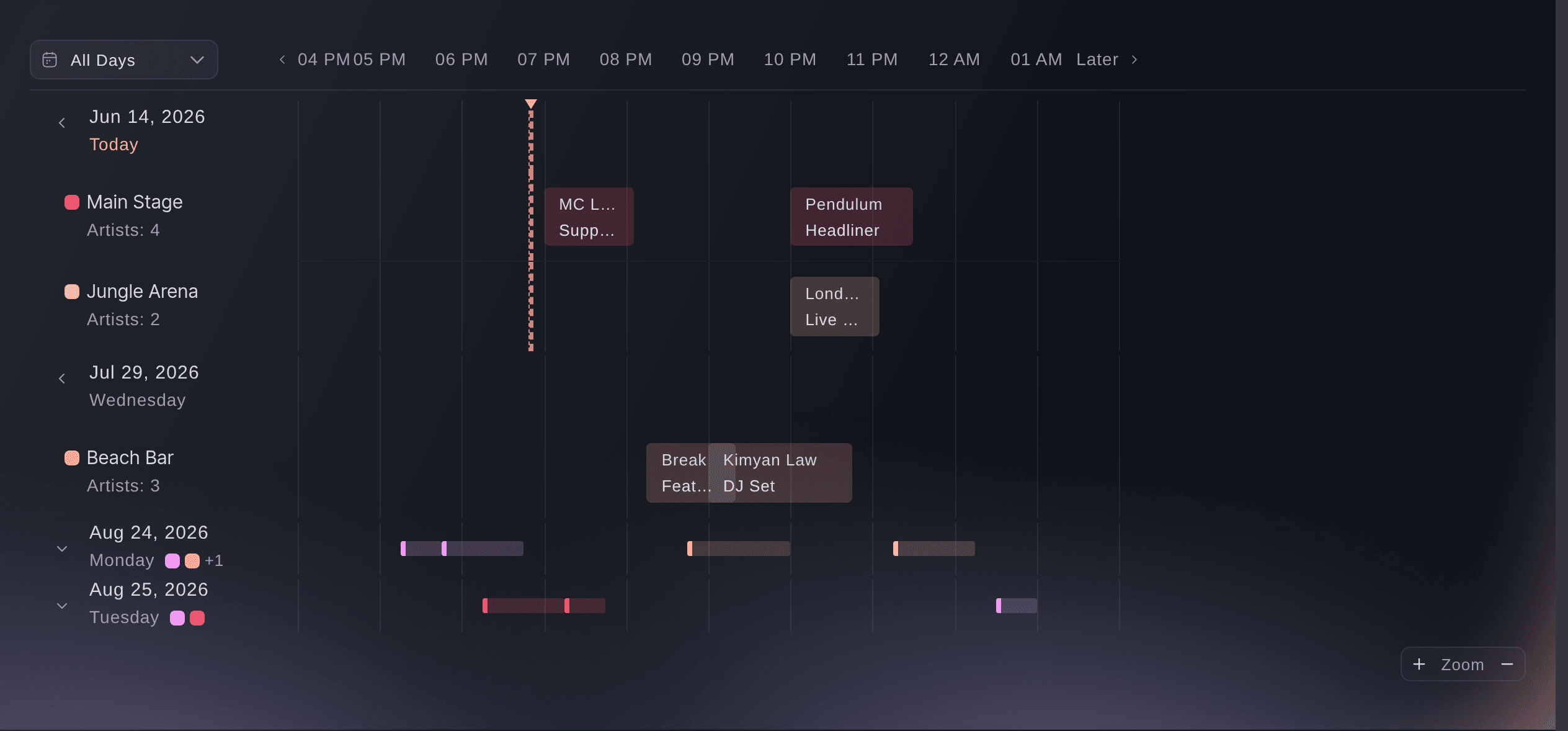
Ticket Fairy event schedule timeline with one row per stage and set times laid out across the hours of the day
  • Each stage's day on one timeline
  • Short changeovers fixed before show day
  • Stages set for each act's rider

See each stage's day on one timeline

Each day of your event gets its own timeline, with one row per stage and each set laid across the hours. A stage promised to two acts at the same hour stands out long before anyone finds it on the day. Two sets that overlap on a stage show as a conflict, with the clashing set named. Open any set to change it, and everyone looking at the timeline sees the change.

Switch to the table when you want the sets as a list. Narrow it by stage or by day, or search for an act, a stage or a note. A set that crosses midnight stays on the day it started, which is how the people working it think about it. While the day runs, the set on stage now is marked.

Version history keeps each change to a set with who made it and when, so a moved time is never a mystery. The same timeline works for a conference agenda, a film festival's screenings and a sports event's matches. Each one uses the names that kind of event uses.

  • One row per stage: each set across the hours of the day
  • Conflicts flagged: two sets booked on one stage at once
  • Timeline or table: by stage and by day, with search
Give each stage manager one page for their stage

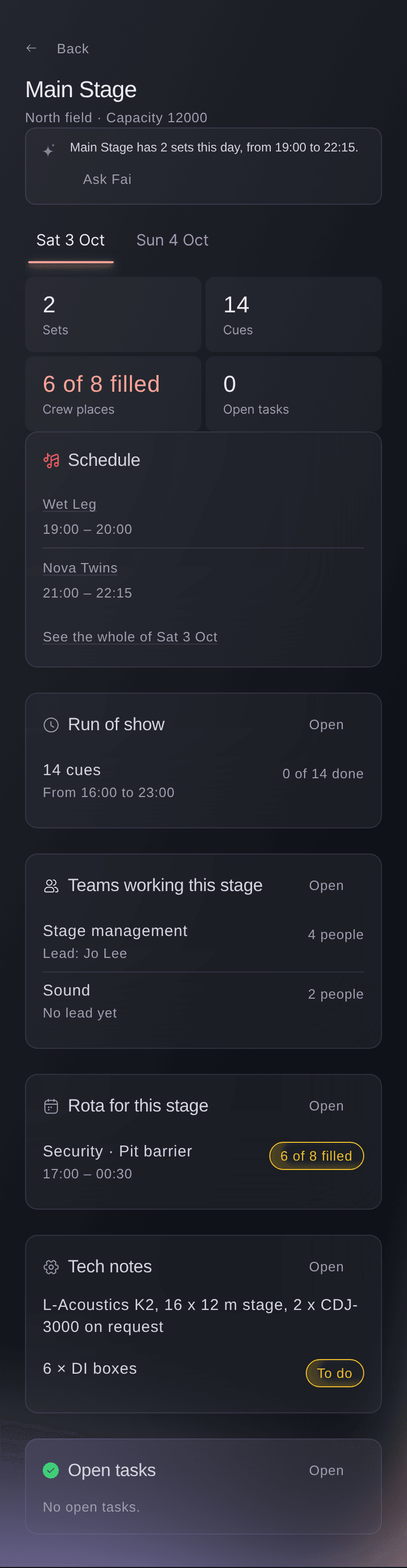
Add each place where two things cannot happen at once, with its capacity, location, technical specification and colour. The names follow your event: stages at a festival, rooms at a conference, cinemas at a film festival and venues at a sports event. Each one becomes a row on the timeline and gets its own page. Your stage manager opens one page for everything about their stage.

A stage page holds the stage's sets for each day and its run of show. It also holds the departments and leads with cues on it, its rota shifts, tech notes and open tasks. The stage's colour carries through to the run of show and its dressing rooms. A busy production office can see the day at a glance.

Each stage also has its own timing rules: its shortest changeover, its opening and closing times and the days it is closed. Set them once on the stage, and each running-order check uses them.

  • Stages: or rooms, cinemas and venues, named for your event
  • Technical specification: what the stage already has, for each act
  • Stage page: sets, run of show, teams, rota and tech notes together
Ticket Fairy stage page for the Main Stage on one day, with its sets, run of show, teams, rota and tech notes

Fix short changeovers and curfew problems before show day

Your running order changes many times as set times, flights and stages move. Fai checks each day each time it changes and points at the problem before an act, a stage manager or the curfew finds it. She flags overlapping sets, a changeover shorter than the stage allows and an act booked on two stages. She also flags a flight that lands after soundcheck and a set outside the stage's hours or past curfew. And she flags a rider line the stage cannot meet.

Each problem comes with fixes Fai has already tested against the rest of the day. A fix never adds a serious problem somewhere else. You see each cue it moves and the new time before you apply it, and you can undo it straight after. Fai never moves a locked stage, or a cue already called on show day.

Fai compares each act's technical rider with the technical specification of the stage they play, including lines such as No drum riser. You see the gap with time to act. Hire the gear, agree a substitute with the act or move them to a stage that has it.

  • Timing rules: shortest changeover, opening hours and closed days for each stage
  • Fixes from Fai: tested against the rest of the day, undone in one step
  • Rider gaps: what a stage cannot meet for an act
Ticket Fairy running-order checks for a festival Saturday, with a late arrival before soundcheck, a short changeover with two fixes and a rider the stage cannot meet

Plan your build and break days like show days

Add a build day before the show or a break day after it. Tick the usual cues to fill in load-in, rig and sound check, or de-rig and load-out. Build and break days work like any show day, on the run of show and the day sheets. Your crew sees their call times the same way all week. You plan the site build with the same care as the headline set.

Book dressing rooms on the same run of show. Fai suggests a room for each performer around their set and flags any booking that overlaps another. Each booking shows on the run of show, the day sheets and the performer and stage pages. No performer arrives to a room someone else is in.

  • Build days: load-in, rig and sound check
  • Break days: de-rig and load-out
  • Dressing rooms: a room for each act around their set
Ticket Fairy dialog to add a build day to the run of show, with the day and the usual load-in, rig and sound check cues

Have each stage set before the act walks on

Your stage manager should not be going through six riders at the side of the stage while the next act waits. Each stage lists the stage plot, the input list and the power each act needs, act by act through the day. They fill in from each act's technical rider. Your stage manager, your monitor engineer and your electricians work from the same spec. The stage is set for each act before they walk on.

The specs build on the riders your team already collects in Advancing. They also build on the hire list, which takes each act's needs line by line from their rider. A rider change waits there for your review, so a change from the act never overwrites a decision your team made by hand.

  • Stage plot: where everything sits for each act
  • Input list: each channel each act needs
  • Power: what each act needs on stage

Run each changeover to a plan your crew can see

Plan the changeover between each act and the next, so your crew works each turnaround to a plan they can see. Crew calls for each changeover sit on the running order. The stagehands, the backline techs and the monitor engineer arrive when the turnaround starts, with the right gear for the act coming on.

Fai already drafts the call times for each act's load-in, soundcheck, changeover, stage call and set, and for each department's cues. She drafts them by email, and by text where there is a mobile number. Each draft waits on Today until you approve it. When a cue moves, Fai drafts it again, so nobody turns up at an old time.

  • Changeover plans: between each act and the next
  • Crew calls: for each changeover on the running order
  • Call times from Fai: drafted for acts and departments, sent when you approve

Hire only what your busiest day needs

Fai works out the backline and production to hire from each rider, stage by stage and day by day. She takes off what each stage already has, so you hire what the busiest day needs and no more. The Production section holds the event-wide work that belongs to no single act or crew member. You keep it as tasks, notes and items for finance, technical, hospitality, catering and travel.

Describe what you need, such as staging, rigging, generators or temporary structures. Fai researches production companies near your event, with their website and how to reach them. Supplier replies and quotes sit in the activity beside the work, so your production manager knows where each order stands.

  • Hire from riders: backline and production by stage and day
  • Tasks, notes and items: for each production department
  • Find suppliers with Fai: local production companies and how to reach them
Ticket Fairy backline item for CDJs opened to how the number was worked out, day by day on the main stage, with one already on the stage and reuse saving three units

Stream your sets to fans who cannot be there

Fans who could not get a ticket or could not travel still want to watch. Your stream schedule starts from the running order your production team already keeps, with each act on its stage and set time. Each act's streaming rights come from their contract, so you stream only the sets you have rights to. The stream plays on your event page, where fans already buy their tickets.

Agree streaming in the contract before the show. Fai drafts each performer's or speaker's contract from the booking, they sign online with no account, and both of you get the signed copy. The rights you stream under are on record, and your team never searches a signed agreement on show day. Publish your line-up and set times to your event page from Public line-up, after you review each change. When set times move, you can email your ticket holders a draft that lists the changes. Fans at home and fans on site then know when each set starts.

  • Stream schedule: built from your running order
  • Streaming rights: for each act, from their contract
  • On your event page: the stream where fans buy their tickets

How production teams plan their stages

  • A four-stage weekend festival

    Build days go on the run of show for the week before, with load-in and rig cues for each stage. On the Thursday, the checks flag a short changeover on the second stage. The fix moves one cue, and the production manager sees exactly which one.

  • A stage manager with a packed bill

    The stage page lists each act's plot, inputs and power from their riders. The changeover crew gets a call for each turnaround on the running order. The monitor engineer works from the same spec as the stage manager.

  • A conference across six rooms

    Rooms take the place of stages, the agenda becomes the timeline, and the AV each session needs sits on its room. If the agenda puts a speaker in two rooms at once, the checks flag it the same day.

  • A club running a showcase night

    Fai goes through three riders asking for CDJs and takes off the pair the club already owns. The hire list asks the supplier for the one extra set the night needs.

  • A festival streaming its headliners

    Only the acts whose contracts include streaming join the stream schedule, which follows the running order. Fans at home buy a ticket and watch on the event page.

Questions About Your Production Schedule and Stages

Schedule & stages

The event's owners, admins and producers, from Run of show on the event's Operations page. You can add build and break days up to 14 days before the event starts or after it ends.

On a build day: load-in at 08:00, rig at 10:00 and sound check at 15:00. On a break day: de-rig at 09:00 and load-out at 13:00. Change or remove them like any other cue.

As many as you programme. Each one is a row, and the timeline scrolls sideways rather than squeezing them together.

No. The timeline lays out set times against stages, so it shows a stage double booked. The running-order checks add short changeovers, acts on two stages, late arrivals, curfew and rider gaps. Check crew against the rota.

No. The dialog lists each cue it moves and its new time before you apply it, and Undo puts them back straight after. Each problem offers up to two fixes.

The stage and day are locked, or a cue in it was already called on show day. Or the run of show changed after Fai worked out the fix. Unlock the stage, or use the new fix the checks show.

No. Fai drafts them, and each one waits on Today for your approval. When a cue moves, Fai drafts it again.

From each act's technical rider. The stage plot, input list and power fill in from it for your production team to check. The stage's own equipment comes from its technical specification in Stages.

The acts whose contracts give you streaming rights. Each act shows its streaming rights beside your stream schedule, and the stream plays on your event page for ticket holders.

Yes. When you ask, Fai adds and changes stages, sets and their timing rules, adds build and break days and applies running-order fixes. She shows you each change and waits for your yes first.

Ready to Build a Stronger Event Business?

Book a live demo, and we will set up your first event on the Event Operating System with your team.

Start Selling Tickets Online

Sign up without a credit card and build a test event before you commit. Go on sale in minutes when you are ready.

No monthly subscription required for ticketing
Start selling tickets immediately
Ticketing tools included in the service fee
Get Started for Free Talk to Fai Now

Ask Fai, our AI assistant, about Ticket Fairy’s features, pricing and how it could work for your event.

No credit card required

Book a demo call

See the referral model that drives 20% more ticket sales on average, learn which campaigns sell tickets, answer buyers faster and keep queues moving.

45-Minute Video Call
Pick a Time That Works for You

The Ticket Fairy, Inc. is a fintech company and technology platform. The Ticket Fairy, Inc. is not a bank, financial institution, or regulated financial services provider. Vault banking services are provided through regulated banking partners. Ticket Fairy Capital financing is provided by third-party private credit partners. The Ticket Fairy, Inc. does not make credit decisions, and all funding terms, approvals and conditions are determined by those lending partners.