Run your whole site from one live control log

Your teams report into one live control log, pinned on your site plan. Send each job to the right team and see which pass holders are in each zone.

  • Your teams on site report into one log
  • Crew and artists in each zone accounted for
  • A complete, private record for your debrief

See what is happening on site as it happens

Stewards, security, medics, bar managers and site crew all report into the live log your control room works from. A report needs what happened, where and how serious it is. A steward with a queue in front of them can log a fainting at the bar in seconds. Each entry shows its team, its zone, a pin on your site plan and how serious it is. The most serious sit at the top.

Your team grades seriousness in plain words rather than codes. Critical means danger to life or emergency services needed now. High means someone is hurt, a safeguarding worry or a risk to many people. Medium needs someone to deal with it, and low is noted for the record. Because everyone grades the same way, a high from the main gate means the same as a high from the campsite.

The pin matters as much as the words. When a steward reports a crowd surge at the barrier, the pin sits on the spot where it happened, on the site plan your team already draws on. The person sending help sees the nearest gate, first aid point and route without asking for directions over the radio.

  • Control log: reports from all your teams, most serious first
  • Pin on your site plan: each entry where it happened
  • Team and zone: who covers it and where on site it is
  • Seriousness in plain words: critical, high, medium or low, clear to everyone
Ticket Fairy incident log for a festival, with counts by status and the incidents that need someone on them, most serious first

Give each entry an owner and see it closed

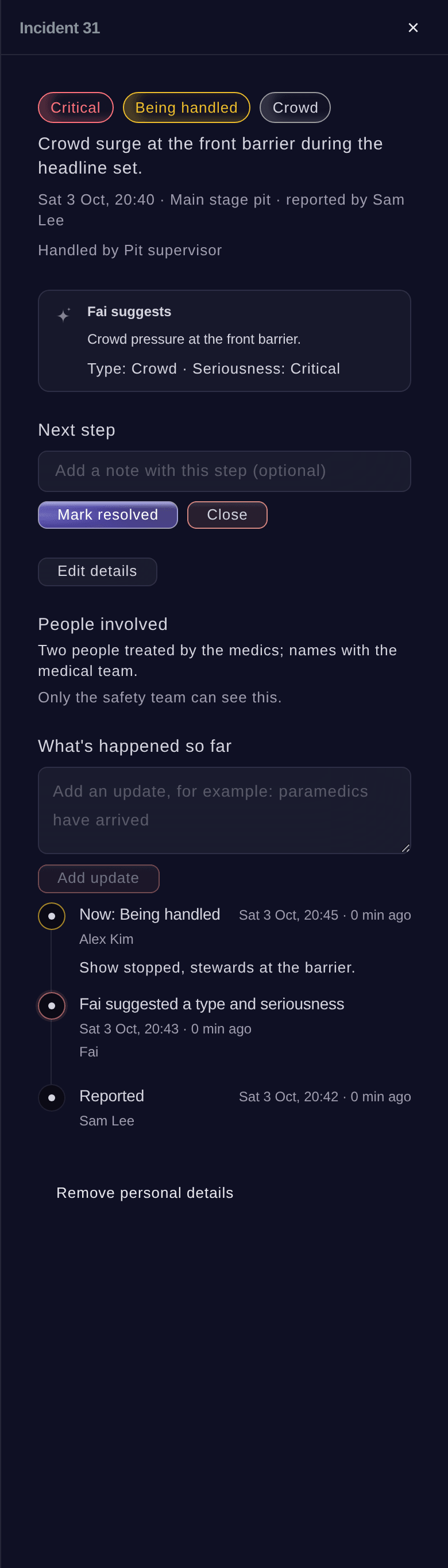
Each entry names who is dealing with it. Your control room never sends two teams to the same fall while a fight at the far gate waits. Raise an entry when it gets worse, and add updates as paramedics arrive or the area is cleared. Move it from new to being handled, resolved and closed. Each step joins the entry's history with who took it and when. Whoever picks it up at the shift change knows the whole story in seconds.

Updates add to the history and never replace it, and nobody can delete an entry. If someone logs an entry by mistake, close it with a note saying so. If the problem comes back, reopen a closed entry. Your licensing officer, insurer or solicitor may ask what happened at the main bar at ten past nine. The answer is there, in order, with each name and time.

Fai checks each new report and suggests its type and how serious it is. The person dealing with it accepts her suggestion with one button or keeps their own judgement. They can ask her again once more detail is in. Your team decides, and Fai saves them the typing.

  • Who is handling it: one owner for each entry
  • Escalate: raise an entry as it gets more serious
  • Full history: each step and update with who and when
  • Fai suggests: the type and seriousness of each report
Ticket Fairy incident panel for a crowd surge, with its seriousness, the next step, Fai's suggestion, the people involved and what has happened so far

Send each job to the right team and channel

Dispatch an entry to the team that covers its zone, on the radio channel that team answers. The channels and call signs come from the radio plan you already keep with your kit. Your control room, security supervisor and medics all work from one plan. Nobody has to remember which channel the campsite stewards are on at two in the morning.

Your radio plan lists each channel as it shows on the radio dial and who uses it. It also holds the call signs and the person who answers each one. Print a radio sheet to pin up in the cabin and at each gate. Each department's day sheet shows the channels that team uses. When you change the plan, the next dispatch and the next day sheet follow it.

  • Dispatch by zone: to the team that covers the zone
  • Radio plan: channels, call signs and who answers each one
  • Radio sheet: a printed sheet of all your channels to pin up
Ticket Fairy radio plan with a Control channel for emergencies and a Security channel, each with its call signs and who answers

Put the live log on your control room TV

Open your private control room link on a TV or computer in the control cabin, and the live log appears with no sign-in. Everyone in the cabin sees new entries arrive, who is on each one and what is still open. Your police liaison, medical lead and security director see the same picture, and nobody shares their own login.

The link is made for the cabin wall. Keep it to your control room, and stop it or make a new one if it reaches people it should not. Personal details on sensitive entries stay off it, so the TV can sit where visitors to the cabin can see it.

  • Control room link: the live log on any TV or computer
  • Private link: no sign-in and no shared logins
  • Sensitive details kept off: safe for a TV visitors can see

Account for everyone backstage and in restricted areas

When the fire alarm goes or a structure must be cleared, you need names, not guesses. Your gate staff scan crew, artists, traders, volunteers, press and guests in and out of each zone. Open a zone and see who with a pass is inside right now, with the time each went in. Your safety lead takes that list to the muster point and ticks people off.

Backstage, the pit, the production village and the artist compound stay for the people meant to be there. Each pass carries its zones, days and hours. A pass for the wrong zone, the wrong day or outside its hours is refused at the gate. A supervisor can let someone through with a reason, and the refusal and the reason both stay on record.

During an evacuation, your control room sees which zones still have pass holders inside and who they are. As your gate staff scan people out, each zone's list gets shorter, so your team knows exactly whom to look for.

  • Who is in each zone: pass holders inside now, with the time each went in
  • Musters and evacuations: a named list to tick people off
  • Restricted areas: passes refused outside their zones, days and hours
  • Supervisor override: let someone through, with the reason on record

Start from the counts your staff gates already keep

Your staff gates already count who is on site and inside each zone, by pass group or organisation. On site now updates by itself while it is open. Open any zone's count for a roll call of everyone inside and when they went in. That is the list you need when you must clear a structure or account for a supplier's crew.

Each pass is checked against its zones, days and hours as it scans. Each movement is kept with where it happened, in or out, and who scanned it. Nobody is ever refused on the way out, and scanning people out at each staffed exit keeps your counts right. Your control room and your gate teams work from the same scans, so everyone sees the same numbers.

  • On site now: who is on site and inside each zone
  • Roll call: everyone inside a zone and when they went in
  • Movements: each scan of a pass, in and out
Ticket Fairy On site now for a festival, with the count on site, the count inside each zone and the counts by group or organisation

Care for each patient with a private medical log

Your medical and welfare teams see people on their worst day of the event. Their notes deserve better than a clipboard in a tent. Record each patient's triage, treatment and outcome on a private record linked to the incident they came from. A fall reported at the second bar and the care that followed then tell one complete story.

Only people with a Medical role on the event, plus its owners and admins, can open the details. Each view of a record is logged. You choose how long to keep records for each event, including keeping them permanently. Erasing a record removes the personal details while the counts stay.

Everyone else gets the numbers without the names. Your control room, your safety lead's shift report and your debrief all show how busy the medical tent was. They also show what kinds of cases came in. Nobody outside the medical team sees who the patients were. Medical, safeguarding and welfare incidents start as sensitive in the control log too, so the report and the treatment get the same care.

  • Triage, treatment and outcome: each patient from arrival to discharge
  • Linked to incidents: each patient beside the report they came from
  • Medical role: details only for the people who need them
  • Counts with no names: for the control room and your debrief

Hear about serious incidents the moment they are reported

Someone reports an incident as high or critical, or raises it to either later. Fai then emails your safety lead and the event's owners and admins straight away. The email gives how serious it is, the type, where and when, and a link. If a critical incident is still open later, they get a second email. An urgent task shows your team someone is chasing it.

Fai also checks the log each hour for patterns, such as several medical calls at the main bar in a short time. When incidents of the same kind cluster at one spot, she drafts an email to your safety lead. It asks whether the area needs more cover, ready for your team to approve. Alert emails never say what happened or who was involved. They are safe to open on a phone in a busy crowd.

Anyone on your event's team can ask Fai to report an incident or add an update in their own words. They can do it from wherever they are standing. Fai shows them what she will log and waits for their yes. Your control room then sees the report, and your safety lead hears about it, just as with one entered in the dashboard.

  • Safety alerts: your safety lead told at once about anything serious
  • Still open: a second email and an urgent task for a critical incident
  • Patterns: the same kind of incident in the same place
  • Report through Fai: for anyone on your event's team

How event teams run their control room

  • A camping festival through the night

    The overnight control team works from the cabin TV while stewards report from the campsites on their phones. A run of welfare calls in one field shows up as a pattern, and Fai drafts the email to the safety lead. An extra welfare team is there before midnight.

  • A stadium concert with a pass-only pit

    Only crew, photographers and security with a pit pass get through the pit gate. A runner with a production village pass is refused there. When the fire panel trips, the security director opens the pit's list and sees each name inside, with the time they went in.

  • A city marathon finish line

    Medics record each runner they treat on the private medical log, linked to the incident the marshal reported. The race director sees the number of cases by hour with no names. The medical provider keeps the full records for as long as its policy requires.

  • A multi-stage day festival

    Each entry goes to the security team for its zone on the channel they answer, from the radio plan the production manager already keeps. Next morning, the debrief starts from the full log, in order, with who dealt with each entry and when it closed.

  • A venue running back-to-back shows

    The duty manager keeps the control room link on the office TV for each show. Incidents go from report to closed with their history, so the venue answers its licensing review with the record itself.

Questions About Your Event Control Room

Control room

They are the same records. Each incident your team reports is an entry in the control log, with its history. The control log adds the team, the zone and dispatch.

No. Open the private link on a TV or computer in your control cabin. Anyone with the link can see the log. Keep it to your control room, and stop it if it reaches anyone it should not.

From the radio plan in your event's Kit and equipment. There you add each channel as it shows on the radio dial, its call signs and who answers each one. Owners, admins and producers can change it.

Your safety lead, named with their email in Rota rules, plus the event's owners and admins, up to 20 people. They get one email each time an incident rises to high or critical. If a critical incident is still open 30 minutes after the report, they get another email at Fai's next hourly check.

Three or more incidents of the same type in the same place within two hours. Fai drafts an email to your safety lead, or a task if Rota rules name no safety lead. Your team decides what to do.

Your safety team can, which means the event's owners, admins and producers and your safety lead. The person who reported it can too. Everyone else sees only that something happened, when and how serious it is. Each time someone opens a sensitive entry, it is recorded.

No. Nobody can delete an entry, so the record stays complete. Close an entry logged by mistake with a note. You can also remove its personal details, which clears the people involved and the text of each update and cannot be undone.

From the passes your gate staff scan in and out, such as crew, artist, trader, volunteer, press and guest passes. Audience tickets scanned at check-in are not part of these counts. Someone who leaves without being scanned out still counts, so scan people out at each exit you staff.

People with a Medical role on the event, plus its owners and admins. Each view is logged. You choose how long to keep records for each event, including permanently, and an erased record keeps its counts.

No. Fai suggests the type and seriousness of a report and drafts emails for your approval. People on your team make each decision, and Fai waits for a yes before she logs anything for them.

Ready to Build a Stronger Event Business?

Book a live demo, and we will set up your first event on the Event Operating System with your team.

Start Selling Tickets Online

Sign up without a credit card and build a test event before you commit. Go on sale in minutes when you are ready.

No monthly subscription required for ticketing
Start selling tickets immediately
Ticketing tools included in the service fee
Get Started for Free Talk to Fai Now

Ask Fai, our AI assistant, about Ticket Fairy’s features, pricing and how it could work for your event.

No credit card required

Book a demo call

See the referral model that drives 20% more ticket sales on average, learn which campaigns sell tickets, answer buyers faster and keep queues moving.

45-Minute Video Call
Pick a Time That Works for You

The Ticket Fairy, Inc. is a fintech company and technology platform. The Ticket Fairy, Inc. is not a bank, financial institution, or regulated financial services provider. Vault banking services are provided through regulated banking partners. Ticket Fairy Capital financing is provided by third-party private credit partners. The Ticket Fairy, Inc. does not make credit decisions, and all funding terms, approvals and conditions are determined by those lending partners.