1. Solutions
  2. By role
  3. Conference programme managers

Build a Programme Your Delegates Love and Run Every Room on Time

Take talk proposals on your own form, score them with your review panel and Fai, and accept a speaker straight onto your agenda with their advance started. Every speaker's travel, hotel, slides and agreement come back from their own link. Delegates pick their sessions, ask questions from their phone and plan their meetings, and the attendance report shows which talks filled the room.

  • Speakers chosen from scored proposals
  • An agenda with every clash caught early
  • Every session room the right size
Ticket Fairy talk proposal being reviewed, with what was proposed, Fai's notes and score, each reviewer's score and comment, and your own score

Choose Your Speakers From Proposals Your Panel Has Scored

Take Submit a talk proposals on your own form, and every proposal lands in Applications. Fai summarises each one, scores it with her reasons and flags likely repeats. Your review panel scores proposals from the dashboard or from their own link, without seeing who applied unless you choose. With Conference or Technology Event as your event type, Programme holds Speakers, Applications, Agenda, Rooms, Public agenda and Networking, named the way your team talks about a conference.

  • Applications: every talk proposal with Fai's score and reasons
  • Review panel: reviewers score from their own link, with names hidden if you choose
  • Programme sections: Speakers, Agenda and Rooms, named for a conference
Ticket Fairy page a reviewer opens from their link, with each talk proposal to score and the names hidden

Build an Agenda With Every Clash Caught Early

Accept a talk and the speaker joins Speakers, the talk takes its place on your agenda with its start time, length and room, and their advance starts. Add a speaker yourself by pasting a LinkedIn link, a public bio page or their bio, and their name, title, company, photo and links are filled in for you to check. Give each room its opening hours and changeover time, and the agenda checks flag the same speaker in two rooms at once, a changeover too short for the room and a flight that lands too late for a talk, each with a fix from Fai you apply or undo in one tap.

  • Accept in one step: the speaker, the agenda slot and their advance
  • Speakers from a link or bio: details filled in for you to check
  • Agenda checks: clashes, changeovers and travel, with fixes from Fai
Ticket Fairy dialog to accept a talk, listing the speaker, the agenda session and the advance it adds, with when the session starts, its length and the room

Get Every Speaker Ready Without Chasing

Each speaker opens their own link to enter their travel and bio, upload their slides and sign their speaker agreement, with no account to make. Fai fills in answers from their replies and forwarded emails and chases what is missing, and you sign off each advance. Send speaker agreements to every speaker at once from one template, hold a hotel block for your speakers and plan each airport pickup with a driver and a vehicle. Send each speaker a welcome pack link with your welcome message, your site rules, their day sheet and their agreement.

  • Speaker advance link: travel, bio, slides and agreement from the speaker
  • Speaker agreements: sent together and signed by email
  • Hotel blocks and pickups: rooms and airport runs for every speaker
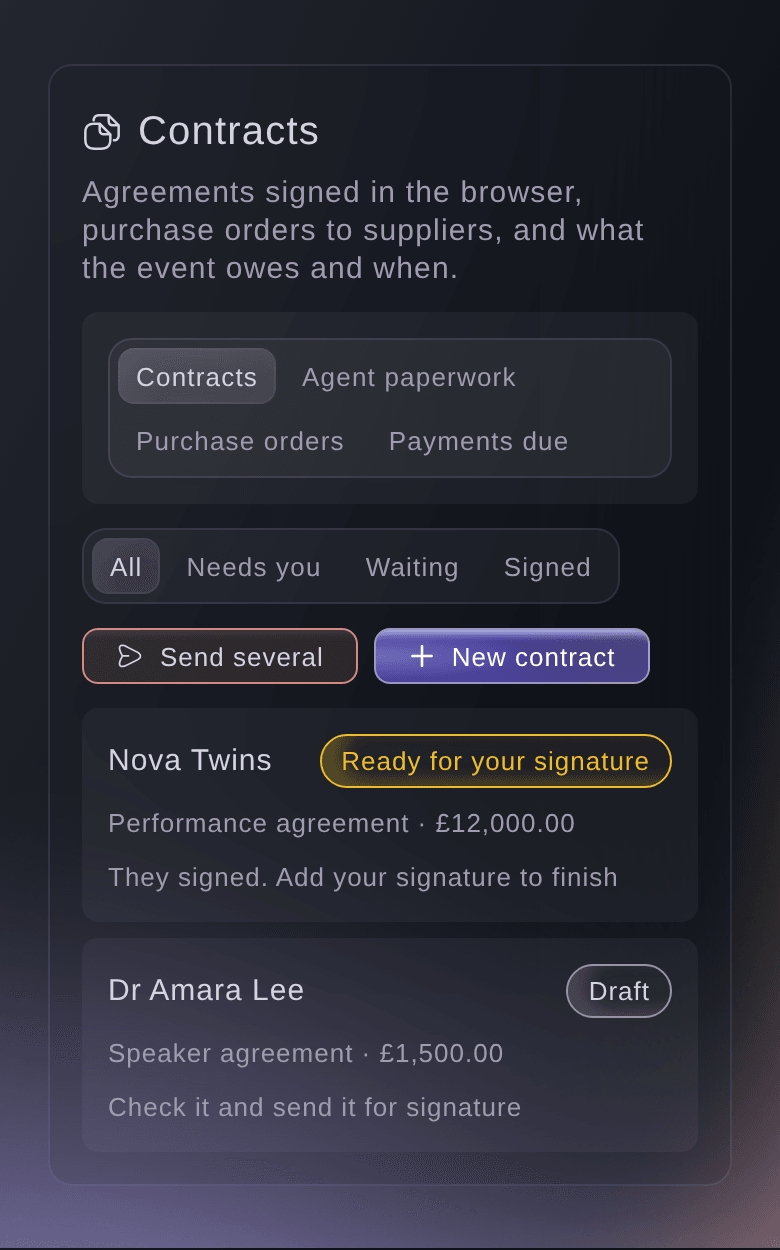
Ticket Fairy Contracts section with a performer agreement ready for your signature and a speaker agreement in draft

Fill Every Session Room Without Overflowing It

Publish your agenda with a photo, bio and links for each speaker on your event page and your own website, and announce speakers in waves at the times you choose. Turn the talks and workshops on your agenda into sessions delegates pick on their order page, each with the places its room holds, a waiting list when it is full and a warning before two picks clash. Delegates add their picks to their own calendar. When a speaker or a room changes, email only the holders of the pass or workshop that change affects.

  • Public agenda: speakers announced when you choose, on your own website too
  • Sessions to pick: places, a waiting list and clash warnings
  • Delegates' own calendars: the sessions each delegate picked
Ticket Fairy dialog to let people pick a sponsor deck workshop, with its kind, time, places, room, track and the waiting list switch

Keep Every Room on Time and Every Session Lively

Plan each room minute by minute in your run of show, name who calls each room and follow Now and next on the day, with how late each room is running. Put now and next on the green room TV from a private link, so speakers know when they are on. Volunteers scan delegates into each session from a link on their phone. In each session, delegates ask and upvote questions and vote in polls from a QR code, your moderator chooses what shows, and the presenter view shows the top questions in large type. Between sessions, delegates find people with shared interests in your attendee directory and book meetings at your tables and times.

  • Run of show: a named caller and Now and next for each room
  • Live Q&A and polls: moderated, with a presenter view
  • Networking: an attendee directory and meetings at your tables
Ticket Fairy backstage screen on a TV, with the act on now and next on two stages, minutes left and how late each stage runs

Learn Which Talks Landed and Plan Next Year's Programme

The attendance report shows how many delegates picked each session, how many came, the no-shows and the people turned away, with your most and least popular sessions. Send a feedback survey the morning after, and see your Net Promoter Score beside last year's with the themes Fai found in what delegates said. Add the top improvements as tasks on next year's conference, and copy this year's setup into the next edition, seeing what each part adds before anything is copied.

  • Session attendance: picked, came, no-shows and the most popular sessions
  • Feedback with themes from Fai: compared with last year
  • Copy from last event: next year's programme starts from this one
Ticket Fairy attendance report of a design conference, with places picked, people let in, no-shows, people turned away and the most and least popular sessions
Get this page as a PDF Read it later or share it with your team. We email you a link to the PDF.
What to put in your PDF

We will email you this deck. We may also email you now and then about Ticket Fairy features that can help your events. You can unsubscribe at any time with one click.

Everything You Need to Run Your Conference Programme

More about ticketing for Conference programme managers

Questions About Ticket Fairy for Conference programme managers

Conference programme managers

No. They open their own link, enter their part of the advance, upload their files and can sign their agreement on the same page.

No. Declining keeps an optional reason for your team, and the person who applied is not emailed, so you choose how to tell them.

Yes. A delegate signs in to their account and finds Your sessions on their order page, where they drop a session and pick another while places are left. A full session lets them join its waiting list.

The sessions delegates pick come with their ticket. Sell a paid workshop as an add-on with the room's places as its stock.

Yes, when you allow anonymous questions on that Q&A board. You also choose whether questions show at once or after your moderator approves them.

No. The directory is off until you switch it on, and delegates join it themselves from their order page. Each delegate chooses which details others see and can leave at any time.

No. The planned times change only when someone moves the rest of the day. Now and next and shared day sheets show the delay in the meantime.

They are part of the Event Operating System, in your dashboard beside your passes, workshops and checkout questions. Book a demo, and we help your team set up the first event.

Sell more tickets. Build the crowd that comes back.

Start Selling Tickets Online

Sign up without a credit card and build a test event before you commit. Go on sale in minutes when you are ready.

No monthly subscription required for ticketing
Start selling tickets immediately
Ticketing tools included in the service fee
Get Started Talk to Fai Now

Ask Fai, our AI assistant, about Ticket Fairy’s features, pricing and how it could work for your event.

No credit card required

Book a demo call

See the referral model that drives 20% more ticket sales on average, learn which campaigns sell tickets, answer buyers faster and keep queues moving.

45-Minute Video Call
Pick a Time That Works for You