1. Solutions
  2. By role
  3. Marketing agencies

Sell More Tickets for Every Client and Prove What Worked

Work on every client's brand from one login, with their tone of voice, colours and logos ready for your team and for Fai. Add each client's ad pixels once, give every ad, post and partner its own tracking link, and see the clicks, orders and revenue each one brought in. Plan and answer their social posts, test which event page sells more, and send each client a live sales report they can open whenever they like.

  • Every client's brand from one login
  • The tickets each ad, post and partner sold
  • Live results your clients can open themselves
Ticket Fairy Tracking Links page for an event, one row per link, with the clicks, orders and revenue each one earned

Work on Every Client's Brand From One Login

Each client invites you from their brand's Team page with the access your work needs, and Brands lists every brand you work on, so you switch clients without signing out. Each brand keeps its own events, team and payouts, so one client's figures never appear in another's reports. The client's brand kit holds their tagline, tone of voice, colours, fonts and logos, and Fai drafts in that tone of voice when she works on their events. Start a new event from a template built for a club show, a concert, a festival or a conference, or copy one the client already ran.

  • Brands: every client you work on, from one login
  • Brand kit: each client's tone of voice, colours and logos
  • Templates and copies: new events set up from the ones that worked
Ticket Fairy Brand Guidelines editor with Identity, Colours, Typography, and Logos & assets cards

Show Each Client Which Ads Sold Their Tickets

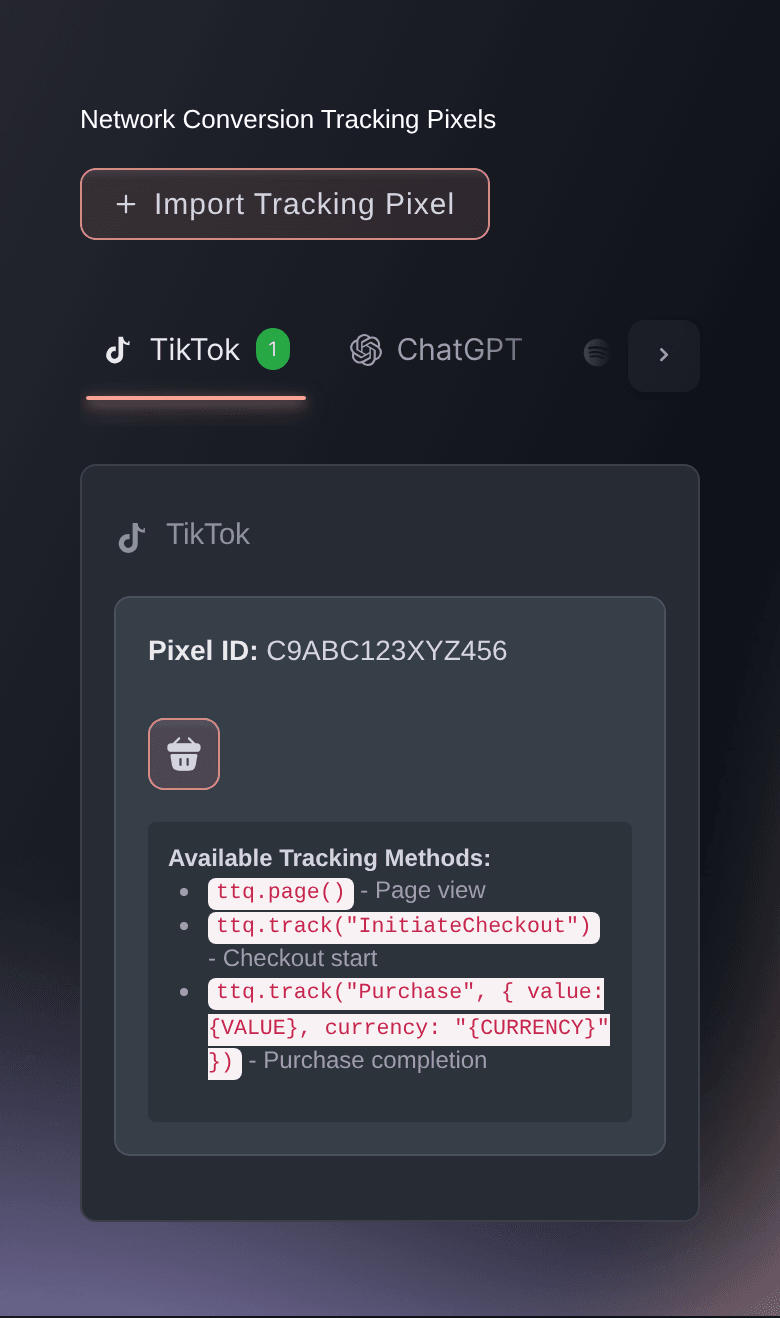
Connect the client's Meta ad account by signing in, with no pixel ID to copy, and Ticket Fairy reports each sale to Meta from our servers as well as the buyer's browser. Paste the tracking code from TikTok, Google Ads, Google Analytics, Snapchat, Reddit, Spotify, X, Pinterest, LinkedIn, Microsoft Bing, Amazon DSP or ChatGPT, and Ticket Fairy recognises the network for you. Pixels belong to the client's brand, so every event they run reports to their networks with the order value and currency. Give each newsletter, influencer post and flyer its own tracking link or QR code, and the Tracking Links table shows what each one sold.

  • Pixels for every network: added once for each client's brand
  • Meta sales from our servers: matched to your ads even when a browser blocks tracking
  • Tracking links: clicks, orders and revenue for each placement
Ticket Fairy Network Conversion Tracking Pixels panel, with a tab for each advertising network

Run Your Clients' Social Accounts With Less Work

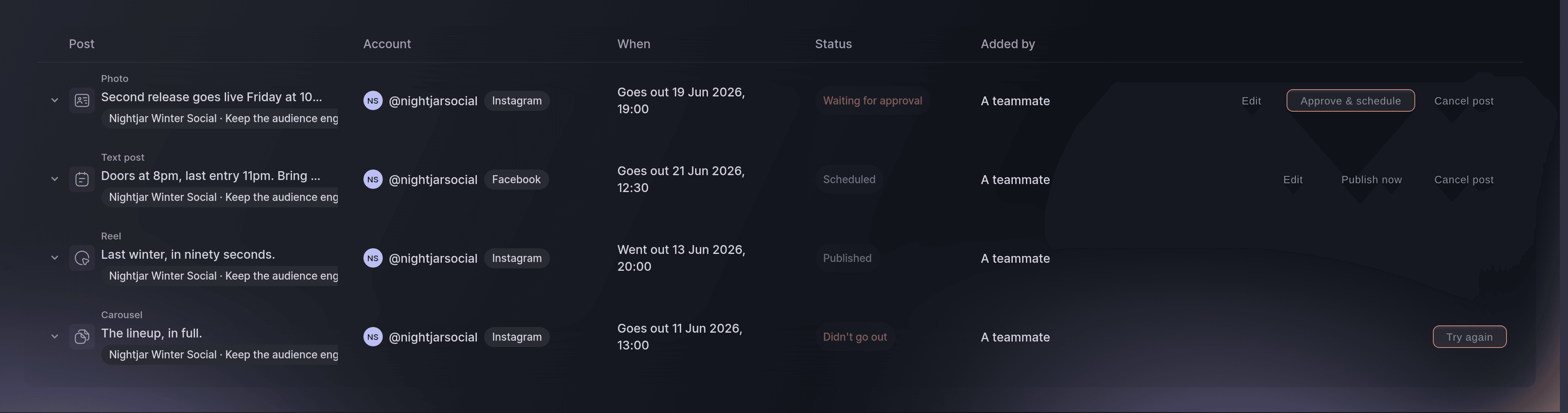
Connect each client's Instagram and Facebook accounts to their brand, and say whether an account promotes the whole brand, a series, a venue or one event. Draft each event's posts with captions from AI, from the announcement to the last chance, and find good times to post on each account. Every comment arrives in the Inbox with a Ticket buyer badge on fans who have ordered, and a workflow sends their own invitation link to every fan who comments a word such as TICKETS. Show your client the reach, views and followers each account gained, and the orders each message campaign brought in.

  • Captions with AI: posts written for your team to approve
  • Posting queue: each post at a good time for its account
  • Ticket link auto-replies: an invitation link for every fan who asks
Ticket Fairy social publishing queue listing posts with their account, send time and status, including one waiting for approval

Turn More of Your Clicks Into Ticket Sales

Give each campaign or audience its own landing page for the event, with its own wording, images and tickets, and send every ad audience to the page made for them. Test two versions of an event page, or two sets of checkout questions, against each other, and the results show the visitors, conversion rate and revenue of each. Reward buyers who bring their friends with money back on their ticket, and win back buyers who left checkout with a reminder email. Give each partner a promo code, and see the sales behind every code.

  • Campaign landing pages: one event page for each audience
  • A/B tests: event pages and checkout questions compared
  • Referral rewards: buyers earn back their ticket price by sharing
Ticket Fairy experiment results comparing visitors, conversions, conversion rate and revenue for two event pages

Give Promoters and Creators Artwork That Sells

Upload the flyers, videos and story artwork for each event, with a caption to copy and the channel each piece is sized for. Each promoter downloads the artwork beside their own promoter link, so every post credits the sale to the person who shared it. Keep a piece hidden until an announcement goes out, or schedule when promoters see it. Build one promoter roster as a collective and deploy it to any client's event or brand with the commission you set, and the Promoters report ranks every seller by the tickets and revenue their links brought in.

  • Promoter artwork: with captions, beside each promoter's link
  • Collectives: one promoter roster for every client
  • Promoters report: every seller ranked by tickets and revenue
Ticket Fairy Download assets tab a promoter opens, with the event link and their own promoter link

Send Clients Live Results They Can Open Themselves

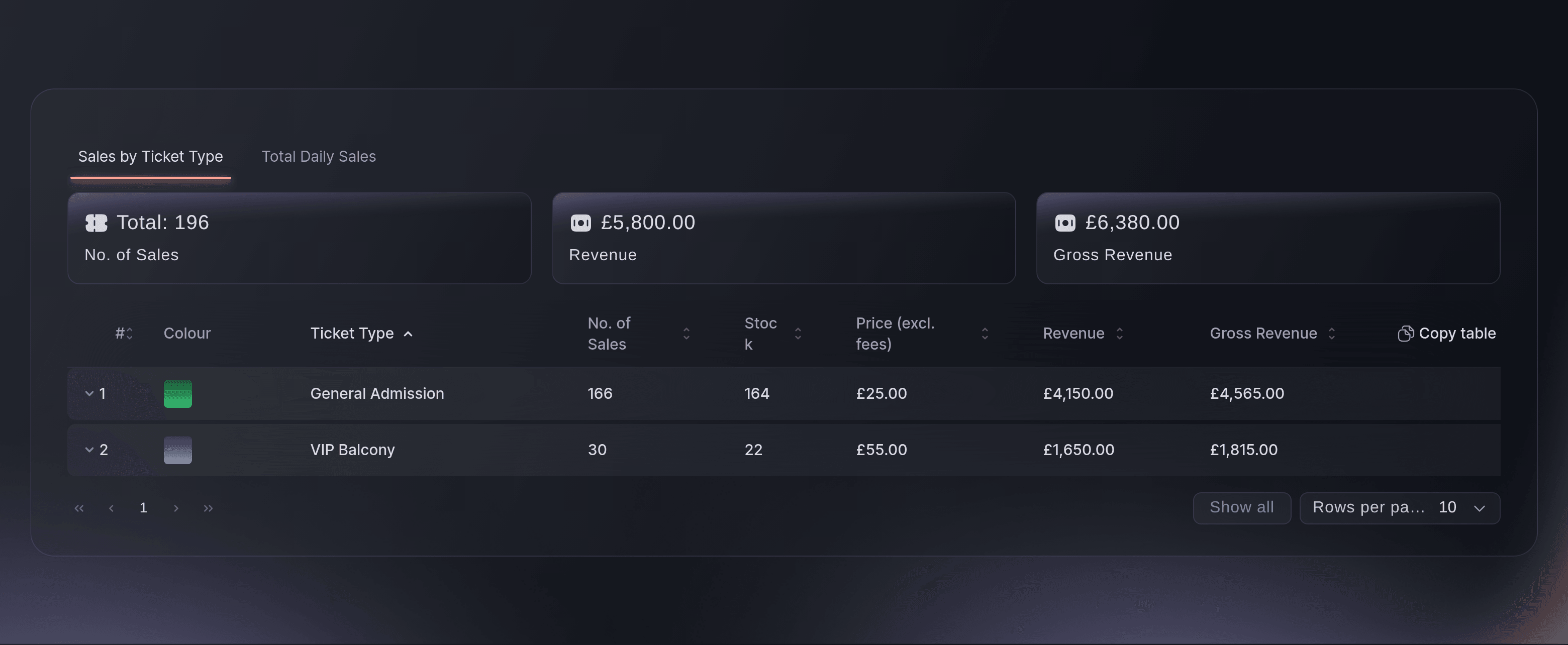
Make a sales report link for the ticket types a client or their venue cares about, and they watch the number sold, the stock left and the revenue as tickets sell. The Traffic report shows the visits to each event page by day or hour, the sites that sent them and how many reached the order confirmation page. Show your client the ages, jobs and home towns of their buyers and how many come back across their events. Ask Fai how last weekend compared with the weekend before, and she answers with the figures and a chart for your client update.

  • Live sales report links: sold, stock left and revenue for each client
  • Traffic report: visits, the sites that sent them and conversions
  • Audience insights: who buys and where they live
Ticket Fairy sales report page with the number sold, stock left and revenue for two ticket types
Get this page as a PDF Read it later or share it with your team. We email you a link to the PDF.
What to put in your PDF

We will email you this deck. We may also email you now and then about Ticket Fairy features that can help your events. You can unsubscribe at any time with one click.

Everything Your Agency Needs to Sell Tickets for Clients

More about ticketing for Marketing agencies

Questions About Ticket Fairy for Marketing agencies

Marketing agencies

Your client invites each person on your team from their brand's Team page with the role your work needs. Accepting the invitation creates the person's account or signs them in to the one they already have, and Brands then lists every client brand they work on. A client can change your role or remove you at any time.

You need an owner or admin role on the client's brand to add pixels, connect social accounts, set up workflows and run a presale. Curators can draft and schedule posts, and support team members can answer comments and messages.

Revenue is the client's share after Ticket Fairy's fees, not what the buyer paid. A sale counts towards a link when the buyer opens that link and buys in the same browser. Tracking links belong to one event, so create them on each event you promote.

Yes. Your client signs in with a Ticket Fairy organiser login of their own when they open the link. They do not need a role on the event, and they see only the report. Anyone signed in to Ticket Fairy who has the link can open it, so send it only to the person it is for.

A professional Instagram account, directly or through the Facebook Page it is linked to, and a TikTok Business account. A brand can connect up to 25 accounts. Workflow and presale messages count towards the brand's monthly message allowance.

No post goes out until someone on your team schedules or publishes it, and Ask before posts go live makes every post on an account wait for an owner or admin. A workflow sends private messages only after you switch it on. An account set to reply automatically answers common questions straight away, so choose Suggest drafts to read every reply first.

Yes. Deploy your collective to each client's event or brand, or share your invite code so a client invites your collective with the commission they pay. You pay your promoters yourself from the commission owed on each deployment.

One event page test and one checkout test for each event at the same time. Event page tests do not run on RSVP events, and the setup cannot change once a test starts.

Sell more tickets. Build the crowd that comes back.

Start Selling Tickets Online

Sign up without a credit card and build a test event before you commit. Go on sale in minutes when you are ready.

No monthly subscription required for ticketing
Start selling tickets immediately
Ticketing tools included in the service fee
Get Started Talk to Fai Now

Ask Fai, our AI assistant, about Ticket Fairy’s features, pricing and how it could work for your event.

No credit card required

Book a demo call

See the referral model that drives 20% more ticket sales on average, learn which campaigns sell tickets, answer buyers faster and keep queues moving.

45-Minute Video Call
Pick a Time That Works for You