1. Solutions
  2. By role
  3. Venue managers

Fill Your Calendar and Run Every Night at Your Venue Smoothly

See every hold and show across your rooms and stages, make offers backed by what you paid each act before and settle each show from its ticket sales. Put your own nights on sale from a template or last month's copy, and give the promoters who hire your room their own event, their own tickets and their own sales report. On the night, your door team scans and sells on their own phones, the box office balances its tills and your bar team sees whose age was checked at the door.

  • Every hold and show on one calendar
  • Nights on sale in minutes, yours or a promoter's
  • Doors, box office and bar ready every night
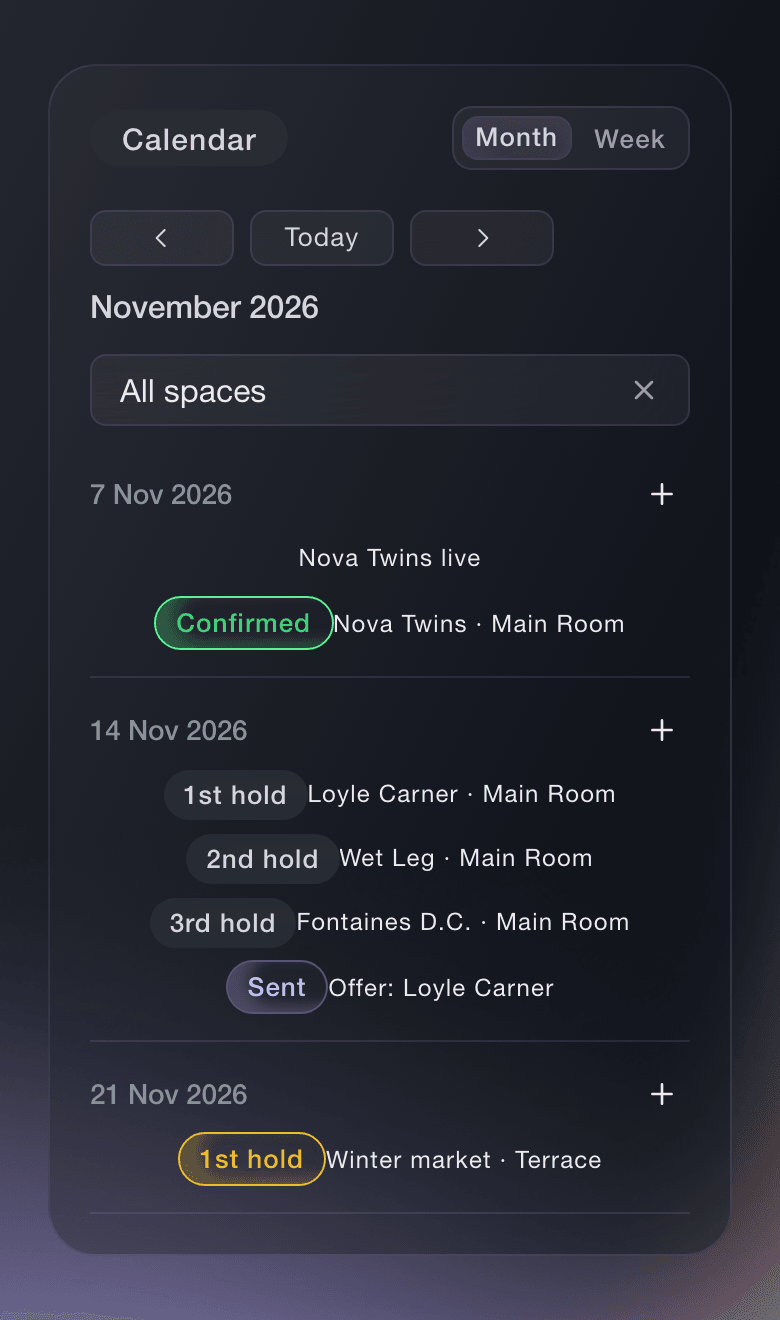
Ticket Fairy Event Operations calendar for November, with a confirmed show on the 7th and a 1st, 2nd and 3rd hold on Saturday the 14th

Know Which Dates Are Free and Who Is Holding Them

Add each of your rooms and stages with its own colour, and see every hold and show across them on one calendar for your brand. Hold a date and see every hold on it in queue order, so you always know who is first in line. Challenge the first hold, confirm it or release it, and Needs attention lists the holds and deals your team has to act on now. On each event, choose Venue manager as your role and the event opens on Today, with the countdown, what changed and what needs you.

  • Calendar: every hold and show on each room and stage
  • Holds and challenges: hold, challenge, confirm, release and take the date
  • Needs attention: the holds and deals to act on now
Ticket Fairy Challenge the first hold dialog, giving the first hold on 14 November 48 hours to confirm or let the date go

Book Acts at the Right Fee and Settle Every Show

See what you paid an act before and the fee range Fai suggests, then start the offer from a template or your last one and email it to the agent. Each counter-offer stays with the offer, and when the agent accepts, the act is booked onto your event. After the show, Fai drafts the settlement from your ticket sales, your costs and the deal, and every line shows how its figure was worked out for the artist's team to check. The Spend tab shows what your nights cost across a period, with the cost per person scanned in at your doors.

  • Offers: templates, past fees and a suggested range
  • Settlements: drafted by Fai, shared and marked agreed
  • Spend across your events: with the cost per checked-in attendee
Ticket Fairy Offers list with a counter-offer, a draft and a contracted offer, and two offer templates beneath it

Put Every Night on Sale Without Starting From Scratch

Start a new night from a built-in setup for a club show, a concert or a theatre show, answer the template's questions such as your ticket price and capacity, and your ticket types and settings are ready to check. Copy last month's night into a new draft, enter the new date, and the sale windows and door times move with it. Keep every edition of a weekly or monthly night in an event series with one page for the upcoming dates. Sell a season pass that covers several of your nights, and holders book the nights they want as you announce them.

  • Event templates: priced around your price and sized to your room
  • Duplicate an event: sale windows and door times move with the new date
  • Event series and season passes: one page and one pass for your regular nights
Ticket Fairy concert template with its price, capacity, VIP and seating questions beside the list of what the template creates

Give the Promoters Who Hire Your Room Everything They Need

When a promoter builds the night themselves, give them Administrator on that event and they set up the tickets, guest list and publishing on that event only. Hold back tickets on a release for each promoter, with each hold named for who it is for, and give a partner an allocation of guest tickets they hand out themselves. Share a live sales report link with a co-promoter, so they watch tickets sold and stock left without a role on your event. The Promoters report on your brand ranks every promoter by the tickets and revenue their links brought to your venue.

  • Access to one event: a hiring promoter runs their night and sees nothing else
  • Held tickets and allocations: named holds and guest tickets partners hand out
  • Sales report links: live sales for a co-promoter or partner
Ticket Fairy Hold tickets setting with two named holds on a general admission release

Run Your Doors, Box Office and Bar Every Night

Your door team scans tickets on their own phones with a Door Staff login that opens the scanning app and nothing in your dashboard, and walk-ups pay at the door by card, phone or cash. Start each box office till with its float, hand over will-call and reprint tickets, and finish the night with a reconciliation that shows whether the cash matches. Door staff see each guest's age status on the scan and mark the wristband as ID checked, and your bar team logs every refusal. Sell VIP tables with a deposit online, give each table guest a host who hears when they arrive, and collect the balance at the door.

  • Scanning and walk-up sales: on your door team's own phones
  • Box office float and end of night: what each till took, checked against the cash
  • Age checks and bar refusals: checked once at the door, logged at the bar
  • VIP tables and hosts: a deposit online and a host who hears when guests arrive
Ticket Fairy Create Table Type form with the name, price, stock, guest limits and online deposit for a VIP booth

Tell Every Visitor What to Expect Before They Arrive

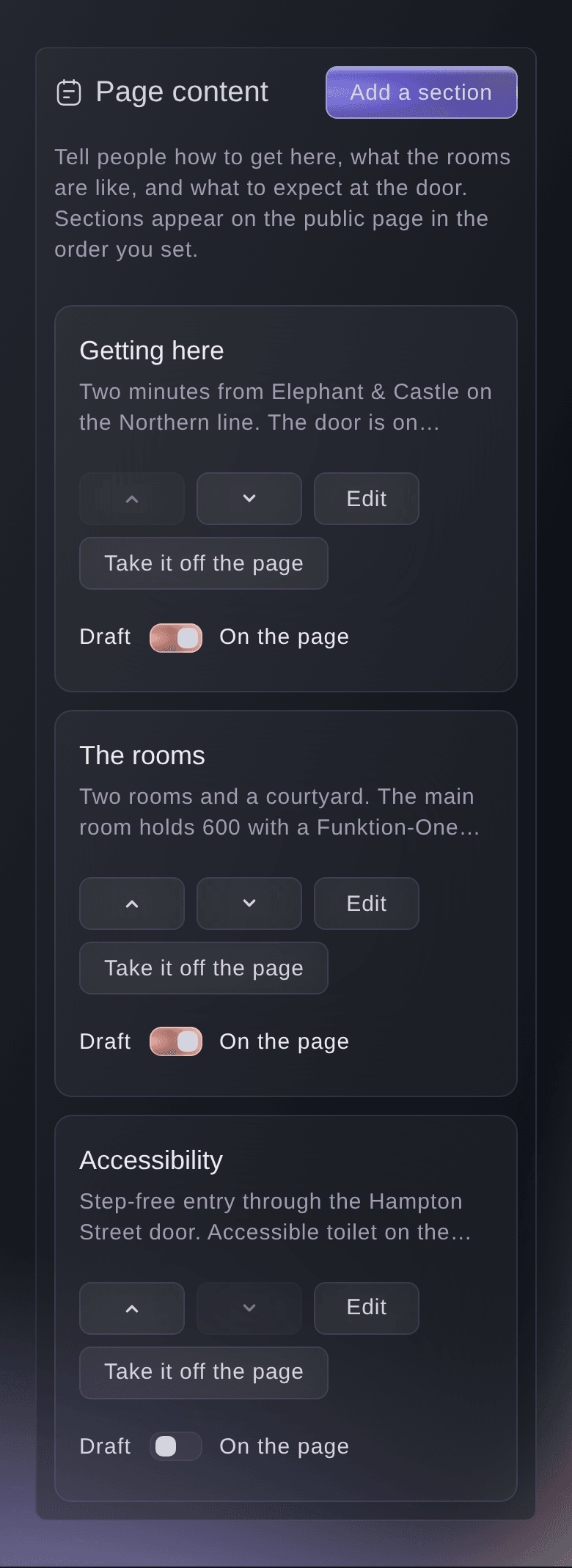
Claim your venue's free page on Ticket Fairy, or add it from the brand you already run, and add sections on getting there, the rooms, accessibility and the door. Answer the questions visitors ask, such as where to park and what time you open, and search engines read your answers as questions and answers. Invite your booker or marketing manager to help keep the page current, and they see the venue page and nothing of your events, orders or payouts.

  • Claim your venue page: with a code sent to your venue's email address
  • Visitor questions: parking, opening times and what to expect at the door
  • Your venue team: bookers and marketing managers keep it current
Ticket Fairy venue page sections with Move up, Move down, Edit and a draft switch
Get this page as a PDF Read it later or share it with your team. We email you a link to the PDF.
What to put in your PDF

We will email you this deck. We may also email you now and then about Ticket Fairy features that can help your events. You can unsubscribe at any time with one click.

Everything You Need to Run Your Venue

More about ticketing for Venue managers

Questions About Ticket Fairy for Venue managers

Venue managers

Open Event Operations for your brand. One calendar covers every event and every room and stage you run. The calendar, offers and settlements are part of the Event Operating System: book a demo, and we set up your first event with your team.

You see every hold on a date in queue order. When you challenge the first hold and it does not answer in time, the challenger can take the date.

The act is booked onto your event. If you booked the wrong event, Undo takes the booking back.

No. Access to one event reaches that event only. A partner with an allocation sees only their own link, and a co-promoter with a sales report link sees only that report after signing in with their own Ticket Fairy organiser login.

In cash, or by tapping a card, phone or watch on a compatible Android phone in the country of the event's payment account. Box office staff can also take card payments with a card reader where your payment account allows it. The option appears once the event has a venue and a complete business or venue address.

Yes. The Entry Fairy app needs an internet connection to scan tickets, so check the connection at each door before you open.

No. The page is free and stays free whether or not you sell tickets with us. You claim it with an address at your venue's own website, and if no address there reaches you, contact us and a person sets it up with you.

Sell more tickets. Build the crowd that comes back.

Start Selling Tickets Online

Sign up without a credit card and build a test event before you commit. Go on sale in minutes when you are ready.

No monthly subscription required for ticketing
Start selling tickets immediately
Ticketing tools included in the service fee
Get Started Talk to Fai Now

Ask Fai, our AI assistant, about Ticket Fairy’s features, pricing and how it could work for your event.

No credit card required

Book a demo call

See the referral model that drives 20% more ticket sales on average, learn which campaigns sell tickets, answer buyers faster and keep queues moving.

45-Minute Video Call
Pick a Time That Works for You