Advance your acts without chasing email threads

Ask each act only for what you need, each part with a due date. Their tour manager fills it in from a link, and Fai suggests answers to check.

Ticket Fairy Advancing list for a festival, with each performer's confirmed sections, what is still needed, days to go and status
  • Advances filled in by their team and Fai
  • Allowances from the offer, and every ask answered
  • Acts and riders signed off before show day

Know which acts need you today

Each act on your line-up has an advance showing how many sections are confirmed, what is still needed and the days left before the show. Filter to the acts that need attention, the ones waiting on their own team or the ones ready to sign off. Then work down the list that matters right now. At a conference the same list advances your speakers, and at a film festival your filmmakers.

An act needs attention when you sent a section back for changes, a due date has passed, or the show is close with sections still open. The first time anyone opens an advance, Fai fills in the empty answers she finds in the booking, travel, hotel, schedule and documents. She marks each one as hers, shows where it came from, and never replaces an answer a person gave. Accept a whole section of her answers at once, or change any of them before you save.

  • Filters: needs attention, waiting on their team, ready to sign off and signed off
  • Progress on each row: sections confirmed, what is still needed and days to go
  • Filled by Fai: answers from the booking, each showing where it came from

Ticket Fairy advance for one performer, with the due date, buttons to ask their team, ask Fai, print and sign off, each section with its status, and their team's contacts and links

Ask each act only for what you need from them

A local support DJ does not need the same advance as a touring headliner. Choose the sections each act needs, from arrival and departure, accommodation and technical to guest list, merch and content and marketing. Give each one its own due date. Add a section of your own, such as Wi-Fi or security, wherever your event needs one.

Save the sections for an act as a set, such as one for headliners and another for local acts, and describe the acts it suits. Fai then matches new acts to the right set, with its allowances, so you advance a fifty-act bill on the terms you use each year. A section you leave out keeps its answers and drops out of their team's link and Fai's chasing. It comes back whenever you add it again.

  • Sections for this act: untick what the act does not need, and add it back at any time
  • Due date for each section: the date you need each part by
  • Saved sets: one set for headliners, another for local acts, matched by Fai
Ticket Fairy dialog of the sections one performer needs, with a due date for each and the saved sets of sections for acts like them

Let the tour manager fill in their own part

Choose a contact from the act's team, pick the sections they can see and fill in, and email the link or copy it. The tour manager opens it on any phone or computer with no account and sees what is still needed at the top. They save answers and files such as stage plots, input lists and riders as they go, and each section they save shows as received on your advance.

The tour manager can invite a teammate, such as their production manager, with a link of their own for only the parts they choose. Payment and settlement stays private unless you add it. Start the act's team from the agents, tour managers and engineers Fai found in the booking paperwork. Stop a link at any time and you keep what they already filled in.

  • Ask their team: a link to only the sections you choose, emailed or copied
  • Their team: agents, tour managers and engineers, started from people Fai found
  • Invite a teammate: their own link for the parts the tour manager chooses
Ticket Fairy advance page a tour manager opens from the link, with the sections to fill in, what is still needed and a file upload

Get answers out of tour books, riders and replies

Add a tour book or rider yourself, or let the tour manager send theirs from the advance link. Fai goes through it alongside the act's replies to your emails and what they had at your last event. Each answer she finds waits under Answers to check, beside the words she found it in. Accept the new answers together, replace an existing one only when you choose, and reject anything wrong.

When you accept technical and hospitality answers, your hire and shopping lists update too, so the backline order and the dressing room shop follow the advance. As the show gets closer, Fai drafts an email to the act's main contact listing exactly the sections still open, with a fresh link to fill them in. You read and approve it before it goes, and payment and settlement is never part of a chase.

  • Answers to check: each answer with the words Fai found it in
  • Use what they had last time: answers from the act's advance at your earlier event
  • Answers from their replies: emails from the act's contacts in your connected mailbox
  • Chase drafts: the missing sections listed, sent only when you approve
Ticket Fairy answers Fai found for a headline DJ's advance, each with the words she found it in, the answer now, and Accept, Replace or Reject

Give each act what you agreed, straight from the offer

The deal already says what the act gets. Use the numbers from the accepted offer and the guest list places, hotel rooms, nights, meals and drinks fill in for you, each marked as coming from the offer. Change any number, or leave one empty for no limit, and see what is used and what is left beside each.

The tour manager sees the same allowances on their advance link, with what is left and a way to ask for more. They cannot add more guest list names or a bigger party than the rooms allow, so the limits hold without anyone policing them. Each ask shows what they want and why. Approve it and the allowance rises by exactly that, or say no with a reason they see on their link. When an approval rule covers these asks, the ask goes to the person it names. Your own team can always go over an allowance, and it then shows as over.

Guest list places are the act's guest list pass group in Accreditation, so changing the number on the advance changes it there too. On the day, when your meal desk scans a pass from the act's travel party, the card shows their drinks for today and your team serves each one against the allowance.

  • Use these numbers: allowances taken straight from the accepted offer
  • Used and left: what the act has taken against what they are allowed
  • Asks for more: approved, or declined with a reason the act sees
Ticket Fairy allowances for a headline DJ, with guest list places, hotel rooms and nights, meals and drinks, what is used and left, and an ask for more guest list places

Work from one travel party list across your teams

Add each person travelling with the act with their role, contact details, dietary needs, room and arrival and departure times. Or paste the list from the tour manager's email and check the names before anyone is added. The passes, the hotel's rooming list, pickups and the kitchen's dietary count all use the names on this one list.

The list counts the people, those staying and the rooms they need, and warns you when it needs more rooms than the act is allowed. The tour manager can fill it in on their advance link. Take someone off and they leave the travel party, the rooming list and pickups together, so the driver is never waiting for a drummer who stayed home.

  • Travel party: people, rooms shared and dietary needs for each act
  • Paste a list: names from an email, checked before anyone is added
  • Room warning: a clear line when the list needs more rooms than allowed
Ticket Fairy travel party for a headline DJ, with each person, what they do, their room and dietary needs, and a warning that the list needs more rooms than allowed

Turn each rider into a checklist your crew can follow

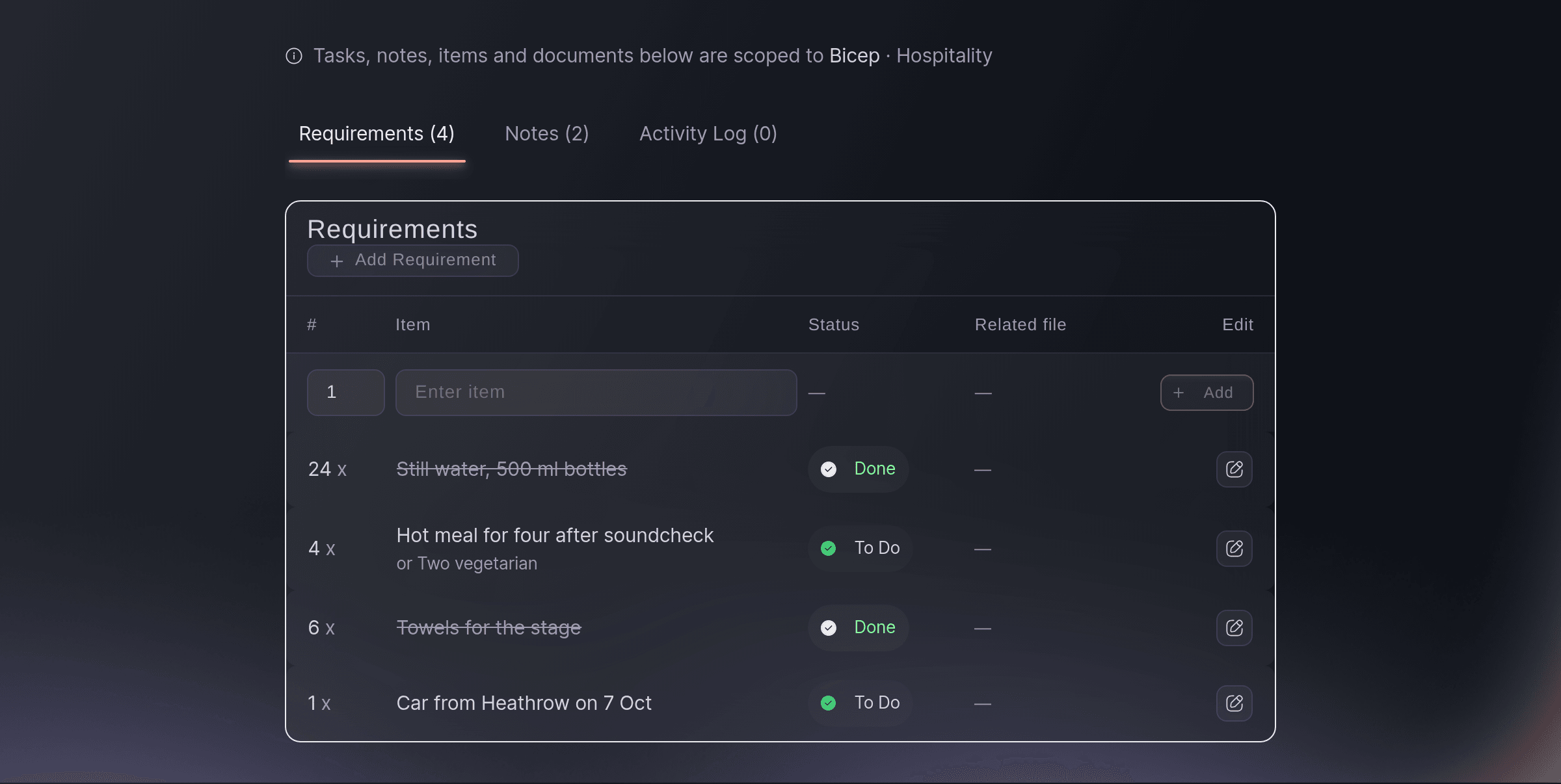
A rider runs to dozens of lines, from backline to towels to the car from the airport. Keep each act's hospitality rider, technical requirements and catering as lines, with how many are needed and any alternative the act accepts, such as "or two vegetarian". Each line starts as to do and is struck through when done, so whoever is on shift sees what is open without calling the booker.

Add notes about the act for anything your team must know, such as where the band wants to eat or which dressing room is theirs. Each note shows who added it and when, and your teammates see it straight away. Upload the rider and Fai picks out what it asks for, then adds the items you name to the list. She also files a document under the right act and part of the booking, and picks the fee, deposit and payment dates out of a contract or invoice.

  • Rider items: quantity, item and the alternative the act accepts
  • To do and done: finished lines struck through, open lines easy to spot
  • Team notes: who added each note and when
  • Rider and contract details picked out: Fai picks out rider items and the fee, deposit and dates
Ticket Fairy hospitality rider for one artist, listing each rider item with its quantity and whether it is To Do or Done

Know which acts to chase, then sign each one off

Each act on the bill is a card on Artists, with a badge for finance, technical, hospitality, catering and travel and accommodation. A badge turns complete only when someone on your team marks it, so two weeks out you see exactly which acts to chase. On the advance, mark each section confirmed or send it back for changes. Sign the advance off once all its sections are confirmed.

Keep notes for your team that the act never sees. Signing off makes the act's page read only until you reopen it, and you can print a day sheet for the act from the advance. Add each day of the event with its opening and closing times, and each set, soundcheck and rider task falls on the right day in your event's time zone. A touring act and your production office then work to the same clock. Drop contracts and riders onto Artists and Fai sorts the files by act, so your existing paperwork starts each record. Switch to the table view to work down a long bill.

  • Booking badges: finance, technical, hospitality, catering, travel and accommodation
  • Section status: received, needs changes and confirmed
  • Sign off and reopen: a read-only page for their team once it is done
Ticket Fairy artists tab showing each booked artist as a card with badges for the finance, technical, hospitality, catering and travel parts of the booking

How organisers advance their acts with Ticket Fairy

  • A festival with sixty acts

    The artist liaison team saves one set of sections for headliners and another for local acts, and Fai matches each new booking. Two weeks out, the Needs attention filter shows the eight acts still to chase, with Fai's chase emails already drafted.

  • A touring headliner

    The tour manager sends their tour book from the advance link. Fai fills in flights, input lists and the hospitality rider for the promoter to accept, and the backline hire list updates from the accepted technical answers.

  • A club with tight guest lists

    Each DJ's guest list allowance comes from the offer, and their tour manager fills in the names on their link. An ask for two more places goes to the promoter, who says no with a reason the act sees on their link.

  • A conference advancing speakers

    The events team advances keynote speakers with only arrival, accommodation and technical sections. Each speaker's assistant fills in flights and slide requirements, and the team signs off each speaker before rehearsals.

  • A venue with a busy calendar

    The production manager keeps each rider as a checklist on the artist's card. Whoever is on shift ticks off the towels, water and backline, and the notes say which dressing room each act has.

Questions About Artist Advancing

Artist advancing

You need an owner, admin or producer role on the event, and you work from Advancing on the event's Operations page. If Advancing is not in the list, open it from More sections. Other roles on your team can see rider items and notes.

No. They open the link from the email on any phone or computer with no sign-in, and see only the sections you shared with them. A teammate they invite opens their own link the same way.

The due date starts at 14 days before the performance, and you can change it for the whole advance or for each section. Once it passes, the act shows under Needs attention.

30 days by default, and you can choose from 7 to 90 days. You can stop a link at any time, and you keep what they already filled in.

No. Everything she finds waits under Answers to check until you accept it, and she only replaces an answer a person gave when you choose Replace. The old answer stays in the advance's history.

From 21 days before the show, when sections are still open and no link went out in the last 3 days. Fai never chases payment and settlement, and each chase waits for your approval.

No. Fai never opens a file ticked as having bank or payment details, and she always treats a file in Payment and settlement that way. She can go through PDF, Word, Excel, text and image files of up to 25 MB.

A link you sent can invite up to 10 teammates a day. A teammate cannot invite anyone else, and their link stops when the tour manager's does.

No. They see your answer, and your reason when you say no, the next time they open their advance link.

The second save does not overwrite the first. The advance reloads with your teammate's version, and you make your change again on it. On a rider item, you choose to keep their version or apply your changes again.

Ready to Build a Stronger Event Business?

Book a live demo, and we will set up your first event on the Event Operating System with your team.

Start Selling Tickets Online

Sign up without a credit card and build a test event before you commit. Go on sale in minutes when you are ready.

No monthly subscription required for ticketing
Start selling tickets immediately
Ticketing tools included in the service fee
Get Started for Free Talk to Fai Now

Ask Fai, our AI assistant, about Ticket Fairy’s features, pricing and how it could work for your event.

No credit card required

Book a demo call

See the referral model that drives 20% more ticket sales on average, learn which campaigns sell tickets, answer buyers faster and keep queues moving.

45-Minute Video Call
Pick a Time That Works for You

The Ticket Fairy, Inc. is a fintech company and technology platform. The Ticket Fairy, Inc. is not a bank, financial institution, or regulated financial services provider. Vault banking services are provided through regulated banking partners. Ticket Fairy Capital financing is provided by third-party private credit partners. The Ticket Fairy, Inc. does not make credit decisions, and all funding terms, approvals and conditions are determined by those lending partners.