Invite each person with the right role, and protect logins

Invite each person with the role their job needs, for the brand or one event. Protect logins with a passkey or code, and choose who support contacts about each event.

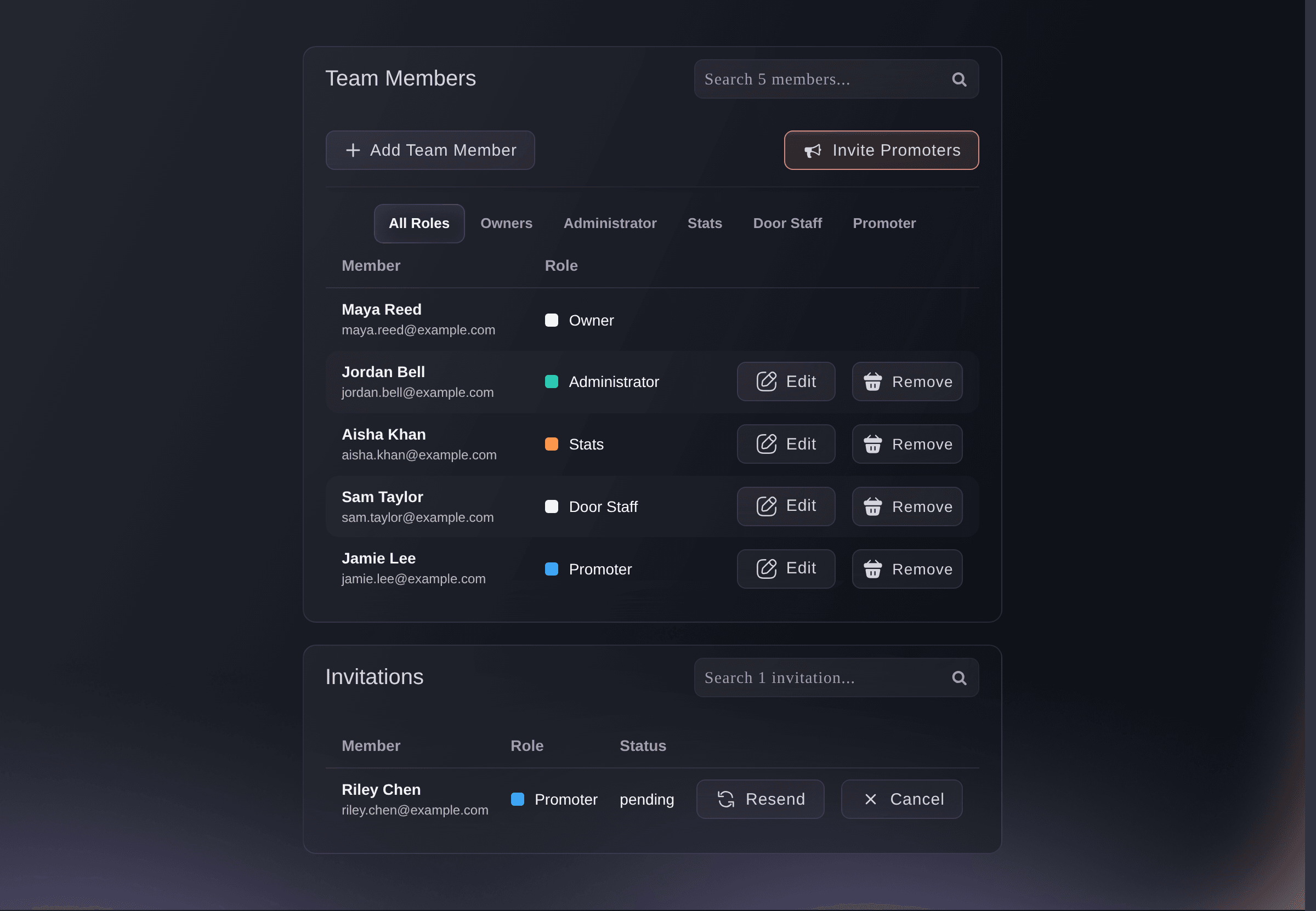
Ticket Fairy brand Team page listing each member with their role, and an invitation still waiting to be accepted
  • Each person sees only what their job needs
  • A stolen password alone cannot get in
  • Buyer questions go to the right team

Match each person's access to their job

Your accountant reads the reports, your door team scans tickets and your support lead answers buyers. None of them sees more than that. Choose a permission level for each person you invite, from full control of the brand to the scanning app and nothing else. Fewer logins can see your revenue and your buyers' details, and nobody waits on you for a page they need.

Owners and administrators run everything. Stats sees every report including revenue, and Limited Stats sees the same reports without revenue. Customer Support works on orders, and Limited Support works on orders and check-in. Curator looks after guest tickets and invitations. Producer runs the production side of your events without control of the team. Promoter sees their own link and their own sales. Door Staff use the Entry Fairy scanning app and nothing else.

Pick the narrowest level that still lets the person do the whole job. A box office manager who refunds buyers and checks guests in at the door needs Limited Support. A business partner who wants to see the takings needs Stats. When the job changes, you change the access with it, and nobody has to share a login to cover for a colleague.

  • Owner and Administrator: full access to the brand and every event under it
  • Stats and Limited Stats: every report, with or without revenue
  • Customer Support and Limited Support: orders, plus check-in with Limited Support
  • Door Staff: the scanning app and nothing else
Ticket Fairy Add Team Member dialog with the email addresses field and the Door Staff permission level for the scanning app

Add your regulars once, and extra help for one night

Your permanent people join the brand team once. They can work on every event under your brand, including the events you create next season. A visiting promoter or extra door staff for a sold-out night join that event's team. Their access covers that event only.

Event access ends with the event, so there is nothing to take away afterwards. A promoter who works one night for you never sees your other events, your other promoters or your brand's takings. Brand access suits the people you trust with every date: your box office manager, your bookkeeper and your production lead.

  • Brand team: every event under the brand, now and later
  • Event team: one event, with access that ends with it

Let promoters see their own link and their own sales

Each promoter you invite gets their own link and sees the tickets it sold. They can chase their own numbers without seeing anyone else's. To sign up a whole street team at once, share one promoter join link with the group. Each person who joins gets their own link straight away.

Regenerate the join link if it has gone further than you meant it to, or deactivate it once the team is full. Everyone who already joined keeps their own link and their own sales history.

  • Promoter role: their own link and their own sales
  • Promoter join link: one link a whole group uses to join
  • Regenerate or Deactivate: replace the link or close it
Ticket Fairy Add Team Member dialog with the Promoter permission level selected

See who has joined and change access as jobs change

You can see at a glance who has accepted and who still has an invitation waiting. Send an invitation again for anyone who missed the email, or cancel it and the link stops working. Change a member's role as their job changes. Or remove them to end their access to the brand and every event under it at once.

When someone leaves your company, Remove takes away their access to every event in one step. A role change applies the next time they open the dashboard.

  • Invitations: see who has not accepted yet
  • Resend or Cancel: the same invitation again, or a link that stops working
  • Edit or Remove: change a role or end someone's access

Keep your account safe even if a password is stolen

Your ticket sales, your buyers' details and your payouts sit behind your sign-in. With the authenticator app on, each sign-in asks for a code from your phone as well as your password, and after Google sign-in too. Add a mobile number as a backup. If you lose your phone, you get a code by text and you are back in, even in the middle of an on-sale.

Choose the protection that fits how each person works. The authenticator app suits anyone who signs in from several computers, because the code is on their phone. A text message backup suits everyone, because it gets you back in on the day your phone is lost or flat. A passkey suits people who sign in every day. It is the quickest sign-in of all, with no password to enter.

If the authenticator app is out of reach, a code by text gets you in. The key you save during setup brings the same codes back on a new phone. A lost phone never locks you out of an on-sale.

  • Authenticator app: a fresh code on your phone at each sign-in
  • Text message backup: a code sent to your verified number
  • A key you can save: the same codes again on a new phone
Ticket Fairy Turn on authenticator dialog with a code to scan, the key to enter by hand and the authenticator code field

Sign in with your face or fingerprint

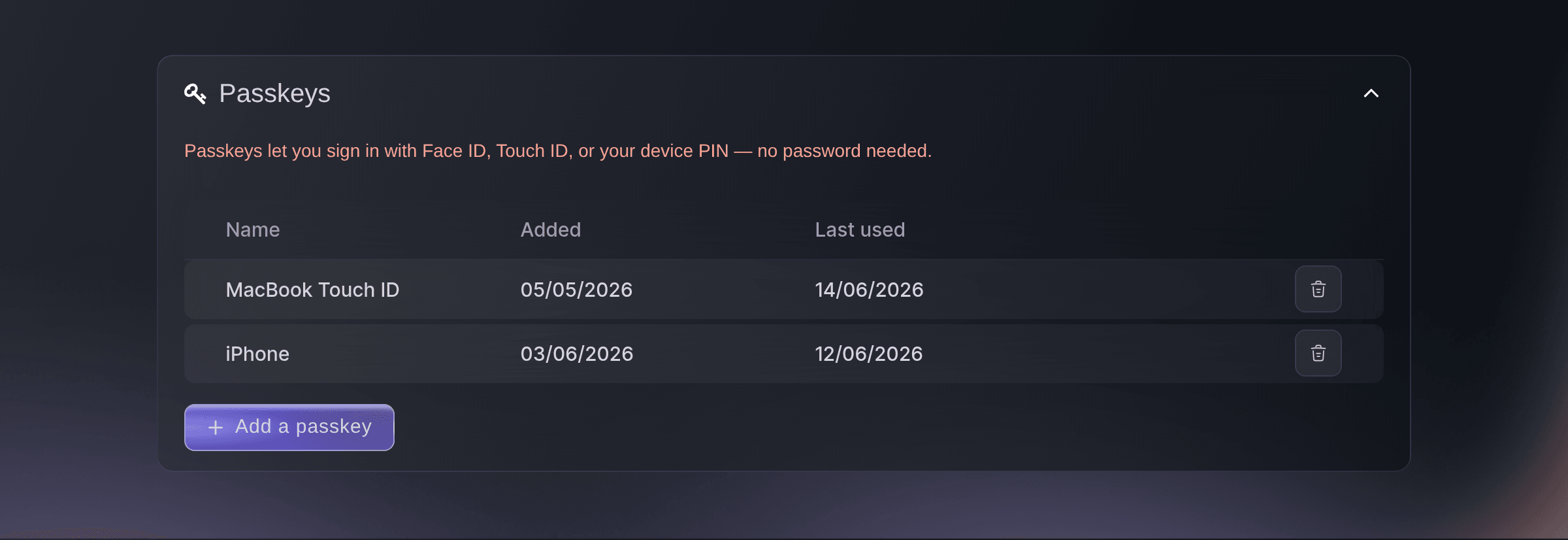
Add a passkey, and your next sign-in is your face, your fingerprint or your device PIN. There is no password to enter and no code to wait for. Each device you add is listed with when you added it and when you last used it. You can remove the passkey of a phone you lost.

Each person protects their own login in their own Account Settings. Ask your owners, administrators and anyone who can see revenue or buyer details to turn it on first. The logins that can see the most are then the hardest to open.

  • Passkeys: your face, fingerprint or device PIN
  • Every device listed: when each was added and last used
  • Remove a passkey: a lost device can no longer sign you in
Ticket Fairy Sign-in protection Passkey row listing a laptop and a phone with the dates each was added and last used

Send buyer questions to the people who run each event

Our customer service team answers your ticket buyers first. When a question needs a decision from your team, our team sends it to your escalation address. When our support team needs to talk to you about the event, they use your point of contact. Set both once for your brand. Give a festival with its own ticketing team its own addresses.

Brand contacts cover every event under the brand, including the events you create later. A new date never goes on sale without someone to escalate to. When you duplicate an event, choose whether the new date keeps the contacts of the event you copied. Otherwise it uses your brand's addresses.

Buyers never see either address. They contact our support team, and our team contacts yours. Your escalation inbox gets only the questions that need a decision from you, such as a request only you can approve. Your point of contact hears from us about the event itself.

  • Contact Email for Escalations: the inbox for buyer questions that need your team
  • Point of contact: the address our support team uses to contact you
  • Use Brand Contacts: turn it off to give one event its own addresses
Ticket Fairy event Contacts page with Use Brand Contacts off and the event's own escalation and point of contact addresses entered

Ask Fai to invite your team and set event contacts

Tell Fai, the assistant inside your dashboard, who to invite and with which role, for the brand or for one event. She can send an invitation again, change a role, remove someone and set an event's support contacts. Fai shows you each change and asks you to approve it before she makes it.

  • Invite in a sentence: addresses, role and brand or event
  • Support contacts: an event's own addresses, or back to the brand's
  • You approve each change: nothing changes until you say so

How organisers share access safely

  • A club night with extra door staff

    A promoter runs a weekly night with a regular crew on the brand team. For a sold-out bank holiday special, they add three extra door staff to that event only, with Door Staff access. The extra crew scan tickets in the Entry Fairy app on the night, and their access ends with the event.

  • A festival with its own ticketing team

    A promoter group runs a summer festival alongside its club nights. The festival's Contacts page has the festival ticketing team's own escalation inbox. Buyer questions about camping and wristbands go to the people who can answer them, and the club nights stay with the office.

  • A street team signed up in an afternoon

    An agency shares one promoter join link in its street team group chat. Each promoter joins with their own link and sees only the tickets they sold. When the team is full, the agency selects Deactivate, and nobody else can join with the link.

  • A venue that keeps its payouts safe

    A venue gives its bookkeeper Stats access to see every report and keeps owner access to two people. Both owners add a passkey and an authenticator app with a text message backup. Anyone trying to get at the payouts needs more than a password.

  • A conference with a support desk

    A conference organiser gives the registration desk Limited Support. The desk can find orders and check delegates in without seeing revenue. The finance lead gets Limited Stats for attendance figures, and the organiser asks Fai to send the invitations.

Get this page as a PDF Read it later or share it with your team. We email you a link to the PDF.
What to put in your PDF

We will email you this deck. We may also email you now and then about Ticket Fairy features that can help your events. You can unsubscribe at any time with one click.

Questions About Team Access and Account Security

Team & security

You need an owner or administrator login on the brand. Only an owner can make someone an owner or an administrator. An administrator cannot change the role of an owner or another administrator. A brand can have more than one owner.

No. When they accept the invitation, they get an account under the address you sent it to. If they already have an account, they sign in to it.

No. Everyone in one invitation gets the same role, so send a separate invitation for each role.

On a plan with paid seats, each member of your brand team takes a seat, and removing them frees it. Access to one event never takes a seat.

Any app that scans a setup code and shows 6-digit codes that change every 30 seconds. Google Authenticator, Microsoft Authenticator or a password manager that stores one-time codes all work.

If you added a text message backup, ask for a code by text on the sign-in page. On a new phone, enter the key you saved during setup and the app shows the same codes again. With no backup number and no saved key, contact Ticket Fairy support.

After five wrong codes, the person is signed out. They can try again 15 minutes after the first wrong code.

No. Sign-in protection belongs to one login, so each person turns it on in their own Account Settings. A passkey sign-in skips the code, because it already checks your device and your face, fingerprint or PIN.

No. Your event page, checkout and tickets show neither address. Ticket Fairy support sees both beside the event's orders. You need an owner or administrator role on the event to change them.

No. Fai can invite people with any role except owner, and you make someone an owner in the dashboard. You need your password and your phone to set up sign-in protection, so you do it yourself in Account Settings.

Sell more tickets. Build the crowd that comes back.

Start Selling Tickets Online

Sign up without a credit card and build a test event before you commit. Go on sale in minutes when you are ready.

No monthly subscription required for ticketing
Start selling tickets immediately
Ticketing tools included in the service fee
Get Started Talk to Fai Now

Ask Fai, our AI assistant, about Ticket Fairy’s features, pricing and how it could work for your event.

No credit card required

Book a demo call

See the referral model that drives 20% more ticket sales on average, learn which campaigns sell tickets, answer buyers faster and keep queues moving.

45-Minute Video Call
Pick a Time That Works for You