Answer buyers at any hour and sell in the chat

Buyers get your answers in a chat on your website, day or night, from your topics, FAQ pages and Google Docs. When they are ready, checkout opens in the chat.

Ticket Fairy concierge knowledge base with Parking and Refunds topics and the answer the concierge gives for each
  • Buyers get answers before they give up
  • Tickets sold in the chat on your page
  • Fewer repeat questions in your inbox

Give buyers the answer you would give yourself

Most questions before a sale are the same few. Buyers ask where to park, when doors open, the bag rules, any age limit and whether tickets are refundable. Add a topic for each one with the answer you would give yourself, and buyers get it in your words. Your concierge already knows your events, ticket types and prices. Your topics only need the facts your event page does not hold.

Starter topics for parking, door policy, refunds and recommended hotels are ready to fill in, so your first answers take minutes. Buyers see your welcome message first. Brief the tone of voice as you would brief a new team member, so a festival can sound playful and a conference formal. Suggested questions such as what is on this weekend give hesitant buyers an easy start. They can stay above the message box for the whole chat or disappear after the first message.

Before the chat goes on your site, Open preview lets you chat with your concierge exactly as a buyer would. Put the hardest questions from your inbox to it. If an answer is missing or wrong, one topic fixes it, so buyers only see answers you have checked.

  • Topics: one for each question, answered in your words
  • Welcome and tone of voice: the greeting buyers see and how the chat sounds
  • Suggested messages: questions buyers tap to start the chat
  • Open preview: chat with your concierge before buyers do

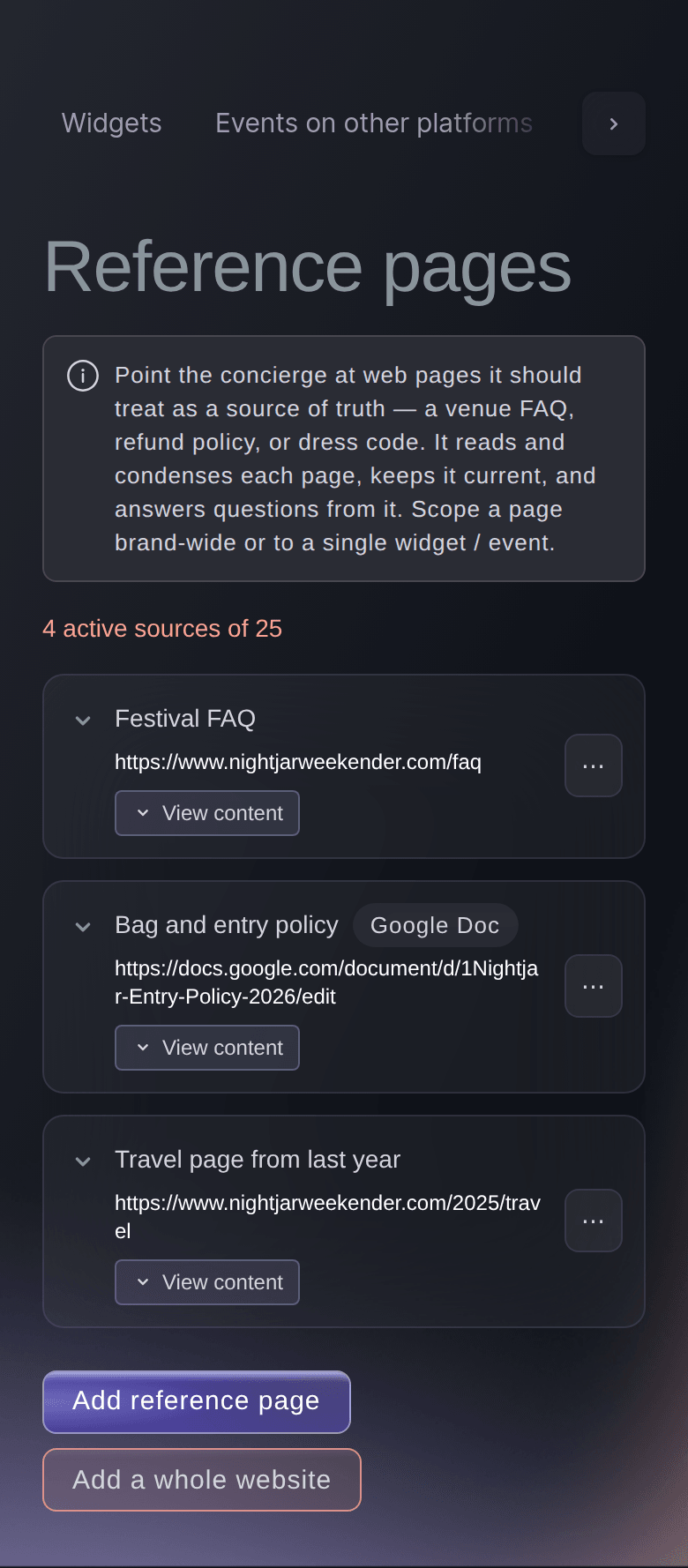
Answer buyers from the FAQ pages and Google Docs

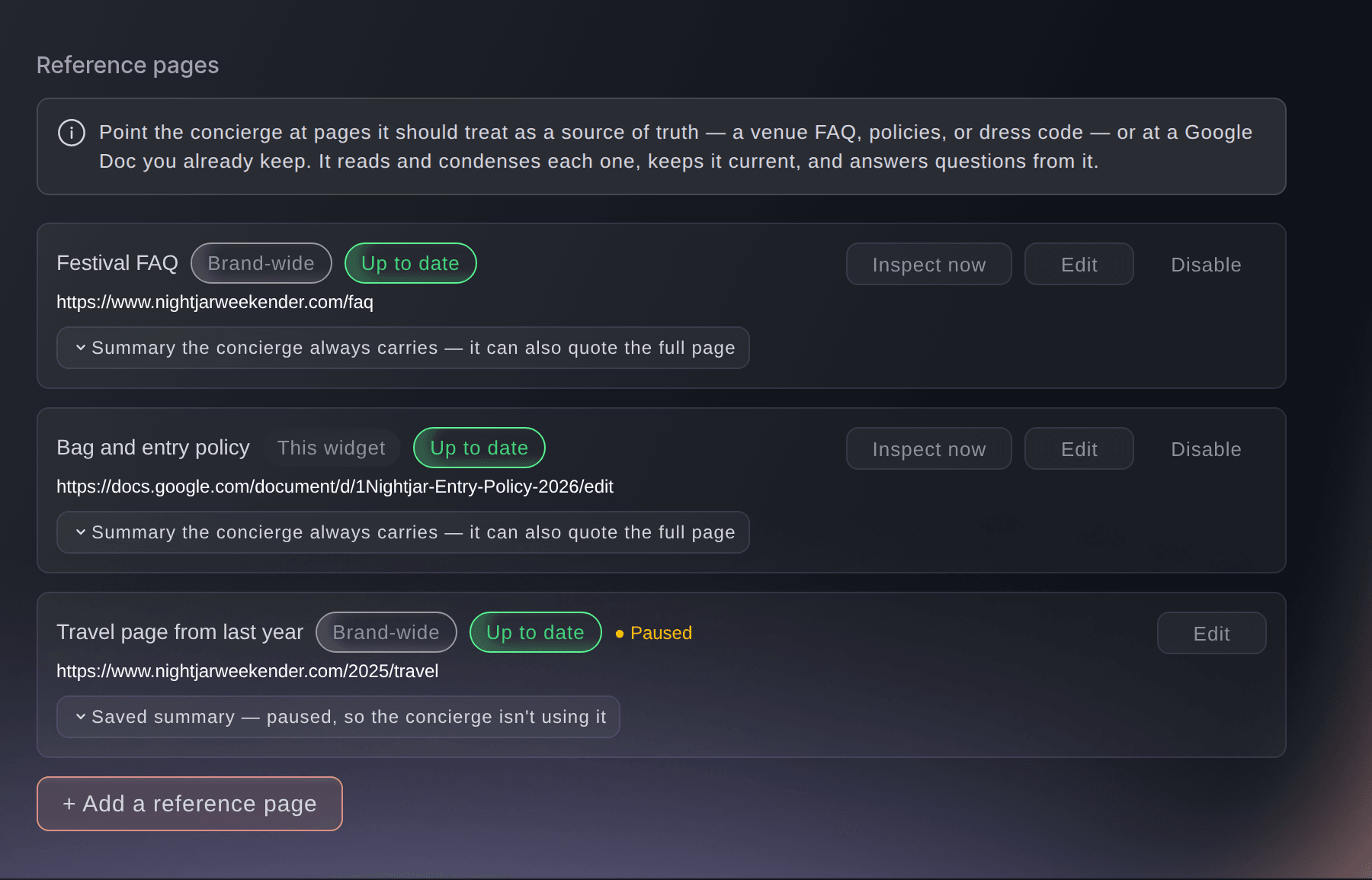
You already keep the long answers on an FAQ page, a bag policy, a dress code, a venue page or a shared doc. Add those pages to your concierge, and buyers get answers from them, down to the small print. Your concierge keeps a summary of each page and searches the full text when a question needs it. A buyer who asks about a detail deep in your terms gets the answer your terms give.

Add a Google Doc shared by link like any other page. Your concierge answers from the facts in it and follows the guidance you put there. That can be never quoting a discount, or sending pricing questions to your team. Change the doc and you change the answers, with no dashboard to open.

You pick how often each page is checked, from hourly to monthly, and your concierge updates only when the page has changed. Buyers get a moved door time without anybody retyping it. Inspect now picks up an urgent change straight away. View content shows exactly what your concierge took from a page, and Disable pauses a page you no longer need without losing it.

  • Reference pages: FAQ, policy, dress code and venue pages
  • Google Docs: the facts and house rules your team keeps current
  • Checked on your schedule: changes picked up hourly, daily, weekly or monthly
  • Inspect now: pick up an urgent change straight away
Ticket Fairy Add reference page dialog, asking for the page address, a label, which widgets answer from it and how often it is checked

Let Fai go through your whole website for you

Give Fai, the assistant inside your dashboard, your home page. She goes through your site and keeps the pages worth answering from. She sorts them into FAQ, policies, venue, getting there, line-up, schedule and tickets. Your concierge then answers from all of them, and you never list your pages one by one.

A small club site needs only the pages your home page links to. A festival with years of archive pages suits a deeper read or the whole website. You decide what Fai keeps. Review pages lists her choices, and you can mark each page Use, Skip or Let Fai decide. Show dropped pages reveals the ones she set aside, so buyers only see answers you would stand behind.

  • Add a whole website: one home page address, and Fai finds the rest
  • Review pages: Use, Skip or Let Fai decide on each page
  • How much to read: linked pages, a little deeper, or the whole site
Ticket Fairy Review crawled pages, listing the pages Fai kept from a festival website with Use, Skip and Let Fai decide on each

Give a festival with its own rules its own answers

Run one concierge for your whole brand, so a buyer who lands on the wrong event still gets an answer. When one event has its own entry rules, camping or age limit, give it its own concierge. Pin it to that event with its own topics and pages. Your brand concierge keeps answering for everything else.

Share a reference page with all the concierges on your brand, or keep it to one concierge. You can also use it only in chats about one event. A festival concierge can answer from its own site rules and your brand's shared pages together. Or turn off Also use this brand's shared reference pages, and it answers from its own pages alone.

  • Brand concierge: answers for all the events under your brand
  • Event concierge: its own topics and pages for an event with its own rules
  • Shared or own pages: brand-wide pages, pages for one concierge, or both
Ticket Fairy Reference pages section of one concierge, with a brand-wide festival FAQ, a Google Doc for this concierge only and a paused travel page

Turn buyers' questions into ticket and table sales

A buyer picks a ticket in the chat and says they want it. It goes in their basket and checkout opens on your page. They pay just as they would on your event page. Prices show in the currency your event page shows that buyer, and checkout keeps it. On an event page, the chat starts with that event in mind.

A buyer who wants a table chooses the table and party size in the chat, then confirms and pays at checkout. For an event with no tables to book, turn on Accept table booking enquiries. Buyers leave the party size, a date and a way to reach them for your team. When a ticket sells out, buyers join your waiting list in the chat with how many tickets they want. They can also sign up for your announcements when they agree to hear from you.

Add a partner venue's listings page, or a single event page on another site, under Events on other platforms. Buyers hear about those events too, with a link out under the platform name you enter. A buyer asking what is on hears about all the shows you are part of.

  • Checkout from the chat: tickets in the basket and checkout on your page
  • Tables and enquiries: book a table in the chat, or leave an enquiry
  • Waiting list: buyers join in the chat when tickets are sold out
  • Events on other platforms: shows you sell elsewhere, with a link out
Ticket Fairy Add source dialog, asking for the page to watch, what kind of page it is, the name buyers see and which concierges mention its events

Pass your team the questions only they can answer

When a buyer asks something your topics and pages do not cover, your concierge says so. It passes the question to the people you choose, with any contact details the buyer gave. A buyer who would rather talk can ask for a call back at a time that suits them. Each passed-on question shows you a topic worth adding, so your concierge answers more next time.

You decide who takes those questions. Your owners, admins and customer support team can get them by email. Ticket Fairy support can answer them for you, or answer first and pass on only what your team can answer. A small team keeps its evenings free, and a large one keeps buyer conversations in house.

Buyers who have already bought get help too. A buyer who is signed in, or who confirms their email address with a code, can ask about their own orders and tickets. Questions about where a ticket went get answered before they reach your inbox.

  • Send escalations to: your team, Ticket Fairy support, or both in turn
  • Call back requests: buyers choose when your team rings them
  • Their own orders: signed-in buyers ask about their tickets

Put the chat on your website in your own style

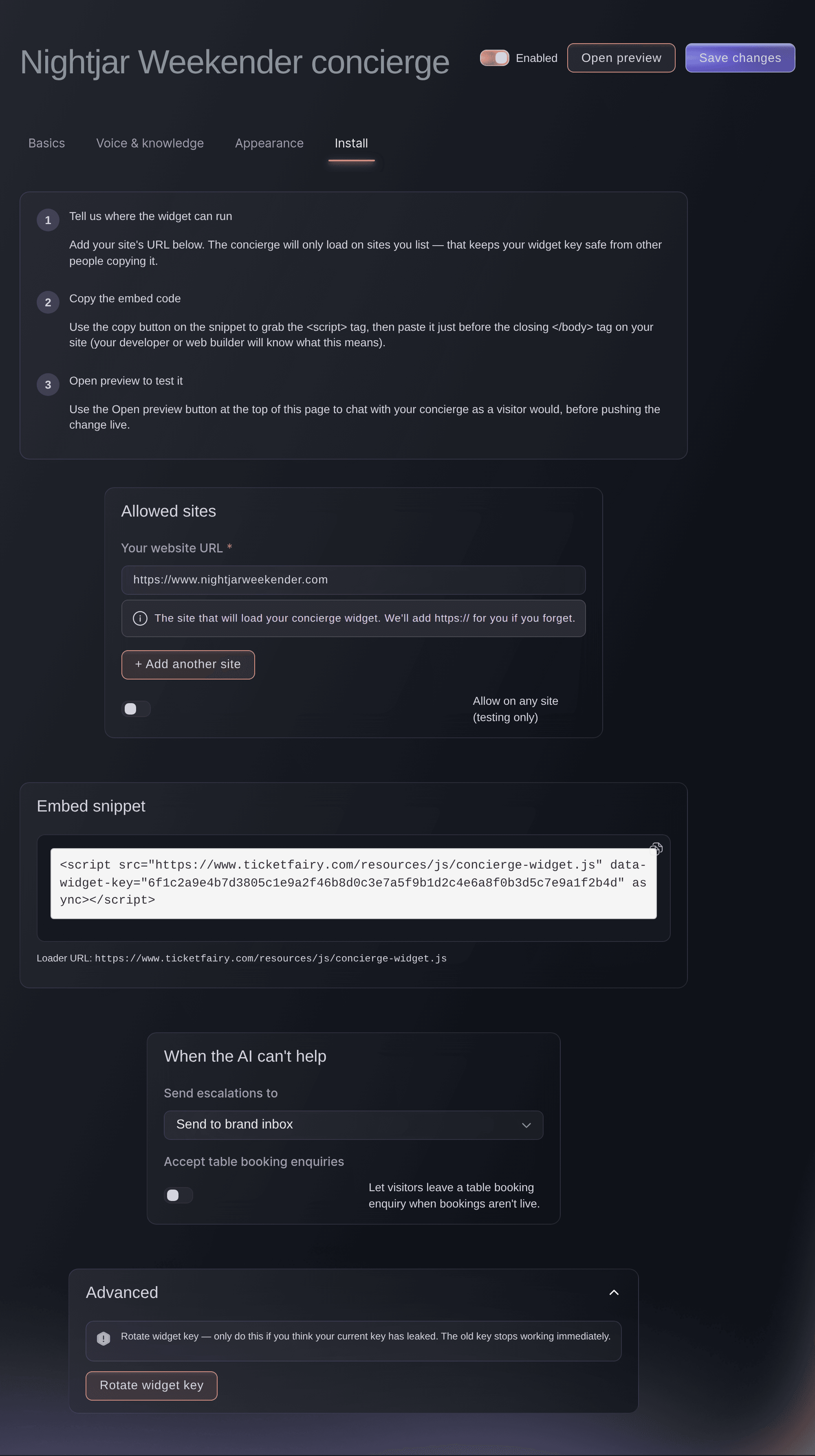
One line of code puts the chat bubble on the pages where buyers make up their minds. Whoever looks after your site can add it in minutes. The chat takes your brand colours, your bubble position and label, your chat header, font and corners. Or it copies your site's look by itself. It matches a light or dark website, and a short message pops up beside the bubble a few seconds after a visitor arrives.

The chat loads only on the websites you list, such as your main site and an event site. Nobody else can borrow your concierge. If a snippet ever turns up where it should not, Rotate widget key gives you a new one. The old one stops working at once. A designer who wants full control has custom CSS under Advanced styling.

  • Embed snippet: one line of code, copied in one click
  • Your look: colours, bubble, header, font and corners
  • Allowed sites: the chat loads only on the addresses you list
  • Rotate widget key: a new snippet, and the old one stops at once
Ticket Fairy Install tab of a festival's concierge, with the allowed website, the embed snippet and where unanswered questions go

How organisers use the ticket concierge

  • A festival with camping

    A festival adds its site rules page and camping FAQ, and Fai goes through the rest of its website. Buyers asking about tent sizes, gate times and the bag policy at midnight get the answer from the festival's own pages. The box office inbox gets only the questions that need a person.

  • A club night with tables

    A club gives its Saturday night a concierge that takes table bookings. A group picks a booth and party size in the chat and pays at checkout. For a night with no tables listed, the VIP host gets enquiries with the party size and a phone number.

  • A venue with a busy programme

    A venue runs one brand concierge across all its shows. A buyer asking what is on this weekend sees the shows on sale. They also see the ones a partner promoter sells elsewhere, with a link out. They join the waiting list for the sold-out one.

  • A conference with long terms

    A conference adds its terms, accessibility guide and hotel page as reference pages. Delegates asking about transfer rules, step-free access and the room block get the exact answer from the documents. Sponsorship questions go to the team by email.

Get this page as a PDF Read it later or share it with your team. We email you a link to the PDF.
What to put in your PDF

We will email you this deck. We may also email you now and then about Ticket Fairy features that can help your events. You can unsubscribe at any time with one click.

Questions About The AI Ticket Concierge

Ticket concierge

You need an owner or admin login on the brand, because the concierge speaks to the public for you. Fai, the assistant inside your dashboard, can open the concierge builder or the reference pages for you. You enter the topics and answers yourself.

It tells the buyer it does not know rather than inventing an answer. It passes the question to the people you chose under Send escalations to. The chat tells the buyer their request is logged and never promises a reply time, so reply quickly using the contact details they gave.

No. It answers in its own words and never gives a buyer the page's address. Anything on a page can still reach a buyer in an answer. Add only pages a buyer may see, and keep editing of a linked Google Doc to your team.

The topic editor shows how much space your topics use and how much is left. All your topics go with each reply, so keep topics to short everyday answers. Put longer material on a reference page or in a Google Doc. Your brand keeps a set number of sources active at once, counting reference pages, whole websites and events on other platforms together. The line above the list shows how many you use.

You choose: your home page and the pages it links to, a couple of levels deeper, which is the default, or the whole website. Under Advanced, Most pages to read is 50 by default and goes up to 300. For a listing page under Events on other platforms, Fai follows up to 10 pages.

It uses Google Docs. Publish a Sheet or a deck to the web from Google and add the published link as a reference page.

The last check failed. Hold the pointer over the status to see why. If a page is gone or a Google Doc is no longer shared, the concierge stops answering from it after three failed checks in a row. It starts again once it can reach the page.

The chat's buttons and labels appear in English, Spanish, French, German, Indonesian, Russian, Danish, Norwegian, Swedish or Finnish. The language matches the buyer's browser. Your topics, welcome message and tone of voice appear as you entered them.

The address you list must match the one in the browser, www included. The snippet must be on the page, and the concierge must be Enabled. An address with www and the same address without it count as two sites. You can list a test site while you try the chat and remove it when you go live.

No. Buyers hear about those events with a link out to the other site. Buyers buy tickets and tables for your own events in the chat and pay at checkout on your page.

Sell more tickets. Build the crowd that comes back.

Start Selling Tickets Online

Sign up without a credit card and build a test event before you commit. Go on sale in minutes when you are ready.

No monthly subscription required for ticketing
Start selling tickets immediately
Ticketing tools included in the service fee
Get Started Talk to Fai Now

Ask Fai, our AI assistant, about Ticket Fairy’s features, pricing and how it could work for your event.

No credit card required

Book a demo call

See the referral model that drives 20% more ticket sales on average, learn which campaigns sell tickets, answer buyers faster and keep queues moving.

45-Minute Video Call
Pick a Time That Works for You