Turn more visitors into buyers with a checkout they finish

Buyers check out as guests, see prices in their own currency and pay the way they trust. Win back the buyers who leave with an email from Abandoned Carts.

Ticket Fairy Abandoned Carts tab with a row per buyer showing the name, email, when they left, the cart stage and the number of checkout attempts
  • No account or password between buyers and tickets
  • Cards, Apple Pay, pay later and local methods
  • Buyers who left checkout come back

Let buyers pay without creating an account first

New buyers enter their name and email address and pay, with no account to set up first. A returning buyer sees Looks like you already have an account! and can sign in to fill in their details. Nobody gives up on a ticket because they forgot the password they chose for last year's event.

With Phone-first sign-in, buyers confirm their mobile number with a code by text message before they enter their email. It suits mobile-first audiences and buyers who live on WhatsApp, and your brand can send the codes by WhatsApp as well as text message. Turn it on for one event, or set a brand default that is on for every event, off, or on in the regions where buyers expect to sign in with their phone.

Buyers tick to hear from your brand by email or by text message as they buy. Your own list grows with every sale, and your next on-sale starts with buyers who asked to hear from you.

  • Guest checkout: no password to choose before paying
  • Phone-first sign-in: a code by text message or WhatsApp
  • Email and text opt-ins: buyers join your list as they buy
Show buyers prices in the currency they use

A buyer who sees a price in an unfamiliar currency has to work out the cost before they decide. Add the currencies your buyers use to the event. On a buyer's first visit, checkout picks the one for where they are, and the buyer can switch. Their chosen currency stays with them from ticket selection to the placed order, so there is no surprise at the last step.

A group price applies by itself when the buyer chooses enough tickets, so nobody needs a code and a group of friends sees the saving as they choose how many. Fai can add another currency to an event for you, with each ticket type's price converted, once you approve the change.

  • Buyer's currency: chosen for their location, and theirs to change
  • Group prices: applied once the buyer chooses enough tickets

Hold tickets while buyers pay, even on your busiest on-sale

The tickets a buyer chooses are held for them while a timer counts down, so nobody takes them mid-payment and the buyer can see how long they have. On a high-demand on-sale, a waiting room in front of checkout shows each buyer their place and lets them in turn. The buyers already paying finish without a slowdown.

The waiting room turns itself on when arrivals climb, so there is nothing for you to switch on or forget on the day. Refreshing the page does not move a buyer up or down. Tell your buyers there is a queue, and they wait calmly instead of thinking the site has broken.

  • Checkout timer: the buyer sees how long their tickets are held
  • Waiting room: buyers let into checkout in turn on a busy on-sale

Let buyers pay the way they always pay

Buyers finish faster when they see the way they always pay. On a phone, buyers pay with Apple Pay or Google Pay with no card number to type. They can also pay with the debit and credit cards they already carry, or with their PayPal account. A weekend festival ticket or a VIP table is a big purchase on one payday, so pay-later options such as Afterpay or Clearpay, Klarna, Affirm, Zip and Laybuy let buyers spread the cost.

Buyers in Indonesia pay with DANA, LinkAja or Jenius Pay, buyers in the Philippines with GCash, buyers in Kenya with M-Pesa and buyers in the Netherlands with iDEAL. A buyer who sees their everyday way to pay completes the order there and then. A buyer who scans a QR Quick-Buy code on a poster, a flyer or a table card buys one ticket type or add-on with Apple Pay or Google Pay and no account.

The payment methods buyers see follow the payment processing account you connect, such as Stripe or Xendit, for your event's country and currency. Each event can take payments through its own account, so a festival in Jakarta and a club night in London each offer the methods their buyers use.

  • Apple Pay and Google Pay: paid from the buyer's phone with no card number to type
  • Pay later: Afterpay, Clearpay, Klarna, Affirm, Zip and Laybuy
  • Local methods: e-wallets, mobile money and bank payments
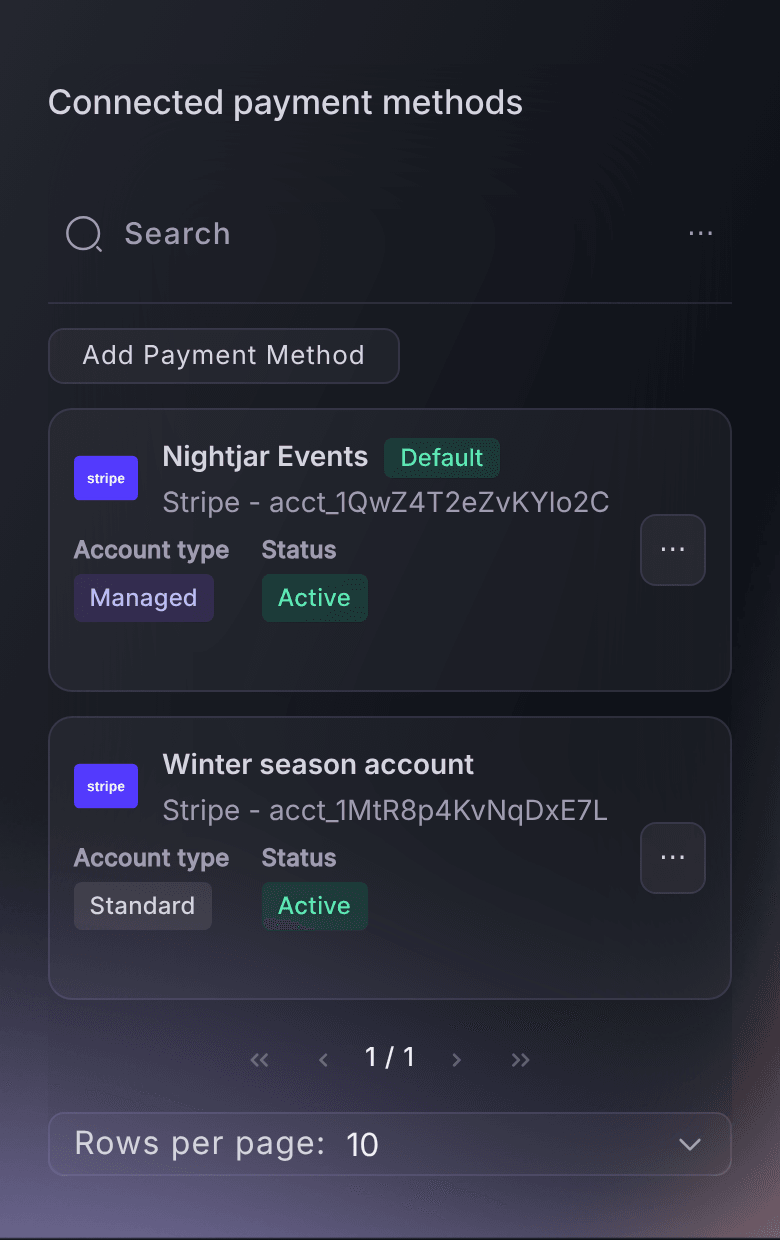
Ticket Fairy Connected payment methods table on a brand, with the default payment processing account and a second account

Sell more high-priced tickets with your own payment plans

Offer your own payment plan, with a deposit today and the rest in instalments before the event. A buyer who could not pay for a weekend pass in one go can still commit now. You choose the number of instalments, the deposit and the last date for the final payment, so the money is in before your event.

A plan suits festivals, VIP packages and tours that go on sale months ahead, when buyers are ready to commit but not to pay everything at once. Fai can set up or change an event's payment plan once you approve it.

  • Deposit today: an even, fixed or percentage first payment
  • Instalments: the rest paid before the event
Ticket Fairy payment plan settings with the deposit, instalments and cancellation grace period

Sell from your own website and app with one checkout

Buyers get this checkout on your Ticket Fairy event page, on your own website through the embedded checkout, and in your own web or mobile app through the checkout SDK. Your prices, questions, limits, currencies and payment methods go with the event wherever a buyer pays, so you never keep two checkouts up to date.

Buyers stay on your website while they choose tickets and pay, so they see your brand from choosing a ticket to the confirmation. List the websites allowed to show your checkout, and nobody else can put it on theirs.

  • Embedded checkout: on your own website
  • Checkout SDK: inside your own web or mobile app
  • Allowed websites: only your sites can show your checkout
Ticket Fairy website embed install page with the checkout code ready to paste

Win back the buyers who left checkout

Some buyers enter their details at checkout and never pay, because a card was declined or something interrupted them. They already chose your event, so an email with a reason to come back is often the cheapest way to win more sales. The Abandoned Carts tab on your event's Orders lists every one of them, newest first, with their name, email address and when they left.

Cart stage shows whether each buyer reached an order and stopped, or left earlier. Checkout attempts counts how many times they came back and tried. Several attempts usually means something blocked them, such as a declined card, so email those buyers first. From your event's Messaging, email the abandoned carts audience about the tickets still on sale or the next release about to open, and Ticket Fairy leaves out buyers who opted out.

Ticket Fairy also emails recent carts twice a day with a link straight back to your event, with nothing for you to set up. The reminder skips an event with nothing left to sell and a buyer who has since paid, and carries a link to opt out. Ask Fai how many people left checkout yesterday or last week, and how many never reached an order, so you know how many sales are waiting before you send.

  • Abandoned Carts: each buyer, their cart stage and checkout attempts
  • Abandoned carts audience: an email with a reason to come back
  • Reminder sent for you: a link back to your event for recent carts
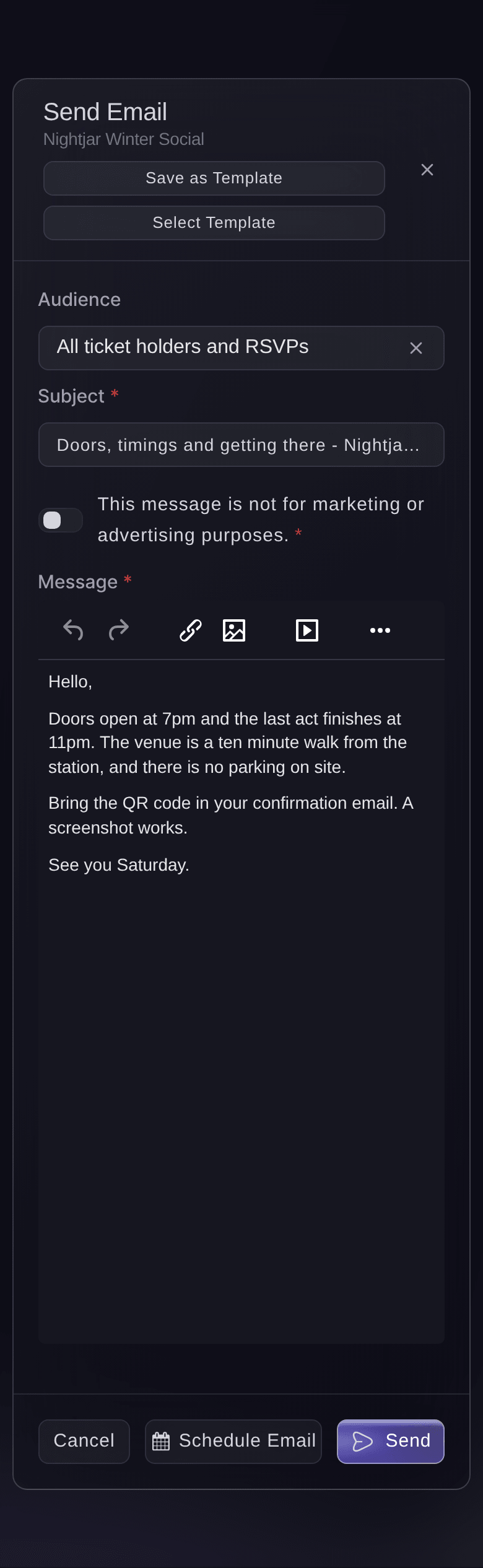
Ticket Fairy email composer with the audience selector for an email to buyers

Find out which checkout wording brings in more revenue

Two versions of your checkout can both look right, and only one of them sells more. A checkout experiment shows a share of your visitors different answers to the questions buyers ask, below the pay button. The results compare visitors, conversion rate, revenue and revenue per visitor for each version, and you keep the version that earns more.

Each visitor sees the same version for the whole test, and everyone else sees your normal checkout. A variant is marked the winner only when its conversion rate is higher and the difference is clear, so you decide on evidence rather than a hunch. Fai can draft, start, pause and conclude a test and compare the results, and she asks you to approve every change.

  • Checkout experiments: different answers shown below the pay button
  • Revenue per visitor: the figure that tells you which version earns more
  • Clear result: a winner only when the difference holds
Ticket Fairy experiment editor comparing two sets of checkout questions and answers

How organisers sell more at checkout

  • A festival in Southeast Asia

    The festival connects Xendit, turns on phone-first sign-in for the region and adds US dollars beside rupiah. Local buyers pay with DANA or GCash and international buyers see dollar prices, so both finish checkout on their phones.

  • A club night with declined cards

    On the night of the on-sale, the Abandoned Carts tab shows a cluster of buyers with several checkout attempts. The promoter emails them that tickets are still on sale and that Apple Pay works, and many come back to finish.

  • A weekend festival with high ticket prices

    Weekend passes go on sale eight months out with a payment plan and pay-later options. Buyers who could not pay in one go commit early, and the festival knows its numbers months sooner.

  • A venue selling from its own website

    The venue embeds checkout on its own website, so buyers never leave its brand. Prices, limits and payment methods match the event page, and the team runs one checkout for every show.

  • A touring promoter testing checkout wording

    The promoter tests two sets of answers below the pay button, one about refunds and one about entry times. Revenue per visitor shows which answers earn more, and the winner goes on every date of the tour.

Get this page as a PDF Read it later or share it with your team. We email you a link to the PDF.
What to put in your PDF

We will email you this deck. We may also email you now and then about Ticket Fairy features that can help your events. You can unsubscribe at any time with one click.

Questions About Your Checkout

Checkout that converts

No. New buyers check out with their email address. Returning buyers can sign in to fill in their details.

The buyer enters their mobile number, gets a 6-digit code by text message and enters it, then enters their email. It is off until you turn it on for an event or set it as your brand's default. Your brand can also send the codes by WhatsApp as well as by text message.

Until the checkout timer reaches zero. When it does, the cart expires, the tickets go back on sale and the buyer returns to ticket selection.

The methods your payment processing account offers for your event's country and currency. Cards, Apple Pay and Google Pay suit most events, and local and pay-later methods appear where your account offers them for that country. With Xendit, Indonesian buyers can pay by card, DANA, LinkAja and Jenius Pay, and buyers in the Philippines by card and GCash.

Each pay-later provider sets the order amounts it accepts and decides whether to approve the buyer. Checkout tells the buyer when their order qualifies. Some pay-later and bank methods open their own payment page and bring the buyer back afterwards.

Not on your Ticket Fairy event page. On your own website, list your website address on the Embed page and add a verification file to your domain, and the Apple Pay and Google Pay buttons then appear in the embedded checkout.

Yes, for most events. For a few features, such as pay-what-you-want pricing or custom terms, the embedded checkout opens your full Ticket Fairy event page so buyers keep every purchase option. Checkout experiments show their answers in Ticket Fairy's hosted checkout only.

The last 30 days, with the 10,000 most recent people. You can email everyone who has left a cart on the event, up to the same 10,000 most recent, apart from buyers who opted out. A buyer appears once they enter their email address at checkout, and leaves the list when they pay or start a payment plan.

For events in the United States, Australia and New Zealand, twice a day, to buyers whose cart is between one and thirteen hours old. Elsewhere, email your abandoned carts from Messaging. Ask us if you would like the reminder turned off for an event.

You need an owner or an admin role on the event to send the email. With a Stats or Support login you can see the list but not send to it.

Sell more tickets. Build the crowd that comes back.

Start Selling Tickets Online

Sign up without a credit card and build a test event before you commit. Go on sale in minutes when you are ready.

No monthly subscription required for ticketing
Start selling tickets immediately
Ticketing tools included in the service fee
Get Started Talk to Fai Now

Ask Fai, our AI assistant, about Ticket Fairy’s features, pricing and how it could work for your event.

No credit card required

Book a demo call

See the referral model that drives 20% more ticket sales on average, learn which campaigns sell tickets, answer buyers faster and keep queues moving.

45-Minute Video Call
Pick a Time That Works for You