
Piloter la production
Ask attendees for feedback after your event
Festival and event teams want to know what their attendees thought while the event is still fresh, but survey tools send to every buyer and need a list exported by hand. Feedback asks only the people who actually came, gives you a Net Promoter Score next to last year's, and has Fai turn the comments into things to fix next time.
Email everyone who checked in at your event a short survey the morning after it ends, in their own language and with their own link, and optionally ask ticket holders who did not come what stopped them. The standard survey already rates your stages, acts, sessions and traders, and you can change the questions and the send time before anything goes out.
- Pour
- Asking the people who came to your event what they thought
- Durée
- 5 minutes
Avant de commencer
- You are an owner, admin or producer on the event. The event's Operations page opens for those roles only.
- Your door team scans tickets at check-in, because the survey goes only to the people who checked in.
-
Open Feedback
Open the event, select Operations, then select Feedback in the list of sections.
Remarque: Feedback is under After the show. If it is not in the list, select More sections and open it there.
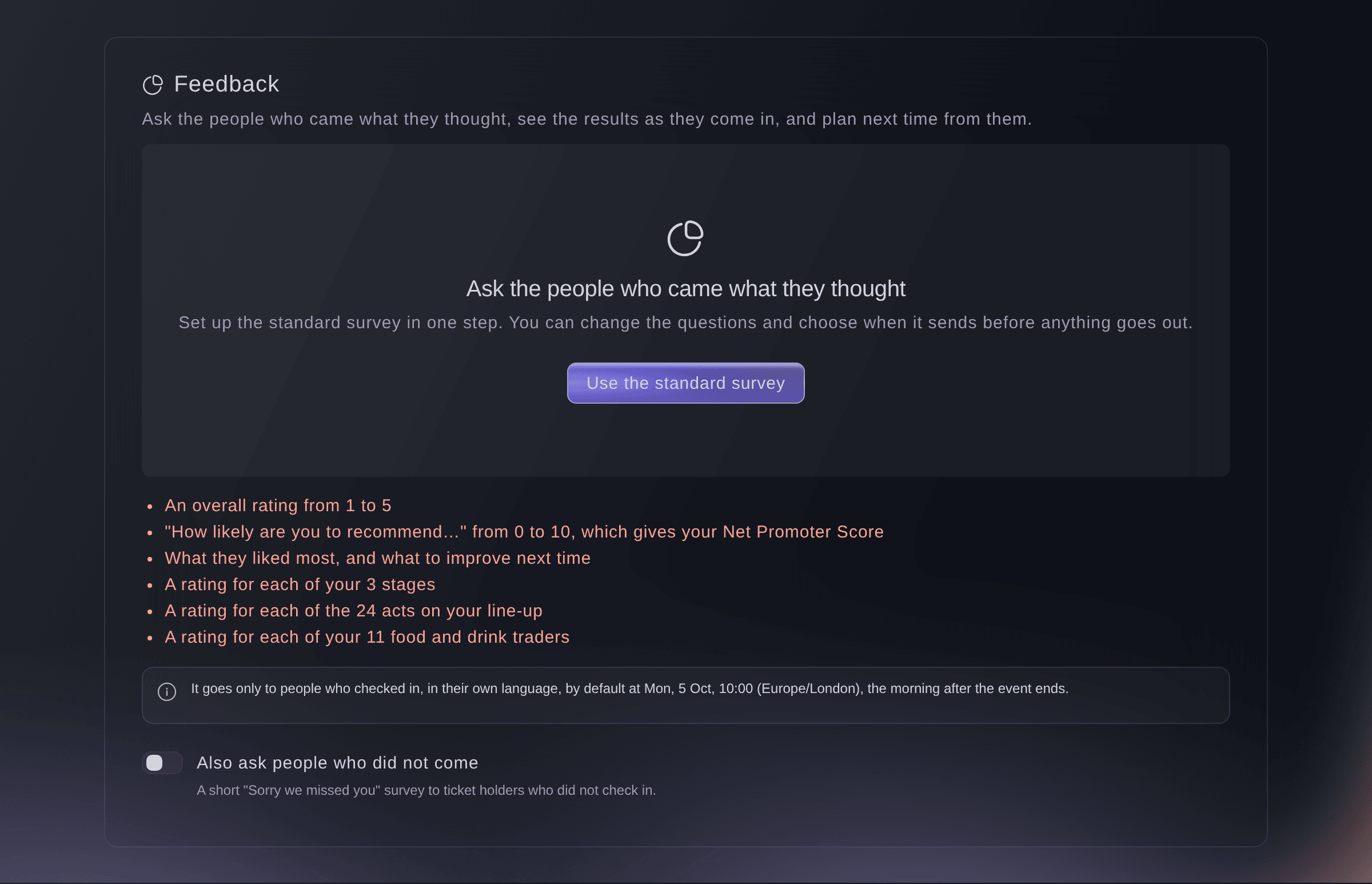
Feedback, ready to set up. -
Set up the standard survey
Select Use the standard survey.
Remarque: The survey asks for an overall rating, how likely people are to recommend you, and what they liked and what to improve, with a rating for each stage, act, session and trader your event has. Turn on Also ask people who did not come first to add a short survey for no-shows.

The survey, set up and not scheduled yet. -
Change the questions
Optional: select Edit questions, change the wording or add a question, then select Save.
Remarque: Leave the heading and message empty to use the standard wording, which shows in each person's own language. A survey can have up to 20 questions.
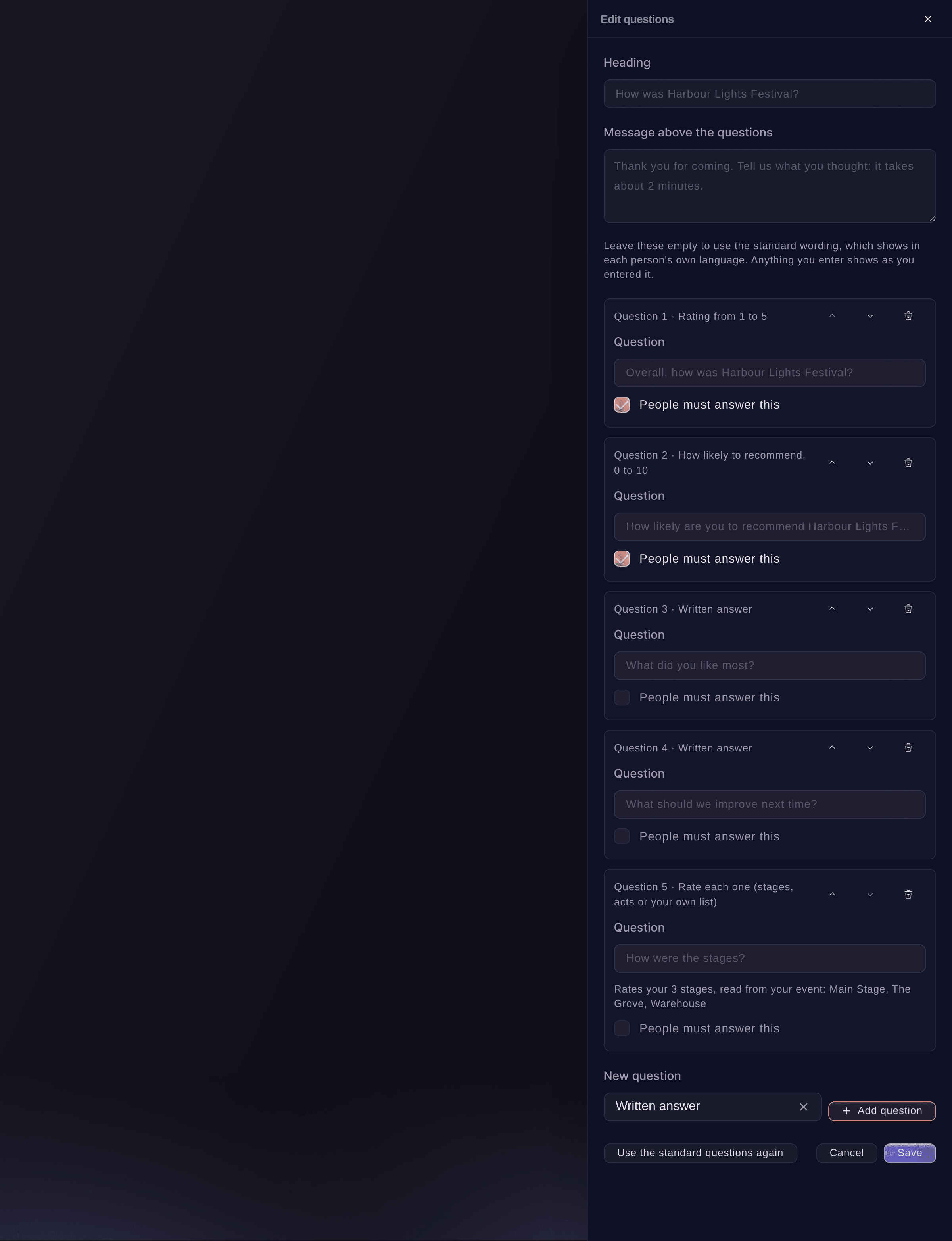
The survey's questions. -
Schedule the survey
Select Schedule on the survey, check the time it sends, choose the Days people can answer, then select the schedule button, which says about how many people it reaches.
Remarque: It suggests 10:00 the morning after the event ends, in the event's time zone. Everyone who checks in before the send time is included.
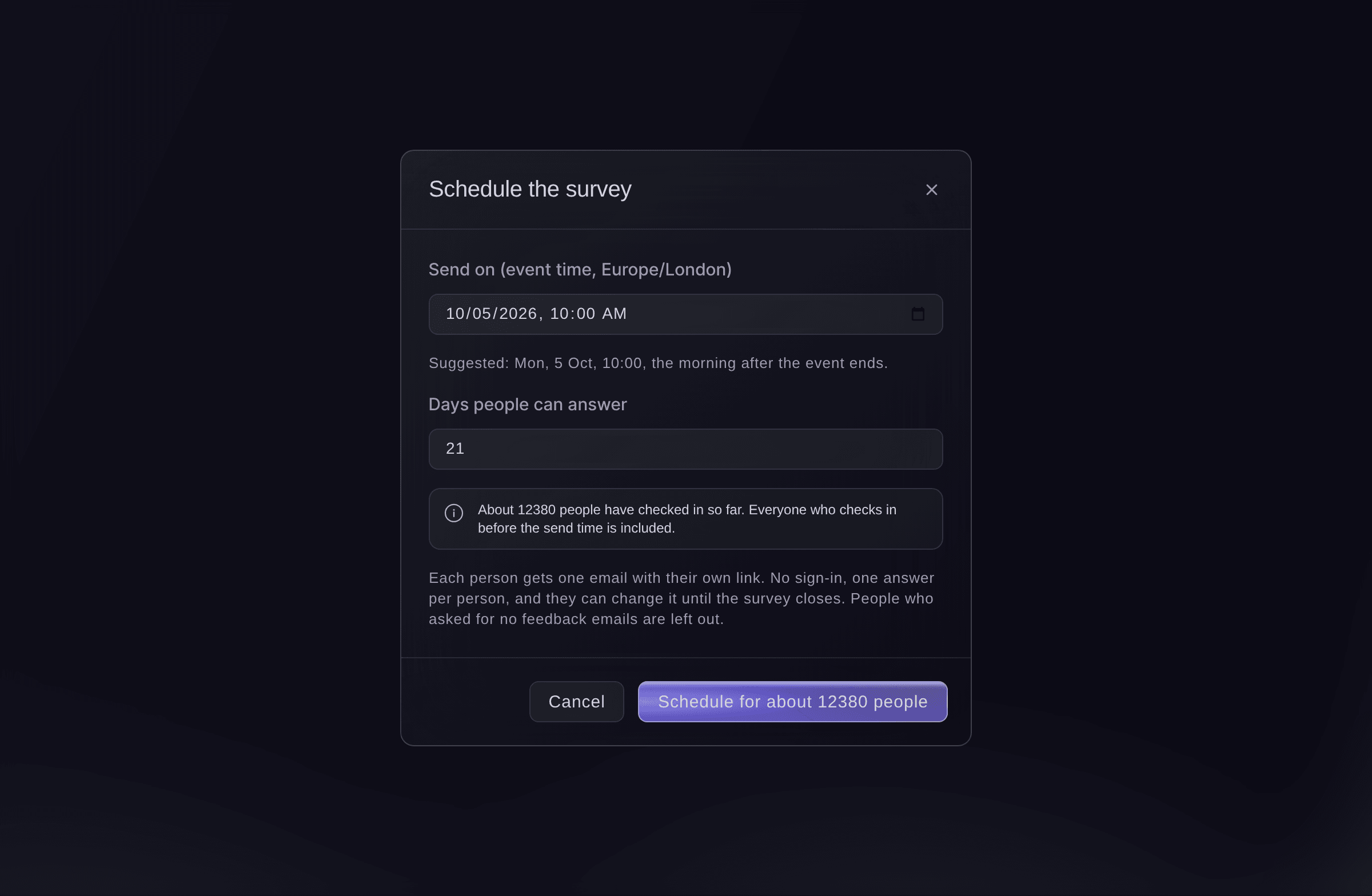
Schedule the survey.


The survey email
Each person gets one email in their own language, with their own link and no sign-in, on your event's branding. They answer once and can change their answer until the survey closes. A person who unsubscribes from feedback emails, or from your emails, is left out.
-
Check the survey is scheduled
Check the survey says Scheduled and when it sends.
Remarque: Until the send time, Stop sending puts it back to not scheduled and nothing goes out.
Essayez ces étapes sur votre propre événement
Créez un compte gratuit, montez votre événement et suivez les étapes ci-dessus dans votre propre tableau de bord. Cela prend quelques minutes et vous n'avez pas besoin de réserver un appel commercial.
Pas de frais d'installation. Pas d'abonnement mensuel obligatoire. Pas de carte bancaire requise.
Ou faites-le faire pour vous
Fai sets up the standard survey, changes its questions and wording, schedules it, stops it before it sends, and closes or reopens it. She shows you each change and waits for your yes first, and she always asks before scheduling, because the survey emails your attendees.
Dans votre tableau de bord, avec Fai
Set up the feedback survey for <EVENT NAME> and schedule it for the morning after, and also ask the people who did not come
Laissez Fai le faire pour vous
Fai travaille dans votre tableau de bord Ticket Fairy. Créez votre compte, ouvrez Fai et collez la consigne ci-dessus.
Pas de frais d'installation. Pas d'abonnement mensuel obligatoire. Pas de carte bancaire requise.
Close or reopen the survey
-
Close it
Select Close survey on the survey, then confirm.
Remarque: People can no longer answer or change their answers. Select Reopen to take answers again for the days you choose.
Fai closes or reopens a survey when you ask, after you confirm.
Dans votre tableau de bord, avec Fai
Close the feedback survey for <EVENT NAME>
Questions que vous pourriez avoir
- Who gets the survey?
- Everyone with a ticket that was checked in, once per email address, even with several tickets. Crew and guest passes are left out. The Sorry we missed you survey goes to ticket holders who did not check in on any ticket.
- Can I change the questions after it has been sent?
- No. The questions are fixed once sending starts, so every answer means the same thing. Change them before the send time.
- How long do the links work?
- Until the survey closes, and at most 60 days after it was sent. A closed survey tells the person it is closed.
- Is an attendee emailed twice?
- No. Each person is sent their email once, even if the send is interrupted and starts again.
Vous avez encore une question ?
Réservez une démo et nous y répondrons lors d'un appel, pour votre type d'événement. Ou créez votre compte et voyez par vous-même.
Pas de frais d'installation. Pas d'abonnement mensuel obligatoire. Pas de carte bancaire requise.
Guides associés
Faites-le sur votre propre événement
Créez votre compte, montez votre événement et suivez les étapes dans votre propre tableau de bord. Vous n’avez pas besoin de réserver un appel commercial.