
Управление продакшеном
Choose what Fai does on your event
Promoters running several events do not want the same help on each of them: a club night needs no catering reader, a conference needs no rider checks. Fai's settings on each event let you keep the help that event needs and switch off the rest.
See the work Fai does on her own for one event and the actions she can take when you ask, and turn off any of her work you do not want on that event.
- Для кого
- Deciding how much of an event's work Fai does on her own
- Займёт
- 4 минут
Перед началом
- You are an owner or admin of the brand the event belongs to. Other roles do not see Fai's settings.
-
Open Fai's settings for the event
Open the event, select Operations, select Set up at the top of the page, then select Fai’s skills.
Примечание: What Fai does lists the work Fai does on her own, such as reading contracts and riders. Each item says On or Off for this event.
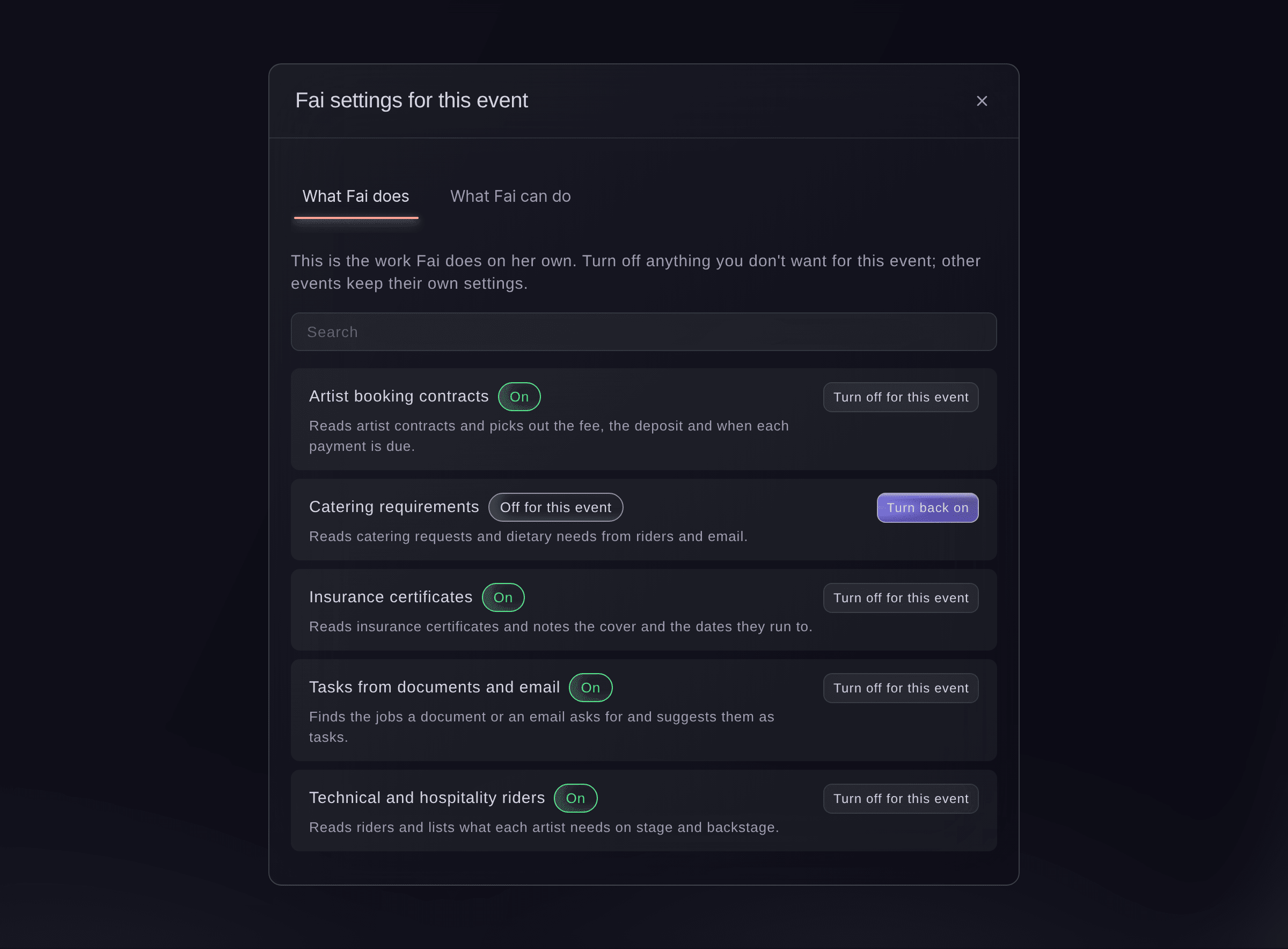
Fai settings for this event. -
Turn off the work you do not want
Find the item, using Search if the list is long, and select Turn off for this event.
Примечание: Only this event changes; your other events keep their own settings. Select Turn back on at any time to undo it.
-
Check what Fai can do when you ask
Select What Fai can do to see the actions Fai can take on the event when you ask her.
Примечание: An action marked Asks you first always waits for your yes; one marked Reads only looks things up and changes nothing.

Попробуйте эти шаги на своём мероприятии
Создайте бесплатный аккаунт, настройте мероприятие и выполните шаги выше в своей панели управления. Это займёт несколько минут, и звонок с отделом продаж не нужен.
Без платы за подключение. Без обязательной ежемесячной платы. Банковская карта не нужна.
Или поручите это помощнику
Fai opens the event's Management page for you, where you turn her work on or off for the event in Fai config.
В вашей панели, с Fai
Open the Management page for <EVENT NAME>
Пусть Fai сделает это за вас
Fai работает внутри вашей панели Ticket Fairy. Создайте аккаунт, откройте Fai и вставьте запрос выше.
Без платы за подключение. Без обязательной ежемесячной платы. Банковская карта не нужна.
Вопросы, которые могут возникнуть
- What does "Changed for this event" mean?
- Fai follows extra instructions on this event for that item. Ticket Fairy support adds those instructions when you ask for them.
- Can I give Fai my own instructions for an event?
- Contact Ticket Fairy support with what you want Fai to do differently on the event, and support adds the instructions for you.
- Why does the dialog say only brand owners and admins can change Fai's settings?
- Your role on the brand does not include changing them. Ask an owner or admin of the brand to make the change.
Остался вопрос?
Запишитесь на демо, и мы ответим на него на звонке применительно к вашему типу мероприятия. Или создайте аккаунт и посмотрите сами.
Без платы за подключение. Без обязательной ежемесячной платы. Банковская карта не нужна.
Похожие руководства
Сделайте это на своём мероприятии
Создайте аккаунт, соберите мероприятие и выполните шаги в своей панели управления. Звонок в отдел продаж не нужен.