
Управление продакшеном
Get your traders ready for show day
Food, drink and market traders need their insurance, hygiene certificates, terms and load-in times sorted before the gates open at your event, and chasing forty traders by email takes a week. Each trader's own page lets them do their part, while you see at a glance who still owes what.
Give each approved trader their own page to accept your trading terms, pay their invoice, book a load-in time and upload certificates, chase what is missing, and check every pitch, power and water need before your event.
- Для кого
- Getting approved traders' paperwork, payments and load-in sorted
- Займёт
- 9 минут
Перед началом
- You need an owner, admin or producer role on the event.
- The traders are approved, as in the guide to taking trader applications.
-
Add your trading terms and email wording
In Traders, select Set up, then Terms and emails, and enter or paste your Trading terms.
Примечание: Traders accept the terms on their page, and we keep the time, their name and the exact text. If you change the terms, every trader accepts them again.
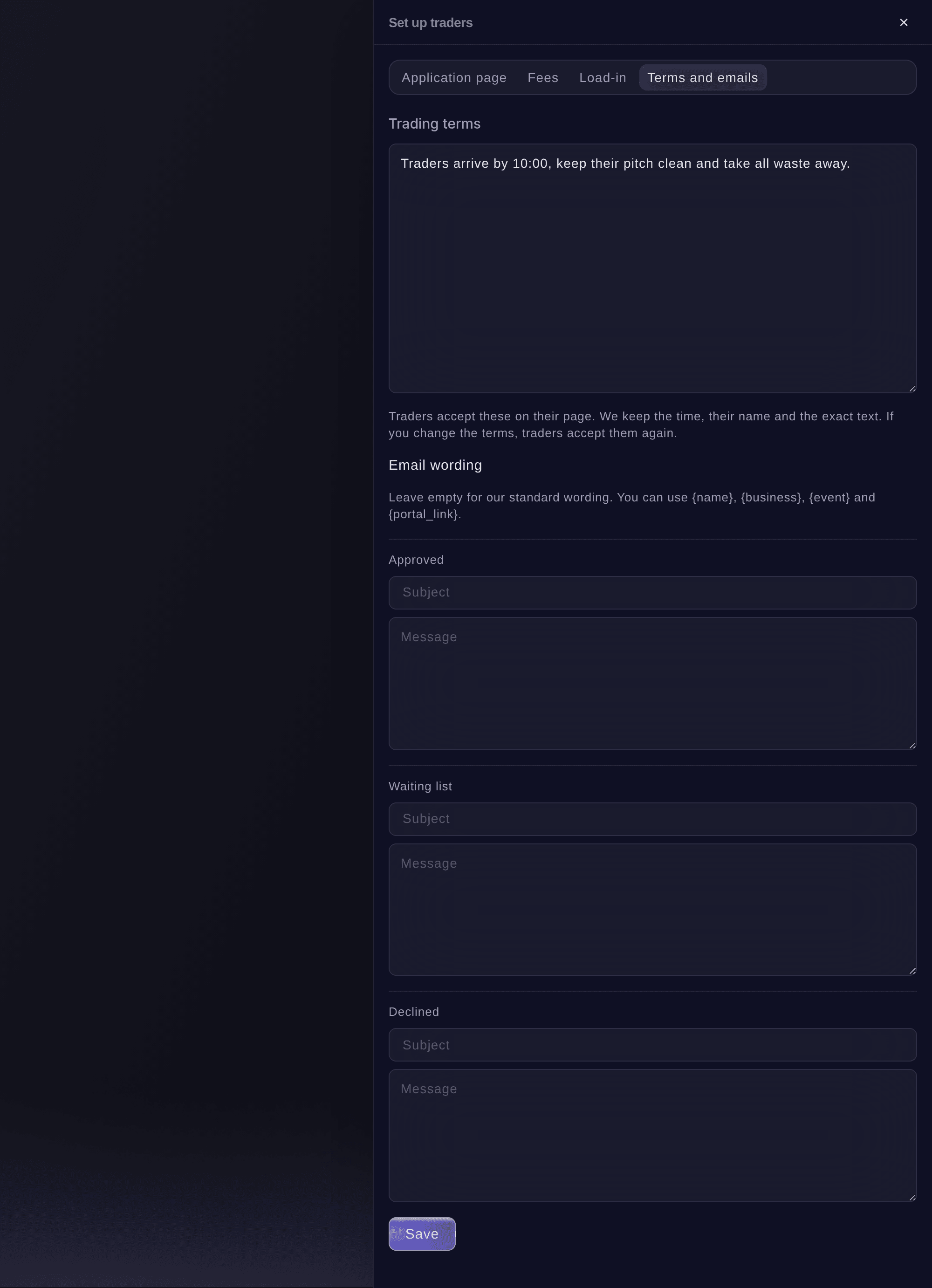
Set up traders, Terms and emails. -
Add load-in times
Select Load-in, then Add load-in time, choose when it Starts and Ends, the Gate or area and how many Traders at a time.
Примечание: Approved traders choose a time on their page, and each time shows how many are booked. A time that traders have booked cannot be removed until you move them.
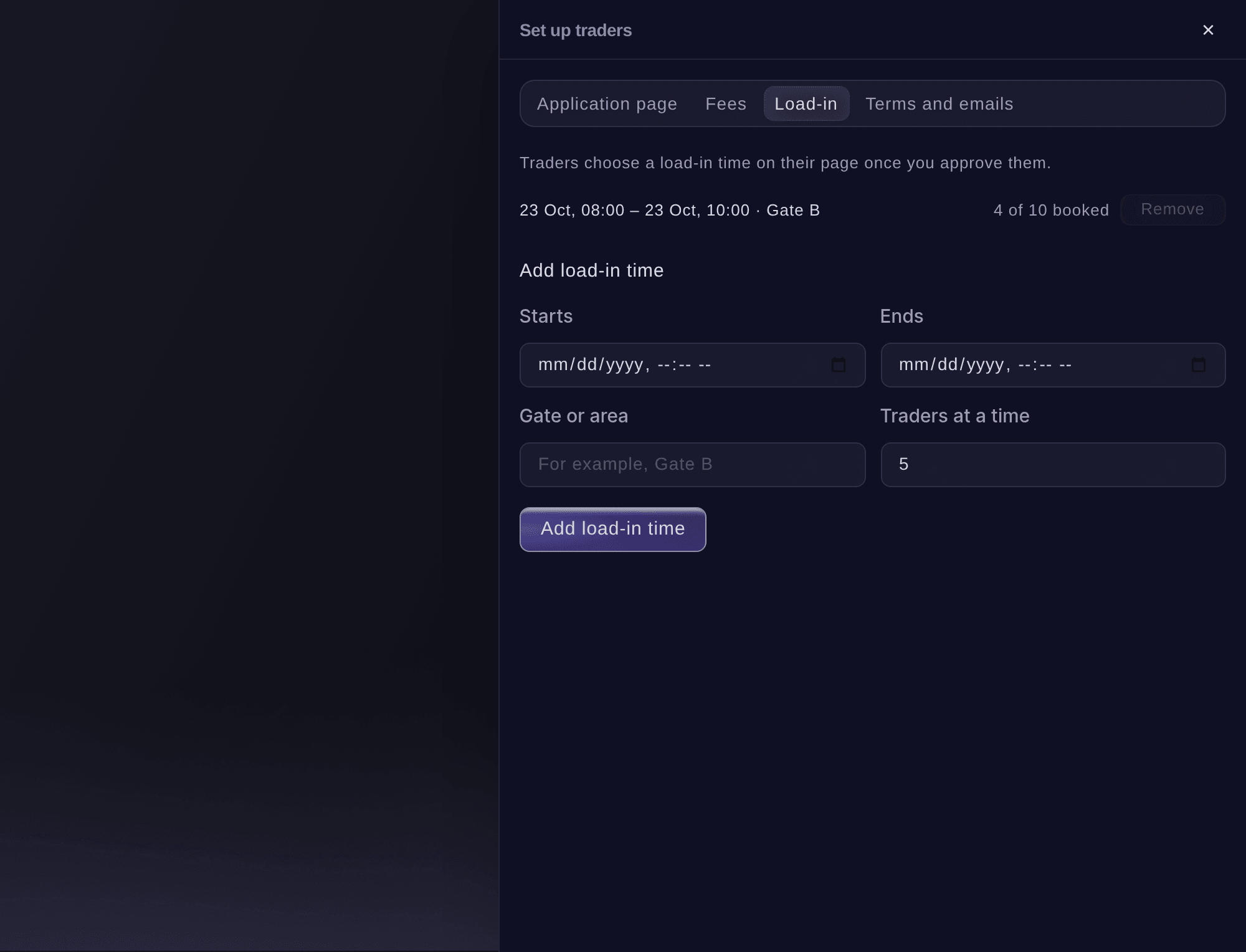
Set up traders, Load-in. -
Open an approved trader
Select Trading, then select the trader. Their panel shows the pitch, invoices, Paperwork and whether their trader page link works.
Примечание: The row in the list says how many things are to chase, or Paperwork in when everything is done.
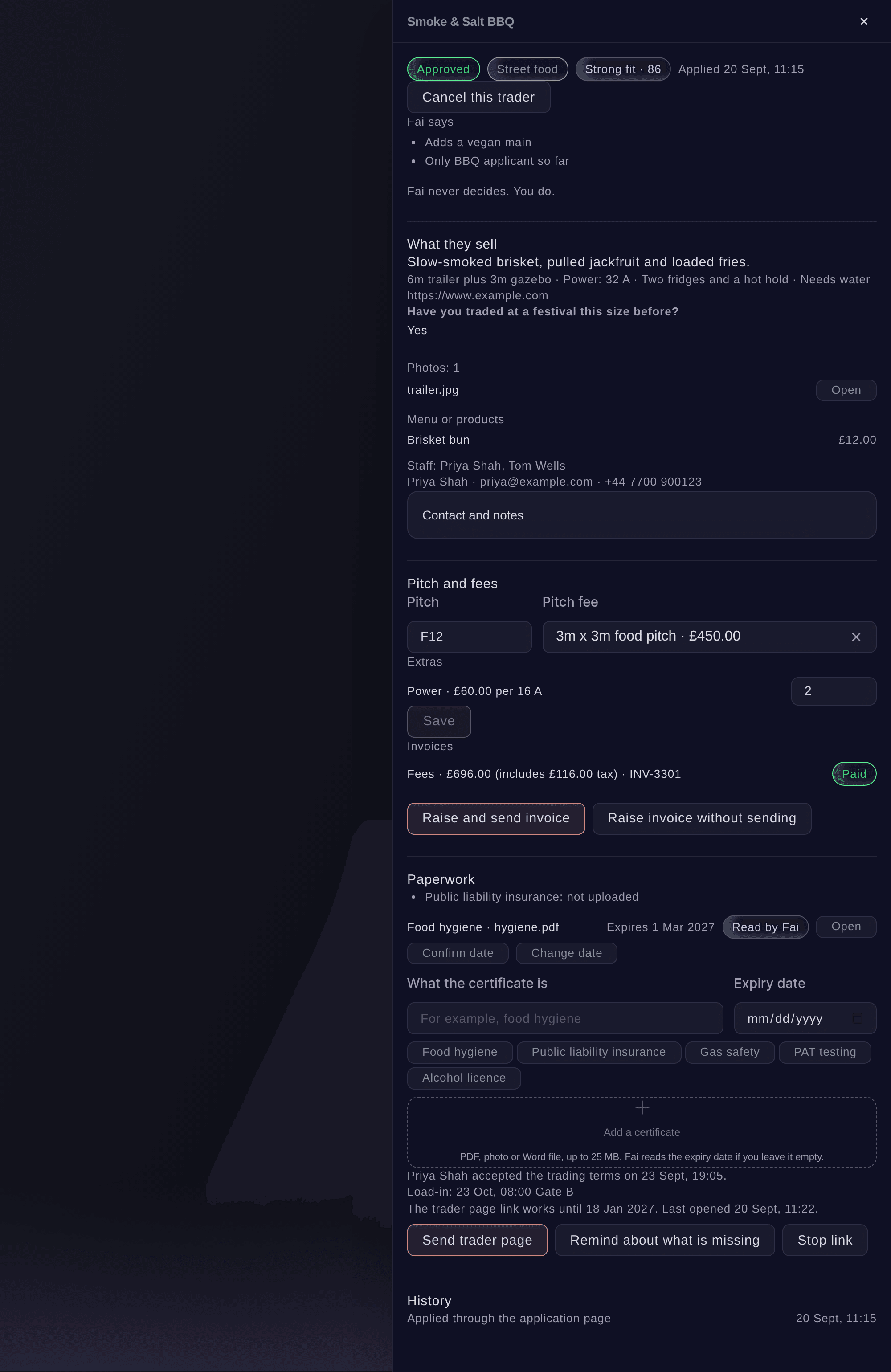
An approved trader. -
Send the trader their page
Under Paperwork, select Send trader page, then confirm. The trader gets an email with a link to their page and needs no password.
Примечание: Any earlier link stops working when you send a new one. The panel says when the link works until and when the trader last opened it.


The trader's own page
The trader page shows their pitch on a map and their fees with Pay invoice, your trading terms to accept, the load-in times to book, Vehicle passes to book into an arrival time, the certificates you need, their menu or products, and the staff working on the stall up to the staff passes their pitch includes. It changes as you update their panel.
Примечание: The same page carries their directory listing, the dates of a market series they applied for, and their takings after the event.

-
Add a certificate yourself
Optional: If a trader sends you a certificate by email, open their panel, enter What the certificate is, then select Add a certificate and choose the file.
Примечание: Use a PDF, a photo or a Word file up to 25 MB. Leave the expiry date empty and Fai reads it from the file.
-
Check the expiry dates Fai read
A date Fai read shows Read by Fai. Select Confirm date if it is right, or Change date if it is not.
Примечание: A certificate that runs out before the event ends shows as expiring under Paperwork, and the trader is counted as having something to chase.
-
Chase what is missing
Select Remind about what is missing, then confirm. The trader gets an email listing what is still missing, with a new link to their page.
Совет: Fai checks for missing or expiring certificates and unpaid invoices, and suggests reminders on the event's Today page for you to approve.
-
Check every pitch
Select Pitches at the top of Traders. Every trading trader is listed with their pitch, the power they need in amps and whether they need water.
Примечание: Place traders on pitches on the site map, and share a power sheet with your electrician from the same view.
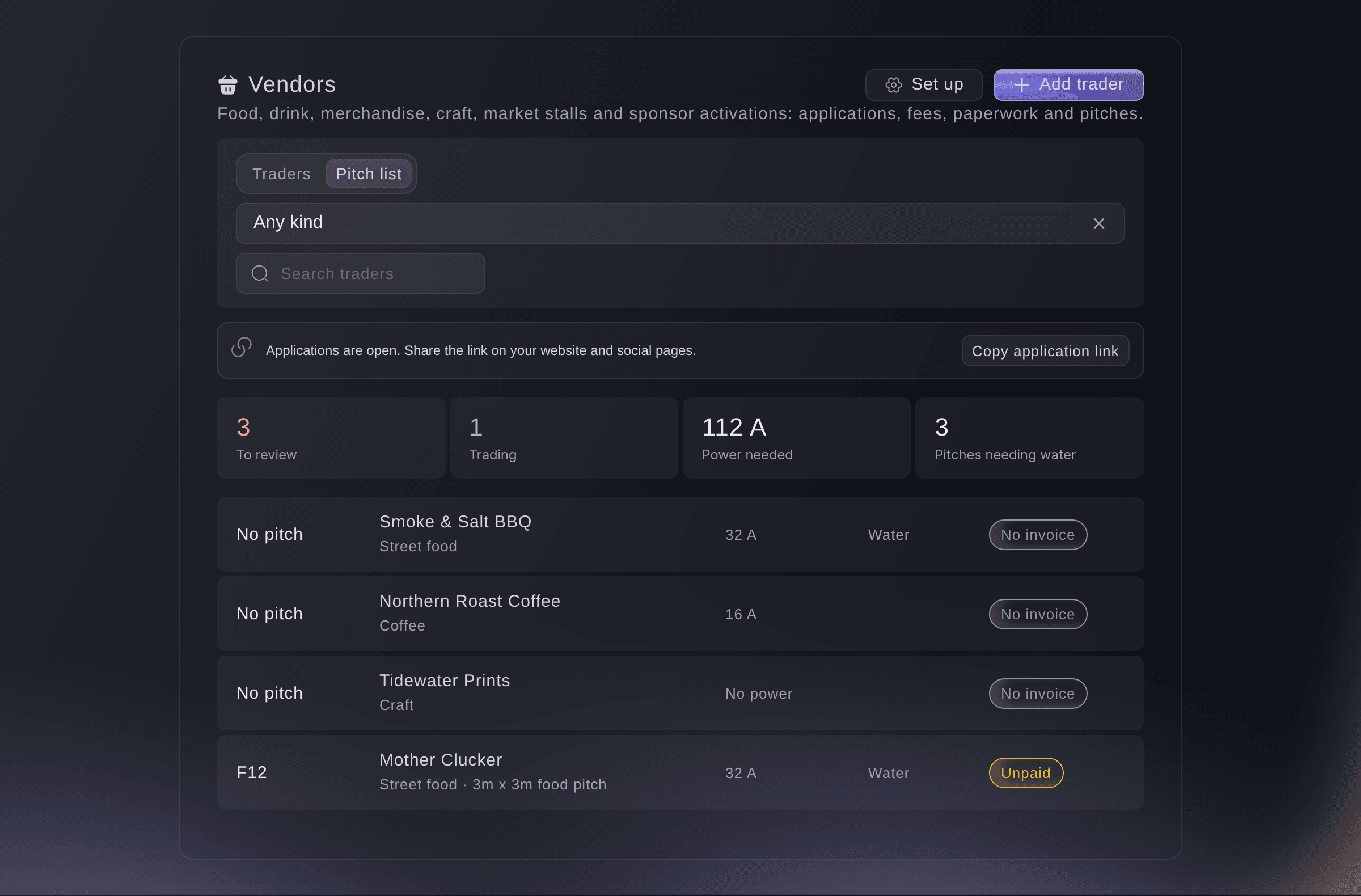
Traders, Pitches. -
Check who arrives on show day
Open Run of show and choose the day. Trader load-in lists each load-in time with the traders booked into it and the vehicles coming.

Trader load-in on the run of show.


Попробуйте эти шаги на своём мероприятии
Создайте бесплатный аккаунт, настройте мероприятие и выполните шаги выше в своей панели управления. Это займёт несколько минут, и звонок с отделом продаж не нужен.
Без платы за подключение. Без обязательной ежемесячной платы. Банковская карта не нужна.
Или поручите это помощнику
Fai sets up your trading terms and load-in times, sends a trader their page or a reminder of what is missing, sets a pitch and reads the certificates traders upload. She asks you before anything is sent or changed.
В вашей панели, с Fai
Which traders at <EVENT NAME> are still missing certificates or have not paid, and send each of them a reminder
Пусть Fai сделает это за вас
Fai работает внутри вашей панели Ticket Fairy. Создайте аккаунт, откройте Fai и вставьте запрос выше.
Без платы за подключение. Без обязательной ежемесячной платы. Банковская карта не нужна.
Stop a trader page link
-
Stop the link
Open the trader, select Stop link, then confirm.
Примечание: The trader can no longer open their page until you send a new link.
Fai stops a trader's page link after you confirm.
В вашей панели, с Fai
Stop the trader page link for <BUSINESS NAME> on <EVENT NAME>
Вопросы, которые могут возникнуть
- Who can open a trader's certificates?
- Owners, admins and producers of the event, from the trader's panel. Each file opens through a link that lasts five minutes, and every opening is recorded.
- What if a trader's link has expired?
- Their page says the link has expired and asks them to ask you for a new one. Select Send trader page to send it.
- What happens to a trader's load-in time if I cancel them?
- Their place goes back to the load-in time, so another trader can book it. The same happens when you decline them or they withdraw.
- Do the certificates show anywhere else?
- Yes. Each certificate is kept in Licences and certificates with the rest of the event's certificates, under the trader.
- How many staff can a trader name on their page?
- As many as the Staff passes included in their pitch fee and extras allow. Set the number on each pitch fee and extra under Fees; with no number set, there is no limit.
- How does a trader book a vehicle in?
- Under Vehicle passes on their page, they book each vehicle into an arrival time you open to traders, and show the gate code on arrival. Their first booking also adds the trader to your outside teams.
Остался вопрос?
Запишитесь на демо, и мы ответим на него на звонке применительно к вашему типу мероприятия. Или создайте аккаунт и посмотрите сами.
Без платы за подключение. Без обязательной ежемесячной платы. Банковская карта не нужна.
Похожие руководства
Сделайте это на своём мероприятии
Создайте аккаунт, соберите мероприятие и выполните шаги в своей панели управления. Звонок в отдел продаж не нужен.