
Управление продакшеном
Settle a show with an artist after your event
Promoters and venues settle with the artist's tour manager on the night or the morning after, and every figure gets questioned. A settlement built from your own ticket sales, costs and the agreed deal shows where each number came from, so the conversation is about the deal, not the arithmetic.
Let Fai draft the settlement for a show from its ticket sales, budget costs, the artist's deal and the act's own travel, hotel and agency fee, check where every figure came from, add or reverse lines, and share it, mark it agreed and mark it paid.
- Для кого
- Settling a show with the artist's side after the event
- Займёт
- 8 минут
Перед началом
- You need an owner, admin or producer role on the brand.
- For the artist's fee to be worked out for you, the show needs an accepted offer. Enter show costs as actuals in the event's budget first if you want them on the settlement.
-
Open Settlements
In the sidebar, select your brand, then Event Operations, then Settlements, and select Settle a show.
Примечание: Once a show has ended with no settlement, Needs attention lists it with Settle, and an accepted offer's panel has Settle this show. Both open the same dialog.
-
Choose the show and the deal
Choose the Event, choose the accepted offer under Performer deal, then select Draft the settlement.
Примечание: Ticket sales come from the event's ticket records after refunds, costs from its budget actuals and the fee from the deal. Choose No performer deal to settle a show without an artist fee.
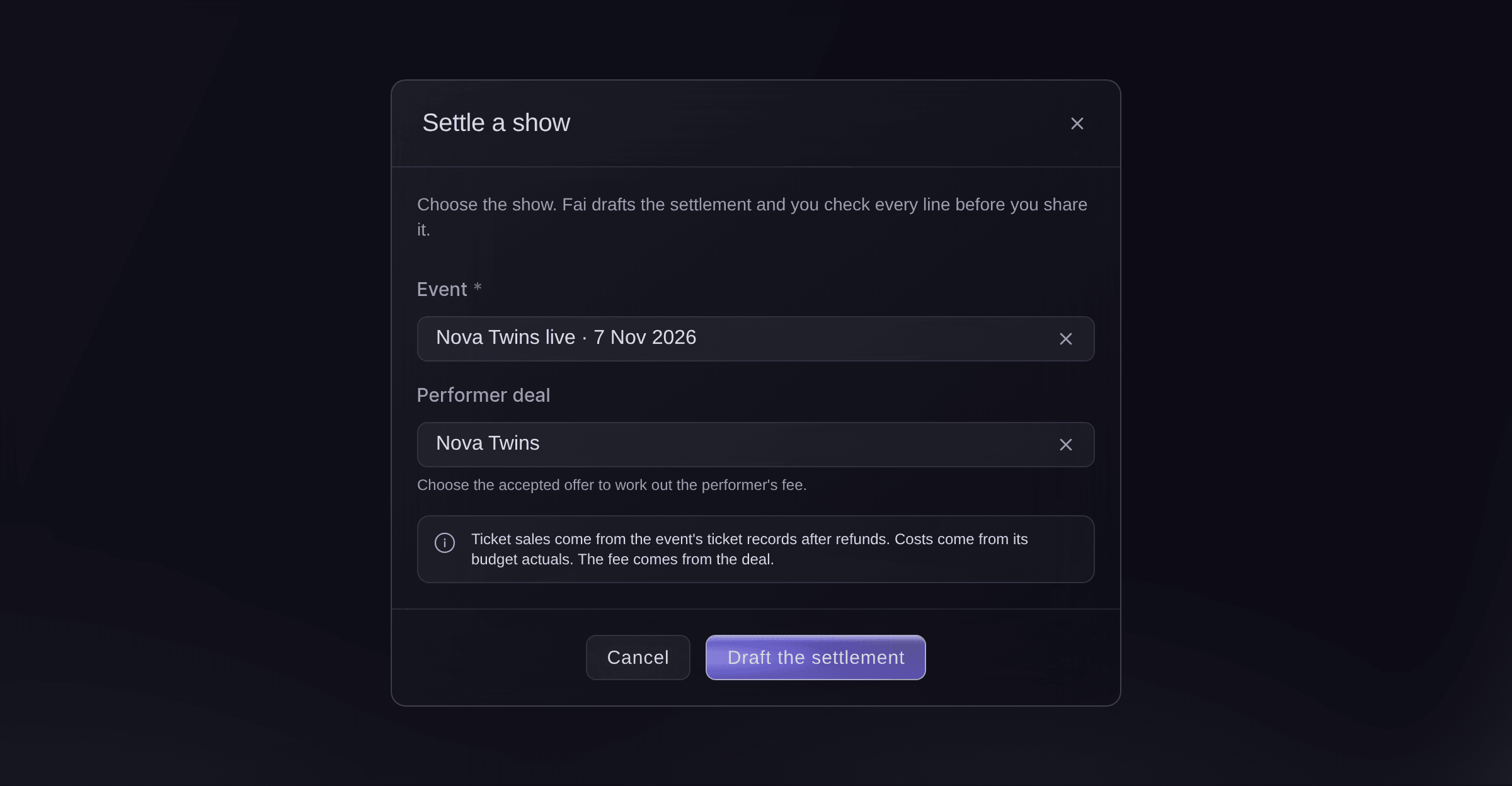
Settle a show. -
Check every line
Read each line under Lines. Each one says where its figure came from, such as From ticket sales or From the deal, and how it was worked out.
Примечание: The lines are grouped into income, deductions, show costs and payments to the performer. Totals adds them up and shows Left for you.
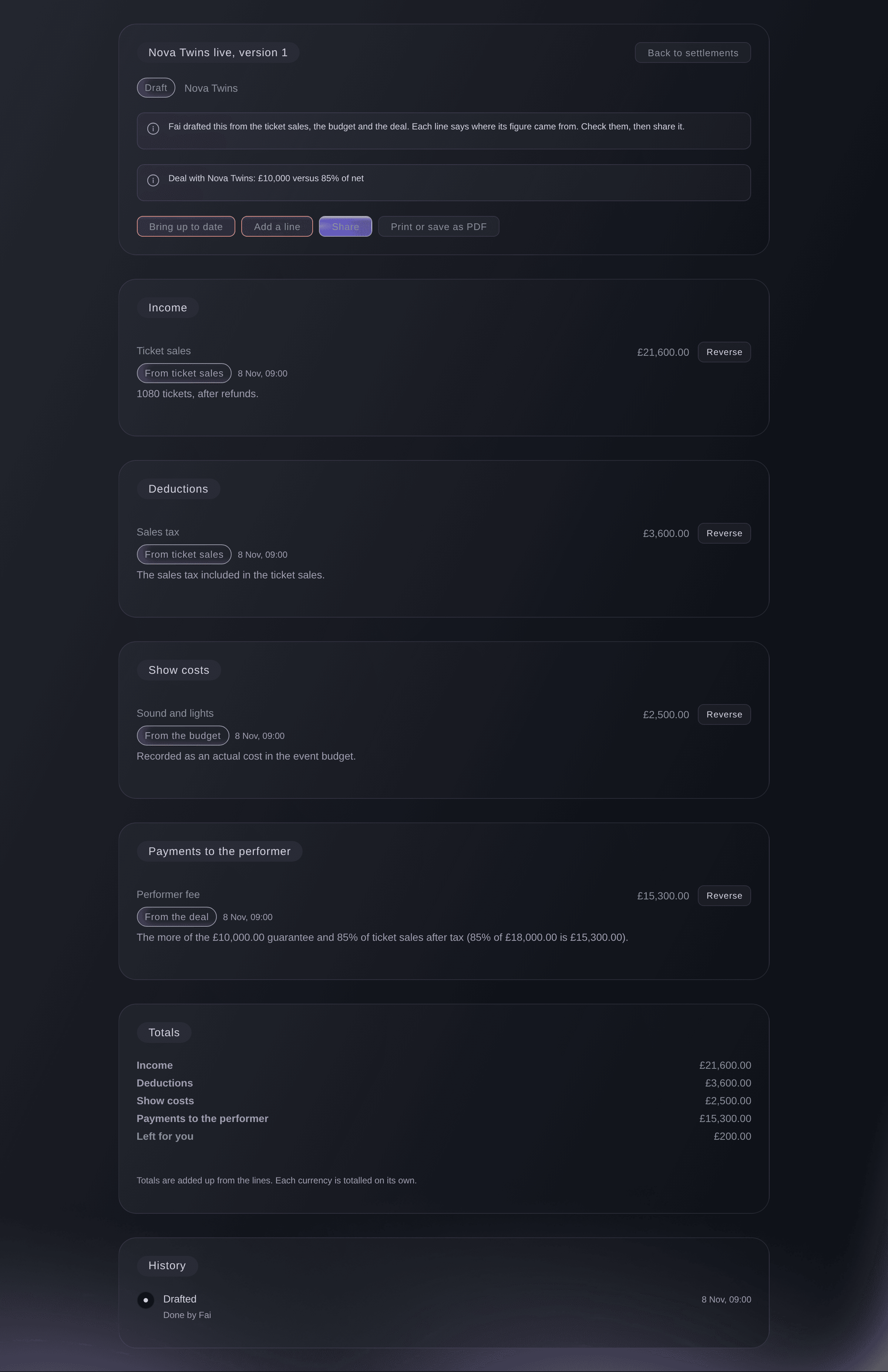
A settlement Fai drafted.


The act's own costs
When the show has the act's accepted offer, the settlement also lists the act's travel, hotel stay and Payments due costs as show costs marked From the act's costs, and the offer's agency fee as a payment beside the performer fee, worked out on the fee the deal pays. Any actual cost in the budget's Artists & talent section is then left out of this settlement, so nothing counts twice. Each amount stays in its own currency.

-
Update the settlement with the latest figures
Optional: Select Bring up to date after a late refund or a new budget actual. The lines that come from the ticket sales, the budget and the deal are worked out again.
Примечание: A line you reversed is not added back.
-
Add a line
Optional: Select Add a line, choose the Kind, enter What it's for and the Amount, then select Add line.
Примечание: Enter a minus amount for a credit, such as a merchandise share you owe back.
-
Reverse a wrong line
If a line is wrong, select Reverse on it, then Reverse in the dialog. A new line cancels it and both stay on the sheet.
-
Share the settlement
Select Share, then Share in the dialog.
Предупреждение: The lines are locked once it is shared. To change anything after that, you reopen it as a new version.
-
Send a copy to the artist's side
Select Print or save as PDF, save the file and send it to the tour manager or agent.
-
Mark it agreed, then paid
When both sides agree the figures, select Mark as agreed. Once the artist has been paid, select Mark as paid.
Примечание: Marking it paid records the payment. It does not move any money.
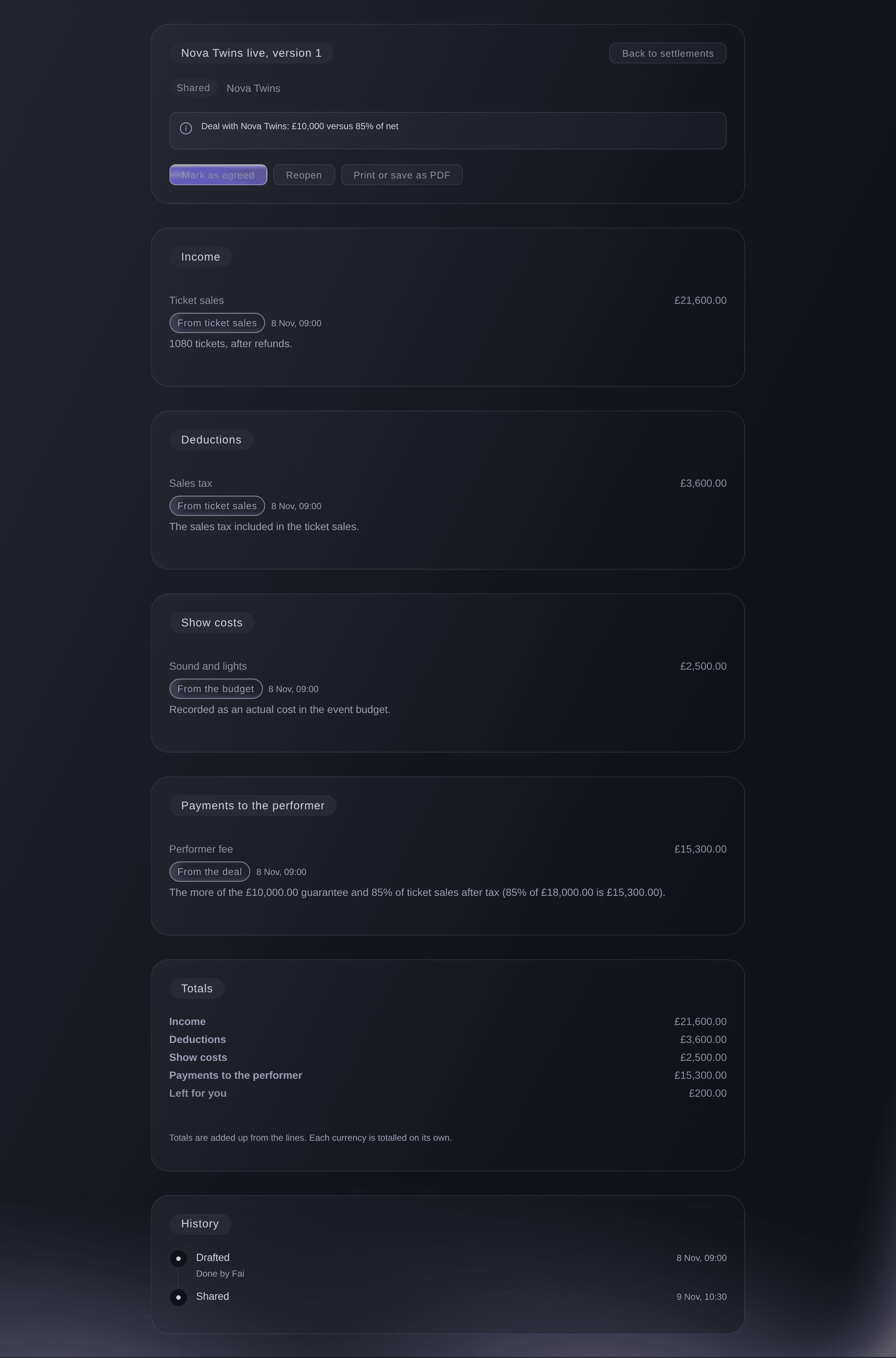
A shared settlement.

Попробуйте эти шаги на своём мероприятии
Создайте бесплатный аккаунт, настройте мероприятие и выполните шаги выше в своей панели управления. Это займёт несколько минут, и звонок с отделом продаж не нужен.
Без платы за подключение. Без обязательной ежемесячной платы. Банковская карта не нужна.
Или поручите это помощнику
Fai drafts a show's settlement, brings it up to date, adds or reverses lines, and shares it, marks it agreed or paid, or reopens it, asking you before each change.
В вашей панели, с Fai
Draft the settlement for <EVENT NAME> with <ARTIST NAME>'s deal and tell me what is left for us
Из вашего собственного ассистента, через MCP
Подключите ассистента к нашему серверу MCP и попросите его:
Оставьте --read-only в конфигурации MCP. Для этой задачи нужно только читать данные, поэтому ассистенту не нужны инструменты, которые вносят изменения.
Pick the brand, list the settlements for <EVENT NAME> and show me the lines and totals of the latest one
Из терминала
Установите CLI по ссылке нашей страницы CLI, войдите командой ticketfairy auth login и выберите бренд, с которым работаете, командой ticketfairy brand use <BRAND_ID>. ticketfairy brand list и ticketfairy event list выводят идентификаторы, которые используют другие команды.
The CLI reads settlements: the list for an event and one settlement's lines and totals. Drafting, changing and sharing a settlement are done in the dashboard or through Fai. You need an owner, admin or producer login on the brand.
List the settlements for one event, with their status and version.
ticketfairy event-os venue settlements list --brand <BRAND_ID> --event <EVENT_ID>
Show one settlement with its lines and totals.
ticketfairy event-os venue settlements show <SETTLEMENT_ID> --brand <BRAND_ID>
Пусть Fai сделает это за вас
Fai работает внутри вашей панели Ticket Fairy. Создайте аккаунт, откройте Fai и вставьте запрос выше.
Без платы за подключение. Без обязательной ежемесячной платы. Банковская карта не нужна.
Correct a settlement after it is shared
-
Reopen it as a new version
Open the settlement, select Reopen, enter why under Why are you reopening it?, then select Reopen.
Примечание: The version you reopened stays exactly as it was, marked Replaced, and a new draft starts with the same lines for you to correct.
Fai reopens a shared, agreed or paid settlement as a new version after you confirm and give the reason.
В вашей панели, с Fai
Reopen the settlement for <EVENT NAME>, the bar share was left off
Вопросы, которые могут возникнуть
- Why is the ticket income different from my sales report?
- The settlement counts tickets after refunds, so a refund after the show brings it down. Select Bring up to date on a draft to pick up refunds since it was drafted.
- Does Fai draft settlements on her own?
- Fai lists shows that ended with no settlement in Needs attention. Where the show is linked to an event, she also suggests drafting it in that event's suggestions, and nothing is drafted until someone approves it.
- Why can I not delete a line?
- Nothing on a settlement is deleted, so the artist's side can always see what changed. Reverse the line instead, and the history shows both.
- Why is the Artists & talent spend in my budget not on the settlement?
- The act's own travel, hotel and costs are on the settlement from the act's record, so the budget's Artists & talent actuals are taken out to avoid counting them twice. If the act's costs are cleared, the budget's actuals come back on the next Bring up to date.
- Can a settlement hold more than one currency?
- Yes. Each currency is totalled on its own under Totals.
Остался вопрос?
Запишитесь на демо, и мы ответим на него на звонке применительно к вашему типу мероприятия. Или создайте аккаунт и посмотрите сами.
Без платы за подключение. Без обязательной ежемесячной платы. Банковская карта не нужна.
Похожие руководства
Сделайте это на своём мероприятии
Создайте аккаунт, соберите мероприятие и выполните шаги в своей панели управления. Звонок в отдел продаж не нужен.