
E-mail, sms og markedsføring
Protect, hide and redirect pages on your event website
Festival teams share arrival details with crew, venues keep a page for private bookers, and last year's ticket links still circulate on social media. These page options let the right people in, keep private pages out of search results and send everyone else to the page they need.
Give a crew, artist or guest page on your event website a password, keep a page out of search engines, choose what visitors see at an address you do not have, and send old addresses from last year's event to the right page.
- Til
- Controlling who finds each page of your website
- Tager
- 8 minutter
Før du går i gang
- You are an owner or an admin of the brand, and you have a website in the dashboard, as in the guide to building a website for your events.
-
Open the page settings
Open the website in the editor, select Pages, select the page, then open Page options in Page settings beside it.
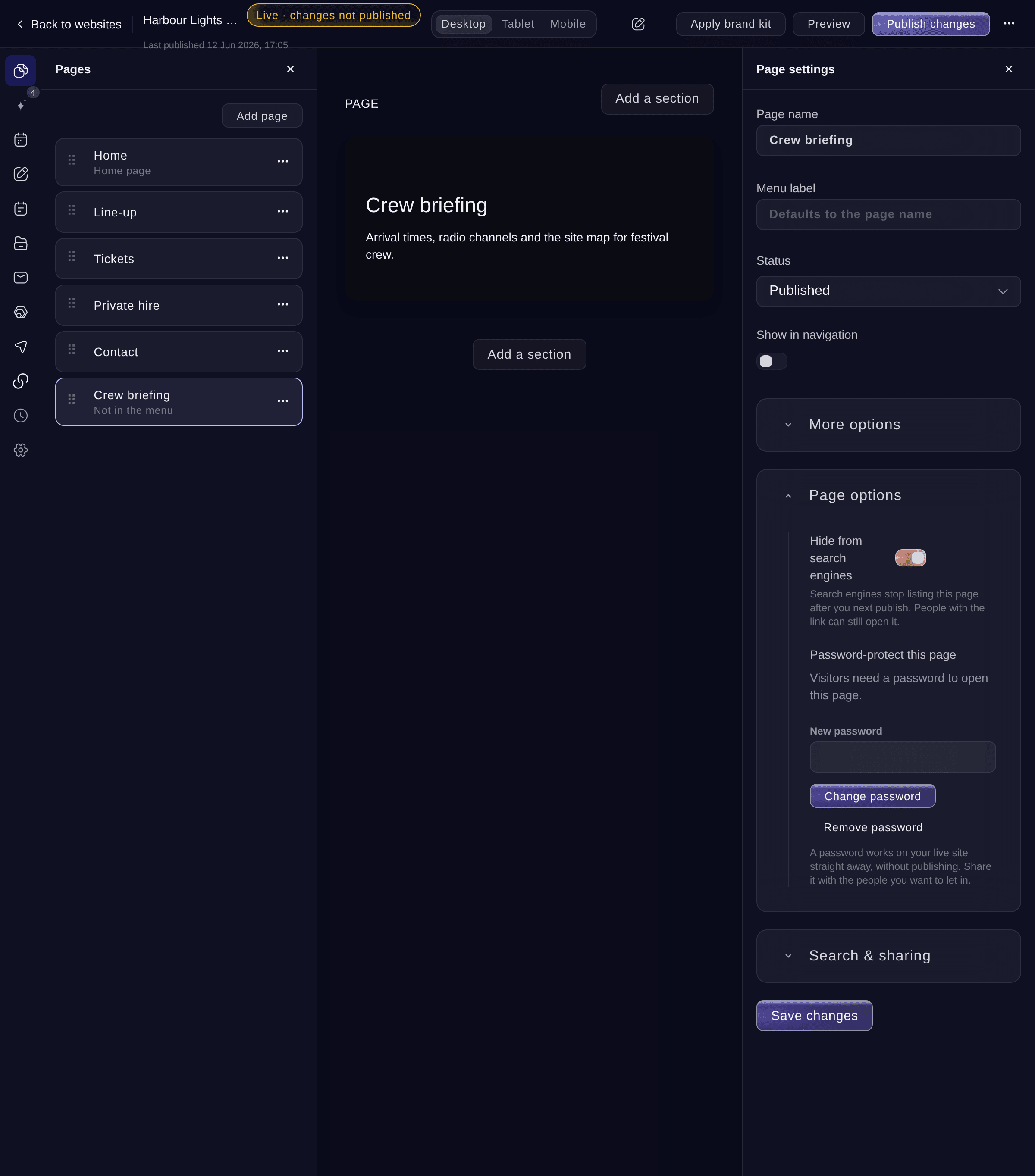
Page settings, Page options. -
Hide the page from search engines
Turn on Hide from search engines.
Bemærk: Search engines stop listing the page after you next publish. People with the link can still open it.
-
Set a password
Under Password-protect this page, enter a Password of at least 6 characters, then select Set password.
Bemærk: The password works on your live website straight away, without publishing. Share it with the people you want to let in.
-
Choose the page for unknown addresses
Select Settings, then choose a page under Page not found, or Standard message.
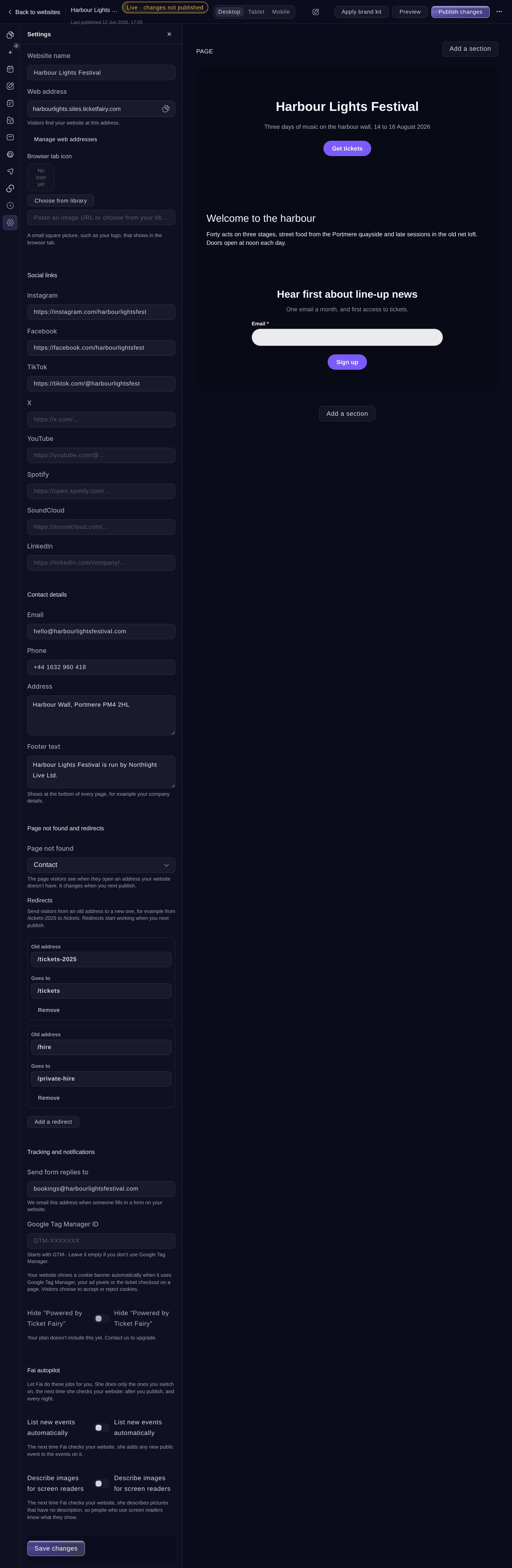
Settings, Page not found and redirects. -
Redirect an old address
Under Redirects, select Add a redirect, enter the Old address, such as /tickets-2025, and where it Goes to, such as /tickets or a full address starting with https://.
Bemærk: A website can have up to 200 redirects. An old address that a page of your website still uses keeps opening that page, and the save says which redirects that affects.
-
Save and publish
Select Save changes, then Publish changes at the top and Publish changes.
Bemærk: Hiding from search engines, the page-not-found page and redirects reach visitors when you publish. Passwords do not need publishing.
-
Check the page
Open the page on your live website in a private browser window. A protected page asks for the password, and an old address opens the page it redirects to.


Prøv disse trin på dit eget event
Opret en gratis konto, byg dit event og følg trinnene ovenfor i dit eget dashboard. Det tager få minutter, og du behøver ikke at booke et salgsopkald.
Ingen oprettelsesgebyrer. Intet obligatorisk månedligt gebyr. Intet kreditkort påkrævet.
Eller få det gjort for dig
Fai can hide a page from search engines, set, change or remove its password, choose the page visitors see at an unknown address and add or remove redirects. She asks before each change.
I dit dashboard, med Fai
Password-protect the Crew briefing page on my <WEBSITE NAME> website and hide it from search engines
Lad Fai gøre det for dig
Fai arbejder inde i dit Ticket Fairy-dashboard. Opret din konto, åbn Fai og indsæt instruktionen ovenfor.
Ingen oprettelsesgebyrer. Intet obligatorisk månedligt gebyr. Intet kreditkort påkrævet.
Change or remove a page password
-
Change the password
In Page options, enter a New password, then select Change password. The old password stops working at once.
-
Remove the password
Select Remove password, then confirm. Anyone with the link can open the page straight away.
Fai changes or removes a page password after you confirm.
I dit dashboard, med Fai
Remove the password from the <PAGE NAME> page on my <WEBSITE NAME> website
Spørgsmål du måske har
- Does a page password also protect the pages it links to?
- Yes for lists shown only on protected pages: the entry pages of a line-up or a list that only password pages show need the same password, and they are left out of your sitemap and search. A form on a protected page takes replies only from visitors who entered the password.
- When does my website show a cookie banner?
- Your website shows a cookie banner by itself when it uses Google Tag Manager, your advertising pixels or the ticket checkout on a page. Visitors choose to accept or reject cookies, and the tracking waits for their answer. There is no setting to change.
- What if someone keeps guessing a page password?
- A visitor can try 10 times in 5 minutes. After many wrong passwords in a short time, visitors who already got it wrong wait before they can try again, and anyone who has not tried is never held back.
- Why is my redirect not working?
- A redirect starts working when you next publish. If a page on your website uses the same address, visitors see the page instead, and the save lists that redirect so you can change it.
- Does restoring an older version change page passwords?
- No. A page keeps its current password when you restore an earlier version of your website.
Har du stadig et spørgsmål?
Book en demo, så besvarer vi det i en samtale ud fra din type event. Eller opret din konto og se det selv.
Ingen oprettelsesgebyrer. Intet obligatorisk månedligt gebyr. Intet kreditkort påkrævet.
Relaterede guides
Gør det på dit eget arrangement
Opret din konto, byg dit arrangement, og følg trinnene i dit eget dashboard. Du behøver ikke booke et salgsmøde.